Type text, add images, blackout confidential details, add comments, highlights and more.
02. Sign it in a few clicks
Draw your signature, type it, upload its image, or use your mobile device as a signature pad.
03. Share your form with others
Send it via email, link, or fax. You can also download it, export it or print it out.
How to use or fill out CA Franchise Board Tax with our platform
Ease of Setup
DocHub User Ratings on G2
Ease of Use
DocHub User Ratings on G2
Click ‘Get Form’ to open the CA Franchise Board Tax document in the editor.
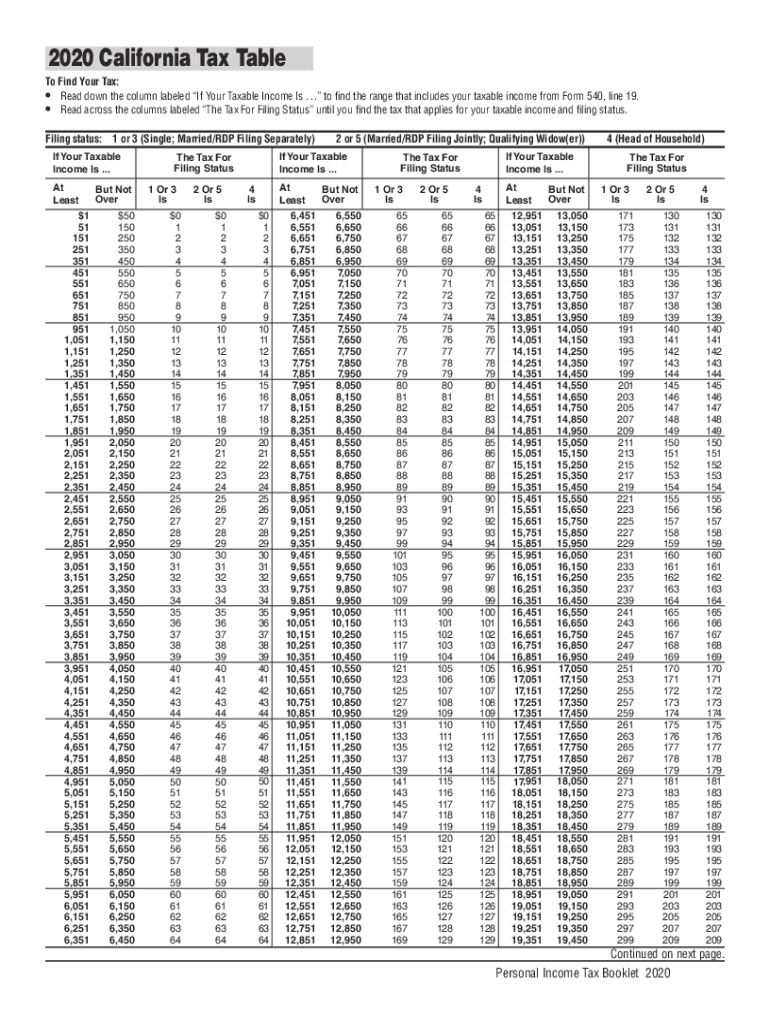
Locate the section labeled 'If Your Taxable Income Is...' and find your taxable income range from Form 540, line 19.
Next, move across to the columns labeled 'The Tax For Filing Status' that corresponds to your filing status (Single, Married/RDP Filing Separately, etc.).
Identify the tax amount that applies to your income and filing status. This will guide you on how much tax you owe.
Fill in any additional required fields as indicated in the form, ensuring all information is accurate.
Start using our platform today for free to streamline your tax form completion!
We've got more versions of the ca franchise board tax form. Select the right ca franchise board tax version from the list and start editing it straight away!
California Tax Power of Attorney (Form 3520) - DocHub PDF
California Tax Power of Attorney or also known as FTB 3520, Franchise Tax Board Power of Attorney Declaration is a legal document intended to facilitateRead more
Cookie consent notice
This site uses cookies to enhance site navigation and personalize your experience.
By using this site you agree to our use of cookies as described in our Privacy Notice.
You can modify your selections by visiting our Cookie and Advertising Notice.