




Here's how it works



How to use or fill out Oregon DMV Form 516 with DocHub

- Click ‘Get Form’ to open it in the editor.
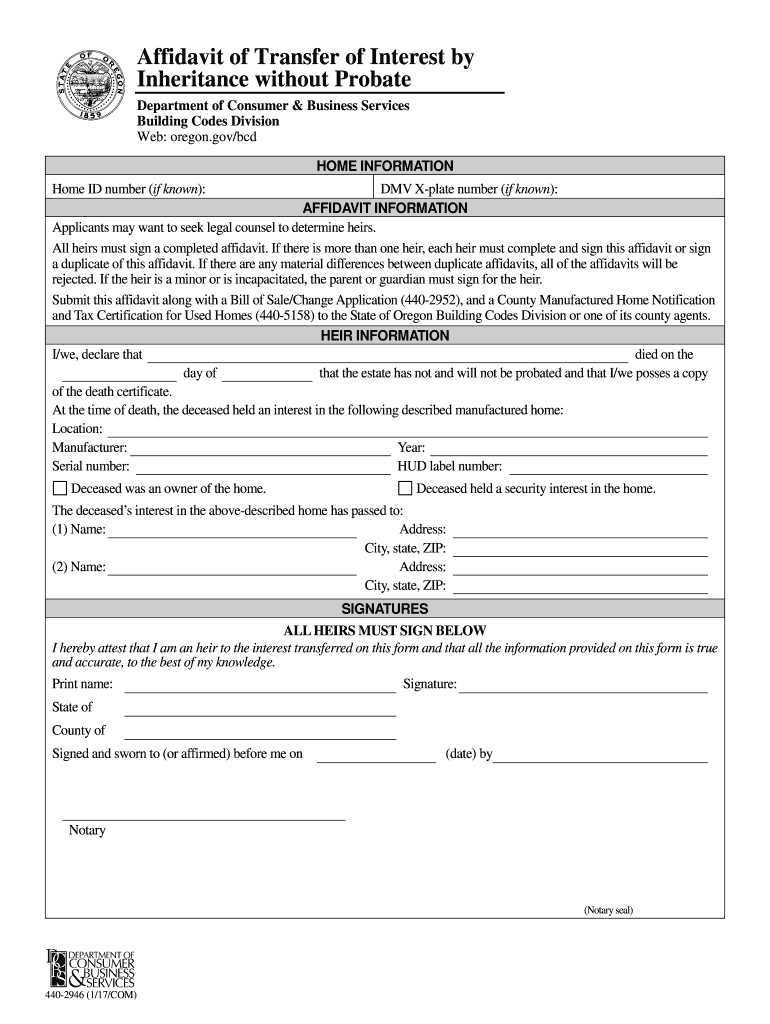
- Begin by entering the Home ID number and DMV X-plate number if known. This information helps identify the manufactured home in question.
- In the Affidavit Information section, ensure all heirs are listed. Each heir must sign a completed affidavit, so make sure to include their names and addresses accurately.
- Fill out the details of the deceased, including their name, date of death, and confirmation that the estate has not been probated. Attach a copy of the death certificate as required.
- Provide information about the manufactured home, including its location, manufacturer, year, serial number, and HUD label number.
- All heirs must print their names and provide signatures at the bottom of the form. Ensure that each signature is notarized as indicated.
Start using our platform today to fill out your Oregon DMV Form 516 for free!
It's free
Got questions?
How do I sign my inheritance affidavit oregon free of charge?
Most eSignature services require users to have a paid subscription. With DocHub, there are two ways for you to create an electronic signature to your inheritance affidavit oregon without being charged:
- You can do it during a 7-day trial period;
- You can sign up for a free plan.
The second option, however, has limitations on the number of signatures, sign requests, emails, and forms for adjusting available per month. You can check for full information here.
Can I sign my dmv form to transfer title after death while I edit it?
When you edit your dmv form to transfer title after death with DocHub, you will not need to look for other applications or solutions to sign it. An electronic signature is a component of DocHub’s substantial editing toolset, which enables you to apply changes in your form without jumping between websites. Just complete your form, double-check the correctness of your information and put your electronic signature at the end to make it submission-ready within a few minutes.
Security and compliance
At DocHub, your data security is our priority. We follow HIPAA, SOC2, GDPR, and other standards, so you can work on your documents with confidence.
Learn more




