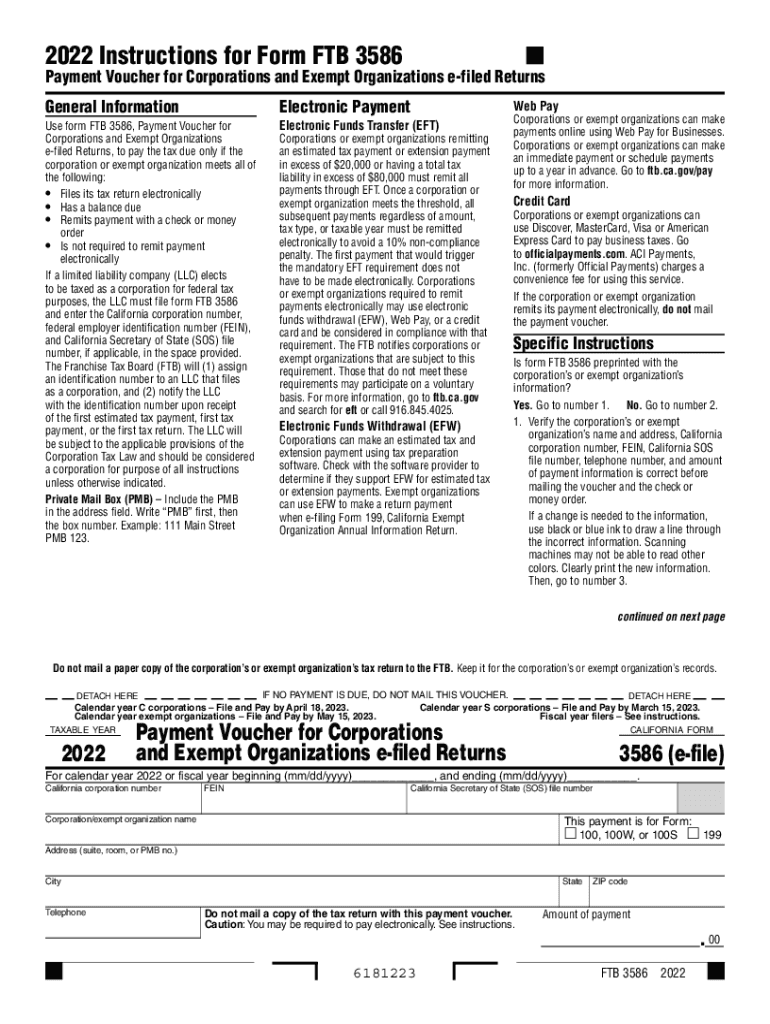
2022 California Form 3586 e-file Payment Voucher for Corporations and Exempt Organizations e-filed Returns-2026

Get Form
form 3586 Preview on Page 1

Here's how it works

01. Edit your form 3586 online
Type text, add images, blackout confidential details, add comments, highlights and more.
02. Sign it in a few clicks
Draw your signature, type it, upload its image, or use your mobile device as a signature pad.
03. Share your form with others
Send how to pay form 3586 online via email, link, or fax. You can also download it, export it or print it out.

How to use or fill out 2022 California Form 3586 e-file Payment Voucher for Corporations and Exempt Organizations e-filed Returns with DocHub

Form edit decoration
9.5
Ease of Setup
DocHub User Ratings on G2
9.0
Ease of Use
DocHub User Ratings on G2
  1. Click ‘Get Form’ to open it in the editor.
  2. Verify if the form is preprinted with your corporation’s or exempt organization’s information. If yes, check that all details are correct. If not, proceed to step 3.
  3. If changes are needed, use black or blue ink to cross out incorrect information and clearly print the new details in capital letters.
  4. Fill in the California corporation number, FEIN, California SOS file number, telephone number, and amount of payment in the designated fields.
  5. Ensure that the information on Form FTB 3586 matches what was electronically transmitted to the FTB and printed on your tax return.
  6. Make your check or money order payable to 'Franchise Tax Board' and include relevant identifiers like your corporation number and '2022 FTB 3586'.
  7. Enclose the payment with the voucher (do not staple) and mail it to the address provided in the instructions.

Start using our platform today for free to streamline your document editing and ensure a smooth filing process!

See more 2022 California Form 3586 e-file Payment Voucher for Corporations and Exempt Organizations e-filed Returns versions

We've got more versions of the 2022 California Form 3586 e-file Payment Voucher for Corporations and Exempt Organizations e-filed Returns form. Select the right 2022 California Form 3586 e-file Payment Voucher for Corporations and Exempt Organizations e-filed Returns version from the list and start editing it straight away!
Versions Form popularity Fillable & printable
2023 4.1 Satisfied (36 Votes)
2022 4.8 Satisfied (22 Votes)
2021 4.8 Satisfied (176 Votes)
2020 4.1 Satisfied (51 Votes)
2019 4.3 Satisfied (135 Votes)
2018 4.3 Satisfied (138 Votes)
2017 4.4 Satisfied (64 Votes)
2016 4.4 Satisfied (142 Votes)
be ready to get more

Complete this form in 5 minutes or less

Get form

Got questions?

We have answers to the most popular questions from our customers. If you can't find an answer to your question, please contact us.
Contact us

Electronic document signing demands a software solution that complies with data protection and eSignature laws. DocHub is a great tool for that, as it meets all the aforementioned requirements. Whatever method you prefer to sign your form 3586 pay online in DocHub, your electronic signature will be legally binding and court-admissible.

If you edit your how to pay 3586 online with DocHub, you will not need to look for other software or solutions to eSign it. An electronic signature is a component of DocHub’s substantial editing toolset, which enables you to implement changes in your form without jumping between platforms. Just complete your form, double-check the correctness of your information and place your electronic signature at the end to make it submission-ready in minutes.

Corporations or exempt organizations can make an immediate payment or schedule payments up to a year in advance. Go to ftb.ca.gov/pay for more information. Corporations or exempt organizations can use Discover, MasterCard, Visa or American Express Card to pay business taxes. Go to officialpayments.com.
FTB accepts payments online or through our mobile application with our Web Pay service. There is no charge when a bank account is used for a payment. The Mobile App can be downloaded from the Apple Mobile App store or Google Play.
Use form FTB 3588, Payment Voucher for LLC e‑filed Returns, to pay the total amount due on Form 568, Limited Liability Company Return of Income, except for any unpaid limited liability company (LLC) annual tax which must be paid using form FTB 3522, LLC Tax Voucher.

Security and compliance

At DocHub, your data security is our priority. We follow HIPAA, SOC2, GDPR, and other standards, so you can work on your documents with confidence.

Learn more
ccpa2
pci-dss
gdpr-compliance
hipaa
soc-compliance

People also ask

We accept and process e-file returns continuously throughout the year.
You can pay the fee with a few simple steps! Just go to Californias Franchise Tax Board website, and under Business, select Use Web Pay Business. Select LLC as entity type and enter your CA LLC entity ID. Once you verify your identity, select Estimated Fee Payment (Form 3536)
Form 568 can be filed online or via mail to the Franchise Tax Board. Payments for associated taxes can be made electronically, although online payments incur a 2.3% convenience fee. Make checks payable to the Franchise Tax Board and include the LLCs FEIN or California Secretary of State file number.
Personal Balances Due, Estimated Tax and Other Payments online with your bank account. Select Use Web Pay Personal Enter primary taxpayer social security number, last name and Captcha code. Enter name and address information. Select Payment Type. Select Applicable Tax Year. Select Payment amount and payment date.
You can make online payments 24 hours a day, 7 days a week up until 11:59 p.m. Pacific Time on the delinquency date. There is no cost to you for electronic check (eCheck) payments.

what is form 3586