Changes To The Net Operating Loss Carryover And Loosening ... 2026

Get Form
net operating loss carryforward Preview on Page 1

Here's how it works

01. Edit your net operating loss carryforward online
Type text, add images, blackout confidential details, add comments, highlights and more.

02. Sign it in a few clicks
Draw your signature, type it, upload its image, or use your mobile device as a signature pad.

03. Share your form with others
Send nol carryforward via email, link, or fax. You can also download it, export it or print it out.

How to use or fill out Changes To The Net Operating Loss Carryover And Loosening ... with our platform

Form edit decoration
9.5
Ease of Setup
DocHub User Ratings on G2
9.0
Ease of Use
DocHub User Ratings on G2
  1. Click ‘Get Form’ to open it in the editor.
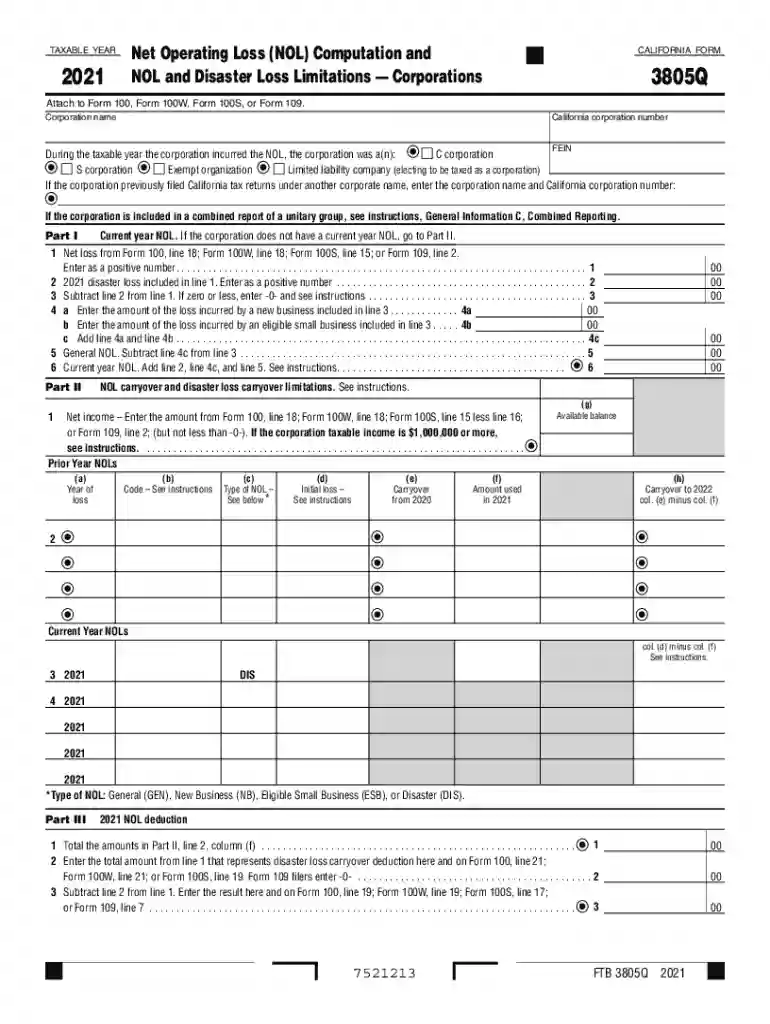
  2. Begin by entering your corporation name and California corporation number at the top of the form. Ensure that you select the correct type of corporation from the options provided.
  3. In Part I, input your net loss from the appropriate form line as a positive number. If applicable, include any disaster losses in line 2.
  4. Proceed to calculate your general NOL by following the instructions for lines 4a, 4b, and 5. Make sure to add any new business losses correctly.
  5. Move to Part II and enter your net income as instructed. Fill out prior year NOLs accurately in the designated columns.
  6. Finally, complete Part III by totaling amounts from Part II and ensuring all deductions are correctly represented before submitting.

Start using our platform today for free to streamline your document editing and form completion!

See more Changes To The Net Operating Loss Carryover And Loosening ... versions

We've got more versions of the Changes To The Net Operating Loss Carryover And Loosening ... form. Select the right Changes To The Net Operating Loss Carryover And Loosening ... version from the list and start editing it straight away!
Versions Form popularity Fillable & printable
2023 4.5 Satisfied (20 Votes)
2022 4.5 Satisfied (23 Votes)
2021 4.3 Satisfied (22 Votes)
2020 4.8 Satisfied (97 Votes)
2019 4.2 Satisfied (83 Votes)
2018 4.4 Satisfied (151 Votes)
2017 4.1 Satisfied (36 Votes)
2017 4.4 Satisfied (249 Votes)
be ready to get more

Complete this form in 5 minutes or less

Get form

Got questions?

We have answers to the most popular questions from our customers. If you can't find an answer to your question, please contact us.
Contact us

Of course, electronically drawing your signature is appropriate, but only if you use a tool that complies with industry regulations and policies. Consider DocHub, which guarantees eSignature validity under ESIGN and UETA requirements. All you need to approve your Changes To The Net Operating Loss Carryover And Loosening ... electronically is an account with DocHub and an internet connection. Once you open your file in our editor, click Sign and choose the Draw tool.

You can find and modify your Changes To The Net Operating Loss Carryover And Loosening ... online by using DocHub. Its straightforward but feature-rich design allows you to start productive work right after you register your account. Create your profile and add your file, then our interface will guide you via our stress-free form completion experience.

The TCJA made changes to the NOL rules and now permits NOLs generated after December 31, 2017 to be carried forward indefinitely. However, these NOL carryforwards can only be utilized to offset 80% of taxable income. NOLs generated before December 31, 2017 are still available to offset 100% of taxable income.
U.S. Federal NOL Carryforward Provisions At the federal level, businesses can carry forward their net operating losses indefinitely, but the deductions are limited to 80 percent of taxable income.
An NOL arising in a tax year beginning in 2018, 2019, or 2020 is carried back five years and has an unlimited carryforward period. However, NOLs of non-life insurance companies have a 20-year carryforward period.

Security and compliance

At DocHub, your data security is our priority. We follow HIPAA, SOC2, GDPR, and other standards, so you can work on your documents with confidence.

Learn more
be ready to get more

Complete this form in 5 minutes or less

Get form

People also ask

Net Operation Loss Carry Over (NOLCO) is the total of your excess allowable deductions over business gross income per taxable year. You can carry over your NOLCO for the next three (3) consecutive taxable years.
Prior to this legislation, NOLs could be deducted against 100% of annual income under federal law. Excess NOL amounts could be carried back two years and carried forward 20 years. As amended by the Tax Cuts and Jobs Act (TCJA), P.L. 115-97, NOL deductions may only offset up to 80% of taxable income.
TCJA (2017) The TCJA made substantial modifications to NOL rules: Eliminated the ability to carry back NOLs (with exceptions for farming and certain insurance companies) Allowed indefinite carryforward of NOLs.
TCJA (2017) The TCJA made substantial modifications to NOL rules: Eliminated the ability to carry back NOLs (with exceptions for farming and certain insurance companies) Allowed indefinite carryforward of NOLs. Limited NOL deductions to 80% of taxable income in any given year.

Related links