




01. Edit your statement of disagreement online
Type text, add images, blackout confidential details, add comments, highlights and more.

Type text, add images, blackout confidential details, add comments, highlights and more.

Draw your signature, type it, upload its image, or use your mobile device as a signature pad.

Send it via email, link, or fax. You can also download it, export it or print it out.
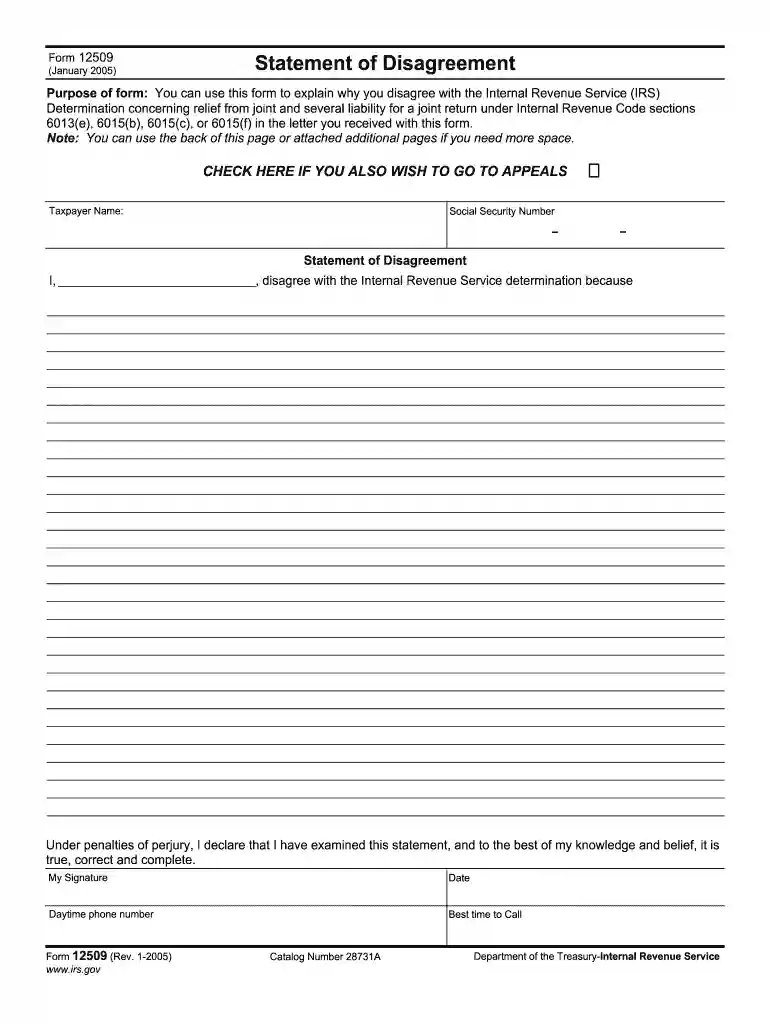
The "Form Disagreement 2005" is primarily used to formally contest a decision made by a taxing or legal authority regarding disputes over financial obligations. This document essentially acts as a Statement of Disagreement, allowing individuals or entities to express their objections to a particular assessment or ruling. The form provides a structured approach to present one's case and supporting evidence, making it essential for those who find themselves in disagreement with official determinations. When submitting this form, users must clearly articulate their reasons for disagreeing and provide any relevant documentation that substantiates their claims.
Obtaining the "Form Disagreement 2005" requires accessing official channels depending on the issuing authority, typically through government websites. Users can:
Visit Official Government Sites: Many forms are available for download as PDFs on official government websites. Ensure you download from sites with secure certificates to protect your data.
Request via Mail: Some authorities provide the option to request forms by mail. This requires providing your address and may involve a nominal fee for processing.
Local Government Offices: Physical copies can be obtained by visiting government offices in person. Check the office’s working hours and necessary identification if form access requires verification.
Tax Preparation Software: Certain tax preparation software may include downloadable forms, which are especially beneficial for those who file taxes electronically.
Completing the form involves a meticulous process to ensure accuracy and compliance:
Personal Information Section: Fill in your name, social security number, and contact details. Ensure all entered data matches official records to avoid processing delays.
Statement of Disagreement: Clearly articulate your disagreement with the authority's determination. Concisely state reasons backed by evidence.
Evidence Documentation: Attach all supporting documents, like receipts, correspondence, or affidavits, that reinforce your claim.
Declaration: Sign the declaration under penalties of perjury, affirming that the information provided is true and complete.
Review and Submit: Double-check for completeness and accuracy. Incomplete forms result in delays or rejection.
The form is predominantly used by taxpayers, business entities, and legal representatives:
These users rely on the form to formalize objections and initiate dialogue with respective authorities.


Understanding terminology associated with the form fosters more precise completion:
Familiarity with these terms aids users in accurately conveying their cases.
The legal utility of this form is significant in formally disputing official assessments. It provides a documented track of contestation and a reliable platform for presenting supporting evidence in accordance with legal standards, ensuring both procedural and substantive compliance. Legal experts emphasize the importance of substantiating claims to avoid potential legal repercussions stemming from inaccuracies or falsehoods.
Several components are integral to the form’s purpose:
These elements form the backbone of an effective disagreement submission.
The form requires several supporting documents, whose inclusion aids in substantiation:
Complete documentation is imperative to effectively challenge assessments or determinations.
We've got more versions of the statement of disagreement form. Select the right statement of disagreement version from the list and start editing it straight away!
Microsoft Word doesn’t have signing tools to create valid eSignatures and enforceable paperwork. Luckily, DocHub is an online eSignature-compliant editor that supports different document formats, including .doc files. Sign in to your account and upload the Word edition of your form disagreement 2005 from your device and cloud, or URL - our editor will automatically transform it into an editable PDF. Make all required changes in your document and click Sign to create your own legally-binding electronic signature. You will find four signing options from which to choose.
If you edit your form disagreement 2005 with DocHub, you simply will not need to look for other applications or services to eSign it. An electronic signature is a component of DocHub’s extensive editing toolset, which allows you to implement changes in your form without jumping between websites. Just complete your form, double-check the correctness of the information and put your electronic signature at the end to make it submission-ready within a few minutes.
At DocHub, your data security is our priority. We follow HIPAA, SOC2, GDPR, and other standards, so you can work on your documents with confidence.
by M Kusch 2018 Cited by 45 This paper seeks to widen the dialogue between the epistemology of peer disagreement and the epistemology informed by Wittgensteins last notebooks.Read more
by T Kelly Cited by 1051 Disagreement among epistemic peers then, is disagreement among those who disagree despite having been exposed to the same evidence. Recognizing this fact, youRead more
Animal studies of toluene inhalation have revealed delayed neurodevelopment and decreased offspring weight at levels that also resulted in maternal toxicity.Read more


