GA Notarial Certificates - Notary Stamp 2026

Get Form
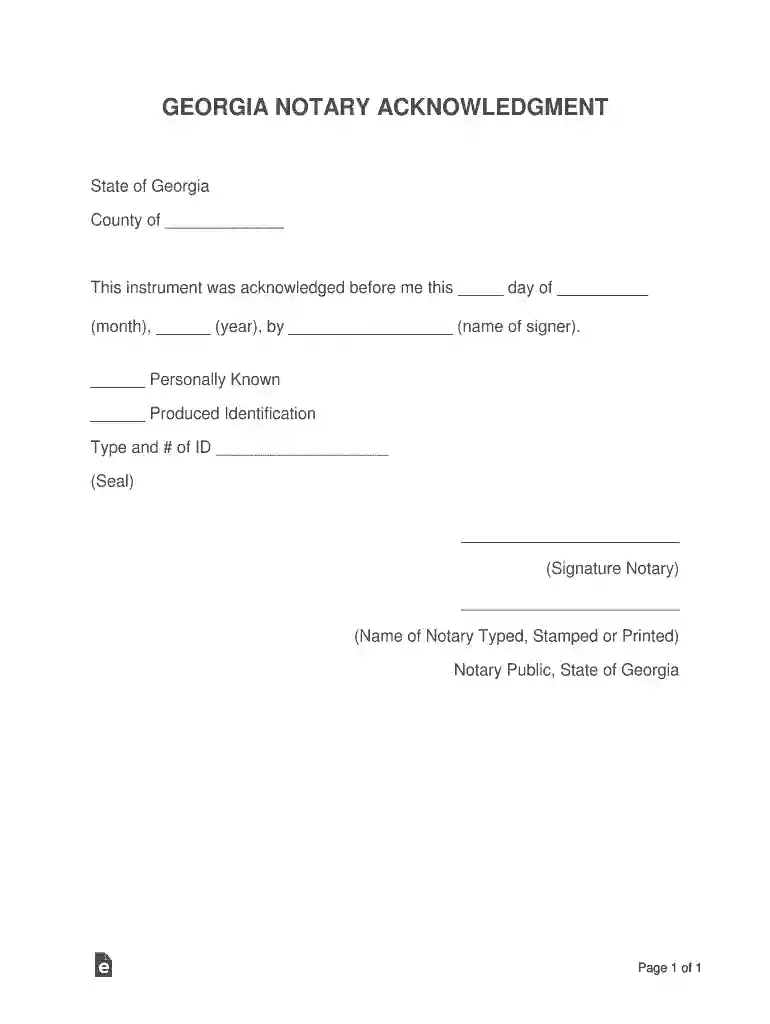
notarial certificate Preview on Page 1

Here's how it works

01. Edit your notarial certificate online
Type text, add images, blackout confidential details, add comments, highlights and more.

02. Sign it in a few clicks
Draw your signature, type it, upload its image, or use your mobile device as a signature pad.

03. Share your form with others
Send georgia notary handbook pdf via email, link, or fax. You can also download it, export it or print it out.

How to use or fill out GA Notarial Certificates - Notary Stamp with our platform

Form edit decoration
9.5
Ease of Setup
DocHub User Ratings on G2
9.0
Ease of Use
DocHub User Ratings on G2
  1. Click ‘Get Form’ to open the GA Notarial Certificate in the editor.
  2. Begin by entering the county name in the designated field. This is essential for identifying the jurisdiction of the notarial act.
  3. Next, fill in the date of acknowledgment. Use the format provided: day, month, and year.
  4. In the section for signer’s name, clearly type the full name of the individual who is signing the document.
  5. Indicate whether you personally know the signer or if they produced identification by checking the appropriate box.
  6. If identification was produced, specify the type and number of ID in the provided field.
  7. Finally, sign as a notary public and ensure your name is typed, stamped, or printed below your signature. Don’t forget to apply your notary seal.

Start using our platform today to streamline your document editing and signing process for free!

See more GA Notarial Certificates - Notary Stamp versions

We've got more versions of the GA Notarial Certificates - Notary Stamp form. Select the right GA Notarial Certificates - Notary Stamp version from the list and start editing it straight away!
Versions Form popularity Fillable & printable
2017 4.8 Satisfied (76 Votes)
be ready to get more

Complete this form in 5 minutes or less

Get form

Got questions?

We have answers to the most popular questions from our customers. If you can't find an answer to your question, please contact us.
Contact us
In Brazil, notary publics, otherwise known as Tabelio de Notas or Cartrio de Notas, are one of those responsible for docHubing documents. These professionals authenticate and docHub the authenticity of signatures on various legal documents, such as powers of attorney, contracts, and affidavits.
All 50 states require public notaries to place their respective stamp on documents as a means to finalize and authenticate the service. Without this stamp, the document is not legally docHubd.
Notary fees by notarial act StateAcknowledgmentRON GA Georgia $2 HI Hawaii $5 per document ID Idaho $5 IL Illinois $547 more rows
Failing to require signers to be present at the notarization is the number one claim of misconduct against Notaries.
The U.S. Embassy, Consulates, and Consular Agencies in Brazil provide notary services. They are available for all nationalities and available by appointment only. Except for affidavits, we can only provide notarial services for documents that are to be used in the United States.

Security and compliance

At DocHub, your data security is our priority. We follow HIPAA, SOC2, GDPR, and other standards, so you can work on your documents with confidence.

Learn more
ccpa2
pci-dss
gdpr-compliance
hipaa
soc-compliance
be ready to get more

Complete this form in 5 minutes or less

Get form

People also ask

A Notary stamp or embosser is required in Georgia. Most Georgia Notaries use an inked stamp.

notarial certificates