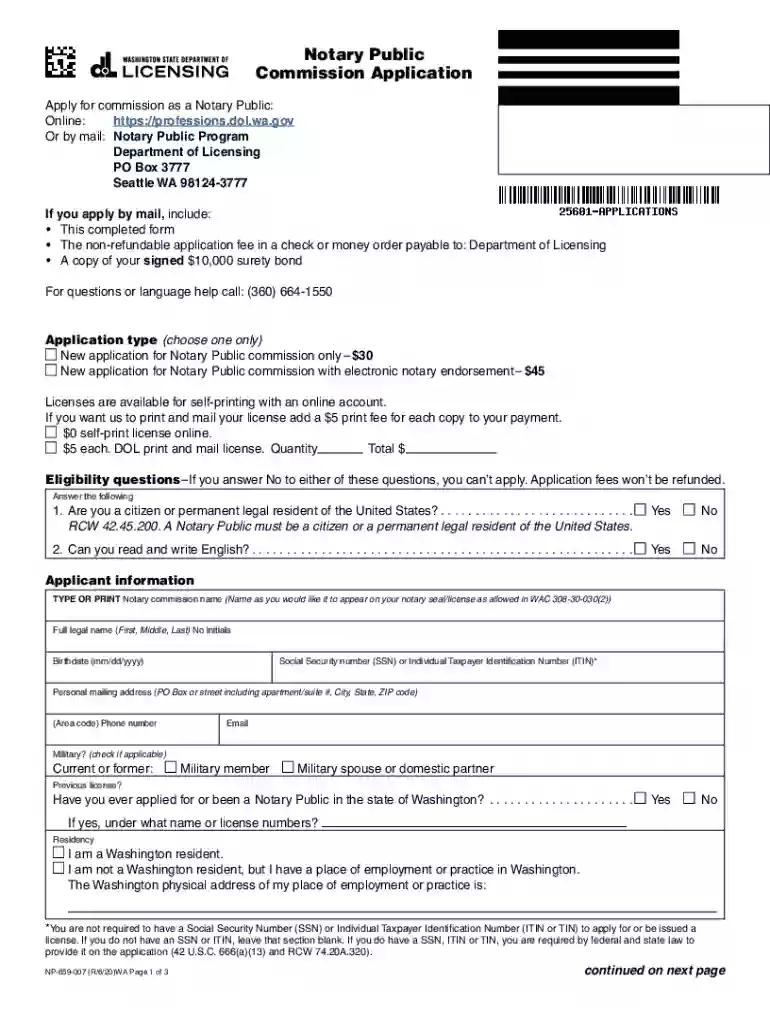
Form NP-659-007 "Notary Public Commission Application ... 2025

Get Form
Form NP-659-007 "Notary Public Commission Application ... Preview on Page 1

Here's how it works

01. Edit your form online
Type text, add images, blackout confidential details, add comments, highlights and more.

02. Sign it in a few clicks
Draw your signature, type it, upload its image, or use your mobile device as a signature pad.

03. Share your form with others
Send it via email, link, or fax. You can also download it, export it or print it out.

How to use or fill out Form NP-659-007 'Notary Public Commission Application' with our platform

Form edit decoration
9.5
Ease of Setup
DocHub User Ratings on G2
9.0
Ease of Use
DocHub User Ratings on G2
  1. Click ‘Get Form’ to open the NP-659-007 application in the editor.
  2. Begin by selecting your application type: either a new commission for $30 or with electronic notary endorsement for $45. Ensure you check the appropriate box.
  3. Fill in your eligibility information. Answer 'Yes' or 'No' to the citizenship and English proficiency questions, as these are mandatory for your application.
  4. Complete the applicant information section by typing your full legal name, birthdate, Social Security number (if applicable), mailing address, phone number, and email.
  5. If applicable, indicate military status and provide details about any previous notary licenses you may have held.
  6. Answer the legal background questions truthfully. If you answer 'Yes' to any question, attach a detailed explanation.
  7. If requesting an electronic notary endorsement, provide the name of your electronic software and its effective date.
  8. Finally, complete the Oath of Office section in front of a Notary Public as instructed. Ensure all signatures and dates are correctly filled out.

Start using our platform today to streamline your application process for free!

See more Form NP-659-007 "Notary Public Commission Application ... versions

We've got more versions of the Form NP-659-007 "Notary Public Commission Application ... form. Select the right Form NP-659-007 "Notary Public Commission Application ... version from the list and start editing it straight away!
Versions Form popularity Fillable & printable
2022 4.6 Satisfied (36 Votes)
2020 4.8 Satisfied (210 Votes)
2012 4 Satisfied (53 Votes)
be ready to get more

Complete this form in 5 minutes or less

Get form

Got questions?

We have answers to the most popular questions from our customers. If you can't find an answer to your question, please contact us.
Contact us

If you regularly deal with documents stored in your Google Drive, DocHub is a superb solution for you to easily and quickly fill out, adjust, and approve them. This editor integrates well with Google services, so you can export your Form NP-659-007 "Notary Public Commission Application ... from your Google Drive to the editor without the need of downloading and re-uploading it. Right-click on your file, select Open With → DocHub PDF Sign and Edit. In our editor, add and assign Signature Fields for all parties involved, then click on the Menu button above → Send → decide on how you want to share your form.

With DocHub, there are several convenient ways to edit your Form NP-659-007 "Notary Public Commission Application ... online. You can drag and drop the form and edit it straight at the DocHub site or use our browser extension to fill out your form right away. Additionally, you can edit your PDF on your smartphone, as DocHub works with all the accessible mobile platforms.

Find a Notary Public: Locate a certified Notary Public in your area. You can often find Notaries at banks, law offices, UPS stores, or local government offices. Make sure to bring a valid photo ID with you when you meet the Notary. Sign the Document in Person: In the presence of the Notary Public, sign the document.
The notary renewal application process is the same as for the initial application for appointment as a notary public, except the oath of office form is not required. You can reapply for reappointment as a notary public no earlier than 120 days before your current commission expires.
The UPS Store locations offer notary services to help make life easier. Once your documents are docHubd, the center will help you make any necessary copies and ship them where they need to go.
be ready to get more

Complete this form in 5 minutes or less

Get form

People also ask

To make a docHubd letter, begin with your contact details, create a clear message explaining the purpose of the letter. Include any legal language if necessary. Conclude with a formal closing and leave space for your signature. And thats how you write a statement that needs to be docHubd.
While the language varies depending on the type of notarization and the law of the state in which you are commissioned, the main body of a certificate will require you to note the date of the notarization, the name of the signer appearing before you, and your official name as the Notary.
Most states set maximum fees Notaries may charge for each specific act they perform. For example, the charge could be based on each signers signature or for acts including both a signature and a verbal oath or affirmation. Depending on the state, these fees range from $2 to $25 per notarial act.
What to Bring to a Notary The completed document you wish to docHub. Valid photo ID that meets state requirements. Any other individuals (with proper ID) who will be signing the document. Payment for notarial services.

Related links