




Here's how it works



How to use or fill out 2021 PA with our platform

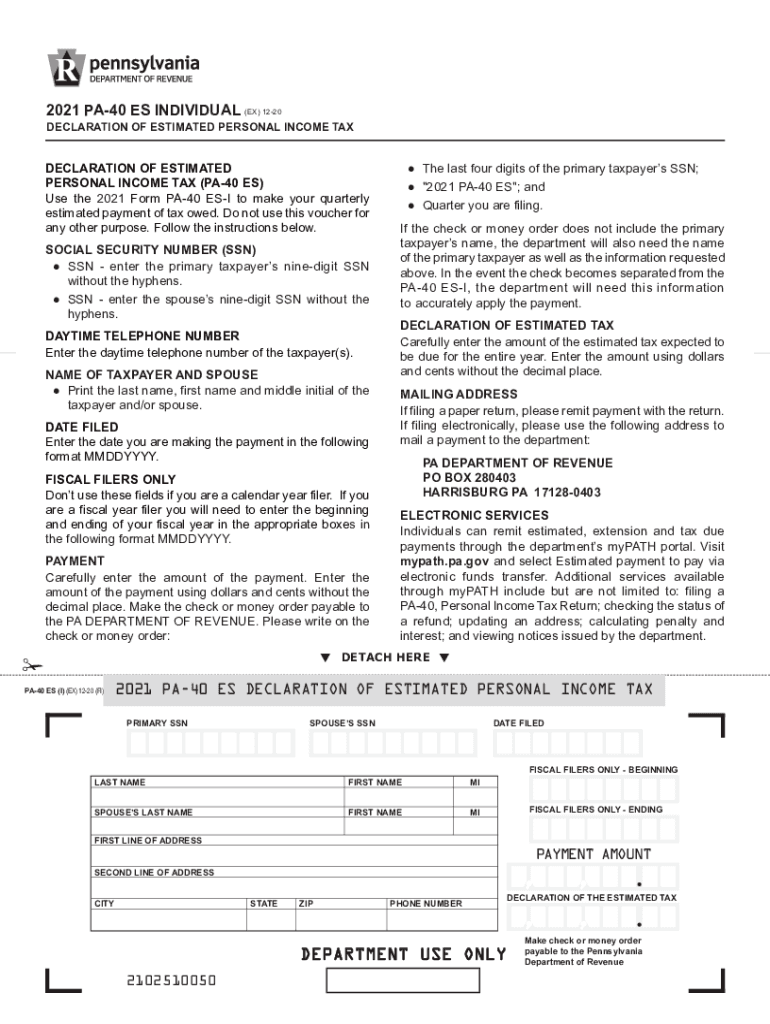
- Click ‘Get Form’ to open the 2021 PA-40 ES in the editor.
- Begin by entering the primary taxpayer’s nine-digit Social Security Number (SSN) without hyphens in the designated field.
- Next, input the spouse’s SSN in the corresponding field, also without hyphens.
- Provide your daytime telephone number for contact purposes.
- Fill in the names of both the taxpayer and spouse, including last name, first name, and middle initial.
- Enter the date you are making this payment in MMDDYYYY format.
- If applicable, for fiscal filers only, enter your fiscal year start and end dates in MMDDYYYY format.
- Carefully input the payment amount using dollars and cents without a decimal point.
- Complete the declaration of estimated tax by entering your expected total tax due for the year.
- If filing by mail, ensure to include your mailing address correctly before submitting your form.
Start filling out your 2021 PA form online for free today!
It's free
See more 2021 pa versions
Got questions?
How can I create an electronic signature in my printable pa 40 form on Android?
Signing documents on a mobile device is fast, straightforward, and doesn’t require software installation if you have an account with DocHub. Sign in from any browser, fill in your blank fields with your data, and click on Sign → Create your signature. You can draw your eSignature the same way you usually do on paper, add its picture to your printable pa 40 form, or type in your name and stylize its look. No matter what option you select, your paperwork will be valid.
What browser do I need to edit pa 40 online?
If you want to edit your pa 40 on the internet easily, it does not matter what browser you use. DocHub’s straightforward editing tools are available using any internet browser. Simply open the appropriate tab within our editor, add your document, and fill it out without stress.
What was the median income in 2021?
What is the PA employer withholding form?
What is the average monthly income in Pennsylvania?
Security and compliance
At DocHub, your data security is our priority. We follow HIPAA, SOC2, GDPR, and other standards, so you can work on your documents with confidence.
Learn more


