





Cdtfa 735 2026

Get Form
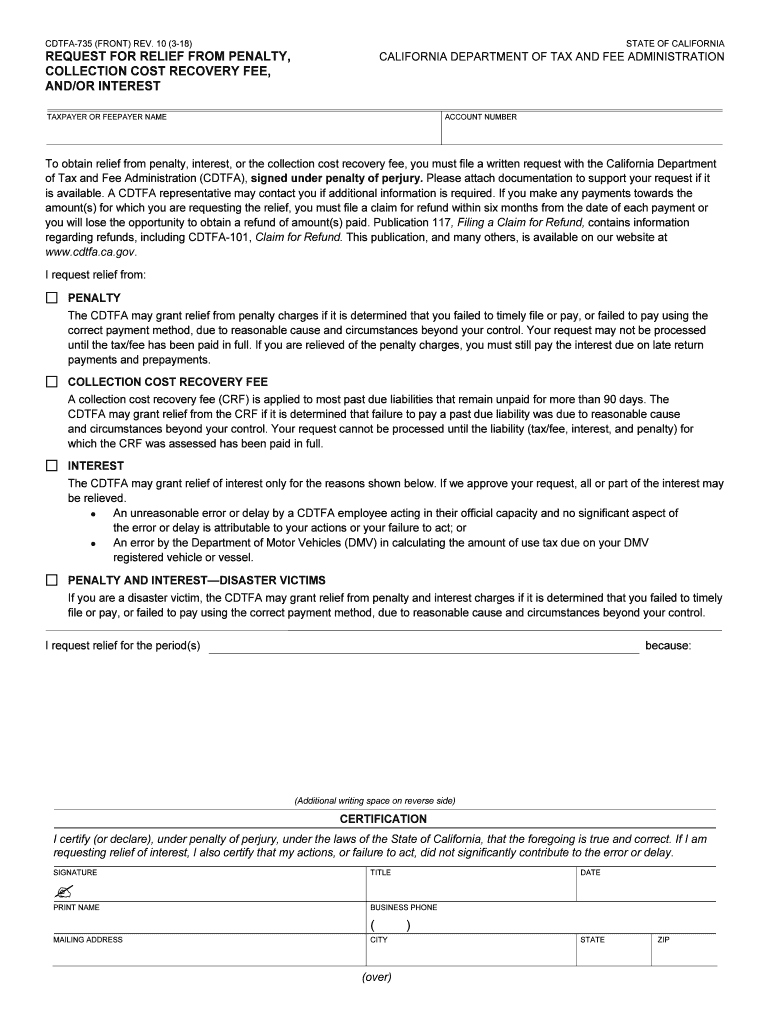
cdtfa 735 Preview on Page 1

Here's how it works

01. Edit your form online
Type text, add images, blackout confidential details, add comments, highlights and more.
02. Sign it in a few clicks
Draw your signature, type it, upload its image, or use your mobile device as a signature pad.
03. Share your form with others
Send it via email, link, or fax. You can also download it, export it or print it out.

How to use or fill out cdtfa 735 with our platform

Form edit decoration
9.5
Ease of Setup
DocHub User Ratings on G2
9.0
Ease of Use
DocHub User Ratings on G2
  1. Click ‘Get Form’ to open the CDTFA-735 in the editor.
  2. Begin by entering your name and account number in the designated fields at the top of the form. This information is crucial for identifying your request.
  3. In the section labeled 'I request relief from:', select the appropriate boxes for penalty, collection cost recovery fee, or interest based on your situation.
  4. If applicable, provide details about the period(s) you are requesting relief for and explain your reasons in the additional writing space provided.
  5. Complete the certification section by signing, printing your name, and providing your business phone number. Ensure all information is accurate to avoid delays.
  6. Finally, review all entries for accuracy before saving or exporting your completed form for submission.

Start using our platform today to fill out your CDTFA-735 form easily and efficiently!

See more cdtfa 735 versions

We've got more versions of the cdtfa 735 form. Select the right cdtfa 735 version from the list and start editing it straight away!
Versions Form popularity Fillable & printable
2023 4.4 Satisfied (34 Votes)
2022 4.5 Satisfied (56 Votes)
2018 4.8 Satisfied (55 Votes)
2017 4.3 Satisfied (130 Votes)
be ready to get more

Complete this form in 5 minutes or less

Get form

Got questions?

We have answers to the most popular questions from our customers. If you can't find an answer to your question, please contact us.
Contact us

Yes, you can utilize DocHub for signing any business and personal paperwork, including your cdtfa 735. All electronic signatures you create with our tool are legally binding and court-admissible, as DocHub complies with criteria required by ESIGN and UETA. Save your completed paperwork with a detailed Audit Trail if needed.

When you go for analog ways of completing your cdtfa 735, you can easily download your file for printing. Search DocHub’s Forms & Templates catalog to get the exact file template you require and open it for editing or download it on your device in the format of your liking. It is easy to complete your form electronically and place your handwritten signature on it right after printing or eSign your file with DocHub.

Under California Revenue and Taxation Code Section 19255, the statute of limitations to collect unpaid state tax debts is 20 years from the assessment date, but there are situations that may extend the period or allow debts to remain due and payable. The stakes are particularly high in criminal tax prosecution cases.
The California Department of Tax and Fee Administration (CDTFA) administers Californias sales and use, fuel, tobacco, alcohol, and cannabis taxes, as well as a variety of other taxes and fees that fund specific state programs.
You can request First Time Abate for a penalty even if you havent fully paid the tax on your return. However, the Failure to Pay Penalty will continue to increase until you pay the tax in full. Example: You didnt fully pay your taxes in 2021 and got a notice with the balance due and penalty charges.

Security and compliance

At DocHub, your data security is our priority. We follow HIPAA, SOC2, GDPR, and other standards, so you can work on your documents with confidence.

Learn more
ccpa2
pci-dss
gdpr-compliance
hipaa
soc-compliance

People also ask

Furthermore, the CDTFA shares its information with the Franchise Tax Board (FTB), the Employee Development Department (EDD),and the IRS. Audits, investigations, and adverse consequences from these agencies may be triggered by this shared information.
Retailers engaged in business in California must register with the California Department of Tax and Fee Administration (CDTFA) and pay the states sales tax, which applies to all retail sales of goods and merchandise except those sales specifically exempted by law.
Penalty and Interest There is a 10 precent penalty for not filing your return and/or paying your full tax or fee payment on time. However, your total penalty will not exceed 10 percent of the amount of tax for the reporting period. An additional 10 percent penalty may apply, if you do not pay the tax by the due date.
CA FTB Penalty Abatement The FTB defines reasonable cause to mean that the taxpayer exercised ordinary business care and prudence in meeting their tax obligations but failed to comply.
You May Owe Use Tax. You may owe use tax if you made a purchase from an out-of-state retailer and were not charged California tax on the purchase. If you have not saved your receipts, you may calculate and pay estimated use tax on your 2021 California Income Tax return, based upon your income.

Related links