




Here's how it works

01. Edit your 2021 first time homebuyer credit online
Type text, add images, blackout confidential details, add comments, highlights and more.

02. Sign it in a few clicks
Draw your signature, type it, upload its image, or use your mobile device as a signature pad.

03. Share your form with others
Send 2021 5405 via email, link, or fax. You can also download it, export it or print it out.
How to use or fill out IRS First-Time Homebuyer Credit with DocHub

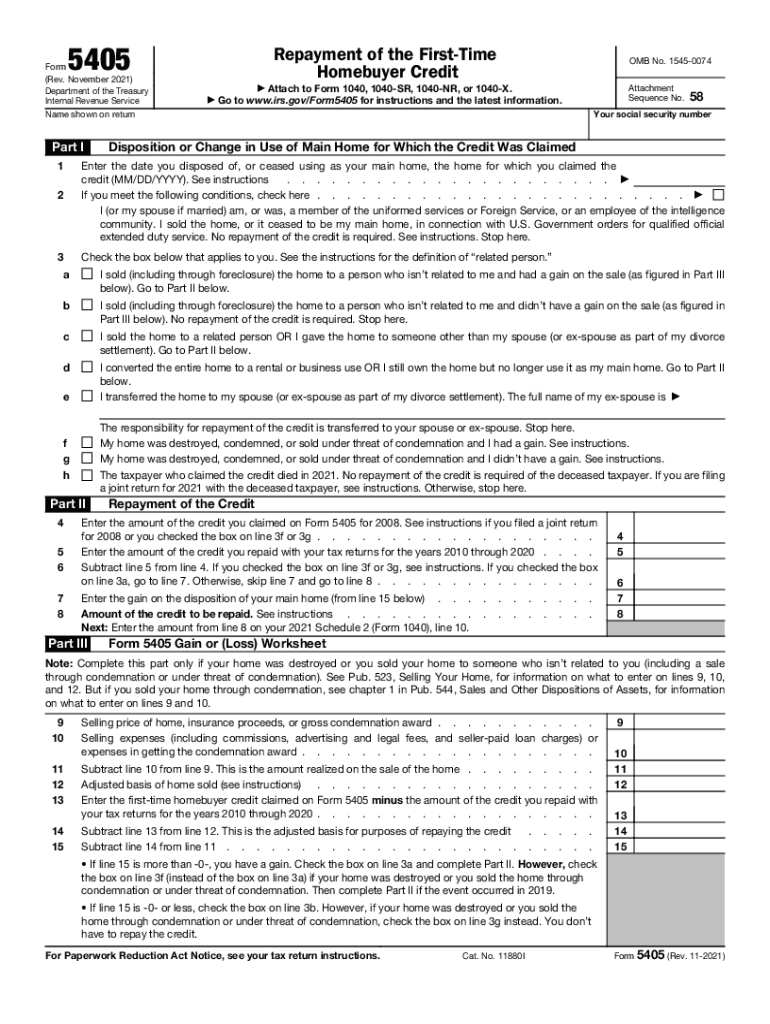
- Click ‘Get Form’ to open the IRS Form 5405 in our editor.
- Begin by entering your social security number and the name shown on your return at the top of the form.
- In Part I, indicate the date you disposed of or ceased using your main home for which you claimed the credit. If applicable, check the box confirming you or your spouse were members of uniformed services and sold the home under specific conditions.
- Select the appropriate box that describes your situation regarding the sale of your home. This will guide you through whether repayment is required or if you can stop here.
- Proceed to Part II to calculate any repayment amounts. Enter the amount of credit claimed and any repayments made in previous years as instructed.
- Complete Part III only if necessary, following instructions for calculating gain or loss from selling your home.
Start editing your IRS Form 5405 for free today with our platform!
Fill out irs first time homebuyer credit online
It's free
It's free
See more irs first time homebuyer credit versions
We've got more versions of the irs first time homebuyer credit form. Select the right irs first time homebuyer credit version from the list and start editing it straight away!
Security and compliance
At DocHub, your data security is our priority. We follow HIPAA, SOC2, GDPR, and other standards, so you can work on your documents with confidence.
Learn more


