BUSINESS DIGITAL LITERACY 2026

Get Form
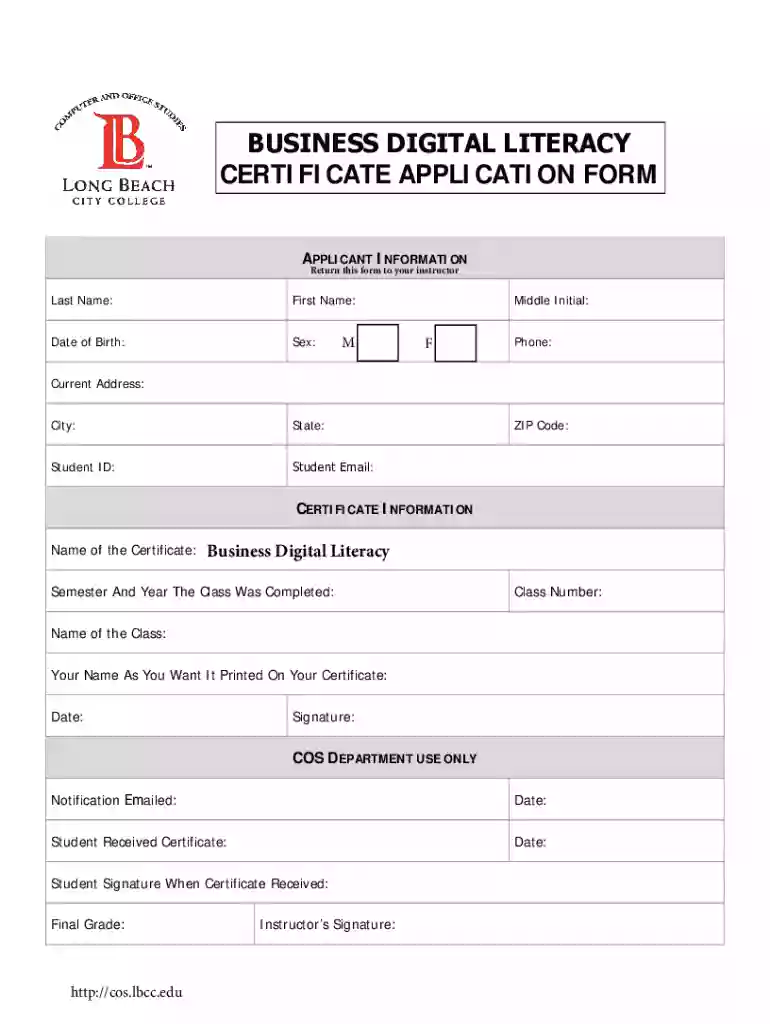
BUSINESS DIGITAL LITERACY Preview on Page 1

Here's how it works

01. Edit your form online
Type text, add images, blackout confidential details, add comments, highlights and more.

02. Sign it in a few clicks
Draw your signature, type it, upload its image, or use your mobile device as a signature pad.

03. Share your form with others
Send it via email, link, or fax. You can also download it, export it or print it out.

How to use or fill out BUSINESS DIGITAL LITERACY with our platform

Form edit decoration
9.5
Ease of Setup
DocHub User Ratings on G2
9.0
Ease of Use
DocHub User Ratings on G2
  1. Click ‘Get Form’ to open the BUSINESS DIGITAL LITERACY application form in the editor.
  2. Begin by filling out the 'APPLICANT INFORMATION' section. Enter your last name, first name, middle initial, date of birth, and sex. Ensure all details are accurate for proper identification.
  3. Next, provide your contact information including phone number, current address, city, state, ZIP code, and student email. This information is crucial for communication regarding your application.
  4. In the 'CERTIFICATE INFORMATION' section, specify the name of the certificate as 'Business Digital Literacy'. Indicate the semester and year when you completed the class along with the class number.
  5. Fill in your preferred name as you want it printed on your certificate and sign at the bottom of this section. Make sure to include the date.
  6. Finally, review all entries for accuracy before submitting. Once satisfied, return this form to your instructor as instructed.

Start using our platform today to easily complete your BUSINESS DIGITAL LITERACY application for free!

be ready to get more

Complete this form in 5 minutes or less

Get form

Got questions?

We have answers to the most popular questions from our customers. If you can't find an answer to your question, please contact us.
Contact us
To develop successful members of the global society, education must be based on a framework of the Four Cs: communication, collaboration, critical thinking and creative thinking.
Here are 5 key digital literacy skills for students in the modern world. Technical Skills. Independent Research. Media Literacy. Digital Citizenship. Communication and Collaboration.
The document discusses developing digital career literacy through the seven Cs: Changing, Collecting, Critiquing, Connecting, Communicating, Creating, and Curating.
What are learning skills? The 21st century learning skills are often called the 4 Cs: critical thinking, creative thinking, communicating, and collaborating. These skills help students learn, and so they are vital to success in school and beyond.
Our Erasmus courses: Digital Tools for Collaboration, Communication, Cooperation, and Creativity (4Cs) The 4Cs: Creativity, Critical Thinking, Communication, and Collaboration in Schools.

Security and compliance

At DocHub, your data security is our priority. We follow HIPAA, SOC2, GDPR, and other standards, so you can work on your documents with confidence.

Learn more
ccpa2
pci-dss
gdpr-compliance
hipaa
soc-compliance

People also ask

The learning trajectory that is used in this research is 4C (creative, critical, collaborative, and communication) intelligence by using digital literacy.
Digital literacy explained, and its key challenges faced by MSMEs. Forbes defines digital literacy as the understanding and proper utilisation of digital technology and maintains that its no longer a nice to have but a critical business imperative.
The four principles of digital literacy are: Comprehension. A digitally literate person is able to extract meaning from digital information. Curation. Interdependence. Social factors.

Related links