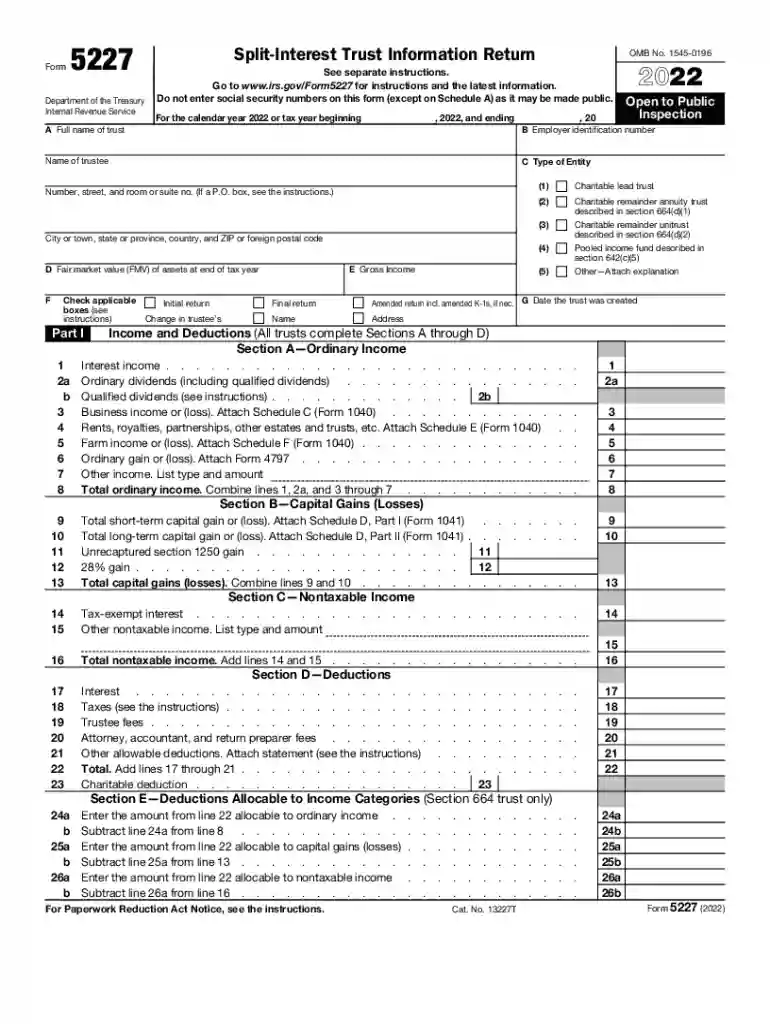
Split-Interest Trust: Annual Return (Form 5227)Internal Revenue Service-2026

Get Form
form 5227 field Preview on Page 1

Here's how it works

01. Edit your form 5227 field online
Type text, add images, blackout confidential details, add comments, highlights and more.

02. Sign it in a few clicks
Draw your signature, type it, upload its image, or use your mobile device as a signature pad.

03. Share your form with others
Send the form 5227 via email, link, or fax. You can also download it, export it or print it out.

How to use or fill out Split-Interest Trust: Annual Return (Form 5227) with our platform

Form edit decoration
9.5
Ease of Setup
DocHub User Ratings on G2
9.0
Ease of Use
DocHub User Ratings on G2
  1. Click ‘Get Form’ to open the Split-Interest Trust: Annual Return (Form 5227) in our editor.
  2. Begin by filling out the trust's full name and employer identification number in Section A. Ensure accuracy as this information is crucial for IRS records.
  3. In Part I, check the applicable boxes regarding the type of return you are filing, such as initial, final, or amended return. This helps categorize your submission correctly.
  4. Proceed to Section A—Ordinary Income. Enter all relevant income figures including interest income and ordinary dividends. Use our platform’s calculation tools to ensure totals are accurate.
  5. Complete Sections B and C for capital gains and nontaxable income respectively. Attach any necessary schedules as indicated in the form instructions.
  6. Finally, review all entries for completeness and accuracy before signing electronically using our platform’s signature feature.

Start filling out your Form 5227 today for free with our user-friendly editor!

See more Split-Interest Trust: Annual Return (Form 5227)Internal Revenue Service versions

We've got more versions of the Split-Interest Trust: Annual Return (Form 5227)Internal Revenue Service form. Select the right Split-Interest Trust: Annual Return (Form 5227)Internal Revenue Service version from the list and start editing it straight away!
Versions Form popularity Fillable & printable
2023 4.3 Satisfied (54 Votes)
2022 4.6 Satisfied (55 Votes)
2021 4.8 Satisfied (60 Votes)
2020 4.4 Satisfied (198 Votes)
2019 4.4 Satisfied (245 Votes)
2018 4.3 Satisfied (175 Votes)
2017 4.3 Satisfied (52 Votes)
2011 4 Satisfied (40 Votes)
be ready to get more

Complete this form in 5 minutes or less

Get form

Got questions?

We have answers to the most popular questions from our customers. If you can't find an answer to your question, please contact us.
Contact us
PDSs deliver to: Internal Revenue Service Center 1973 Rulon White Blvd. M/S 6054 Ogden, UT 84201 Instructions for Form 5227 3 Page 4 PDSs cant deliver items to P.O. boxes.
Follow these steps to generate Form 5227 for a charitable trust: Go to Input Return ⮕ General ⮕ Client Information. Scroll down to the Miscellaneous Info section. Locate the Type of Entity field select 6= Charitable Trust. Select Charitable Trust from the Type of Charitable Trust dropdown menu.
You can also electronically file the Form 5227. This requires a separate export. You can toggle whether you are exporting the Form 1041 or the Form 5227 on Federal General Electronic Filing General Select Type of return to export Override (Interview Form EF-2, Box 91).
Charitable remainder trusts must annually file Form 5227, Split-Interest Trust Information Return. Form 5227: Reports financial activities, including the disposition of the trusts assets. Accounts for current-year and accumulated trust income.
A CRT trustee must file Form 5227 each year to report the financial activities of the trust. This form must be filed on or before April 15th following the close of the trusts tax year. CRTs have a calendar tax year which means December 31st is the end of the trusts tax year.

Security and compliance

At DocHub, your data security is our priority. We follow HIPAA, SOC2, GDPR, and other standards, so you can work on your documents with confidence.

Learn more
be ready to get more

Complete this form in 5 minutes or less

Get form

People also ask

You can electronically file a pooled income or charitable lead trust return with Form 1041 and Form 5227. The ability to electronically file Form 5227 was added on April 27, 2023.

split interest information