






Definition and Meaning
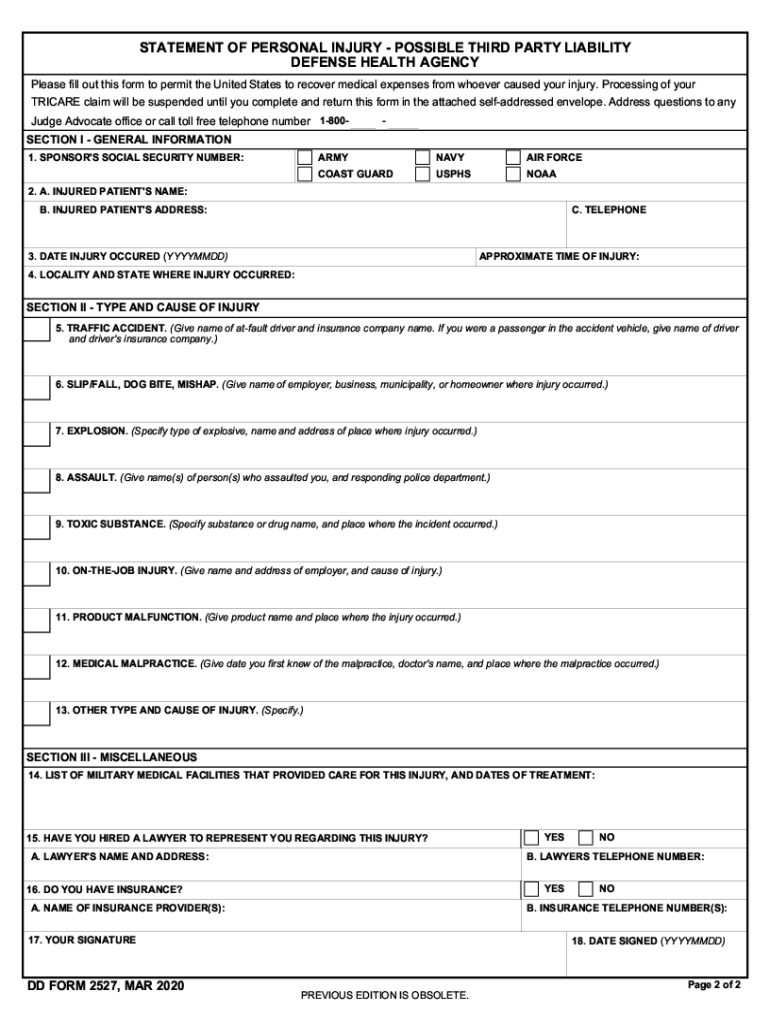
DD Form 2527, known as the Statement of Personal Injury - Possible Third Party Liability, is a document used by the United States Department of Defense to collect information about injuries sustained by military personnel. This form helps determine if a third party might be liable for the medical costs incurred due to an injury. The completion of this form plays a critical role in identifying potential reimbursement opportunities from liable parties or their insurers, thereby reducing medical expenses borne by the government.
How to Use the DD Form 2527
The DD Form 2527 should be used by military personnel or their representatives to report injuries that might involve third-party liability. The process involves detailing the circumstances surrounding the injury, including the involvement of any non-governmental parties. Such information is crucial in case the Department of Defense needs to pursue a claim against a third party to recover medical costs. When filling out this form, the user should ensure all sections are completed accurately to facilitate a clear understanding of the situation and avoid delays in processing.
Obtaining the DD Form 2527
The DD Form 2527 can be obtained through several channels. Typically, personnel can access it via the appropriate military health system or administrative office. It may also be available for download from official Department of Defense websites. Personnel should ensure they receive the most current version of the form to comply with any updates or changes in reporting requirements.
Steps to Complete the DD Form 2527
- Personal Information: Start by entering the service member's full name, social security number, and contact details.
- Incident Information: Provide a detailed account of the injury incident, including date, location, and specific circumstances.
- Third-Party Details: Include any known information about potential third-party involvement, such as names and contact information of witnesses or other parties involved.
- Medical Treatment: Record the details of any medical treatment received, including the facility names and types of services rendered.
- Certification: Complete the form by certifying the information provided is accurate to the best of your knowledge, and sign the document.
Key Elements of the DD Form 2527
- Identification: Section to identify the injured person and relationship, if applicable.
- Incident Narrative: Space to recount the specifics of the injury occurrence.
- Third-Party Details: Portion dedicated to capturing details of third-party involvement.
- Medical Details: Area to outline the medical treatment received, providing insight for potential reimbursement activities.
- Signature: Final section for certification and authentication of the information submitted.
Who Typically Uses the DD Form 2527
The DD Form 2527 is primarily used by active duty military personnel, their representatives, or Department of Defense civilians who have experienced an injury where a third-party involvement might lead to potential cost recovery. This includes instances like car accidents where the other driver might be at fault or workplace incidents involving non-governmental equipment or contractors.


Legal Use of the DD Form 2527
Completing the DD Form 2527 is a legal requirement for processing claims related to third-party liability in military-related injuries. It provides a legal framework to pursue compensation through litigation or settlement negotiations with third parties responsible for the injury. The detailed information captured by this form can influence the legal strategy adopted by the Department of Defense in recovering funds used for healthcare services following an injury.
Penalties for Non-Compliance
Failing to complete the DD Form 2527 when it is required can lead to significant consequences. Non-compliance may result in delays in medical expense coverage, as the Department of Defense might be unable to seek reimbursement without required documentation. This could also lead to the individual being liable for part or all of their medical costs if the third party's liability is not established due to incomplete reporting.