




Here's how it works

01. Edit your tax return receipts online
Type text, add images, blackout confidential details, add comments, highlights and more.

02. Sign it in a few clicks
Draw your signature, type it, upload its image, or use your mobile device as a signature pad.

03. Share your form with others
Send tntap login via email, link, or fax. You can also download it, export it or print it out.
How to use or fill out Gatlinburg, TN Gross Receipts Tax Return Mixing Bar Tax Form

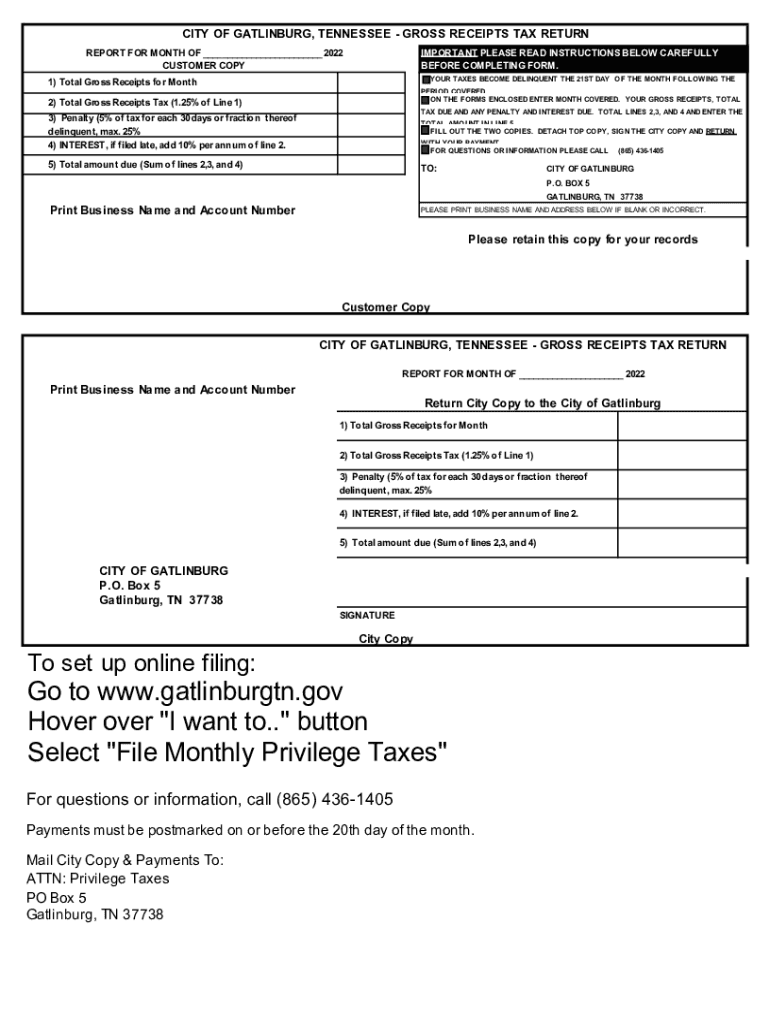
- Click ‘Get Form’ to open it in the editor.
- Begin by entering the month covered for the tax period at the top of the form. This is crucial as it determines your reporting timeframe.
- In Line 1, input your Total Gross Receipts for the month. Ensure accuracy as this figure directly affects your tax calculation.
- Calculate your Total Gross Receipts Tax by multiplying Line 1 by 1.25% and enter this amount in Line 2.
- If applicable, calculate any Penalty due (5% of tax for each 30 days delinquent, maxing at 25%) and enter it in Line 3.
- For late filings, add Interest (10% per annum of Line 2) in Line 4.
- Sum Lines 2, 3, and 4 to find your Total Amount Due and enter this in Line 5.
- Print your Business Name and Account Number where indicated. Detach the top copy, sign it, and return it with payment to the City of Gatlinburg.
Start using our platform today to easily complete your Gatlinburg tax form online for free!
Fill out Gatlinburg, TN Gross Receipts Tax Return Mixing Bar Tax Form online
It's free
See more Gatlinburg, TN Gross Receipts Tax Return Mixing Bar Tax Form versions
We've got more versions of the Gatlinburg, TN Gross Receipts Tax Return Mixing Bar Tax Form form. Select the right Gatlinburg, TN Gross Receipts Tax Return Mixing Bar Tax Form version from the list and start editing it straight away!
Security and compliance
At DocHub, your data security is our priority. We follow HIPAA, SOC2, GDPR, and other standards, so you can work on your documents with confidence.
Learn more


