Arizona a1 2026

Get Form
a1 wp Preview on Page 1

Here's how it works

01. Edit your a1 wp online
Type text, add images, blackout confidential details, add comments, highlights and more.

02. Sign it in a few clicks
Draw your signature, type it, upload its image, or use your mobile device as a signature pad.

03. Share your form with others
Send arizona a1 via email, link, or fax. You can also download it, export it or print it out.

How to use or fill out Arizona A1 with our platform

Form edit decoration
9.5
Ease of Setup
DocHub User Ratings on G2
9.0
Ease of Use
DocHub User Ratings on G2
  1. Click ‘Get Form’ to open the Arizona A1 in the editor.
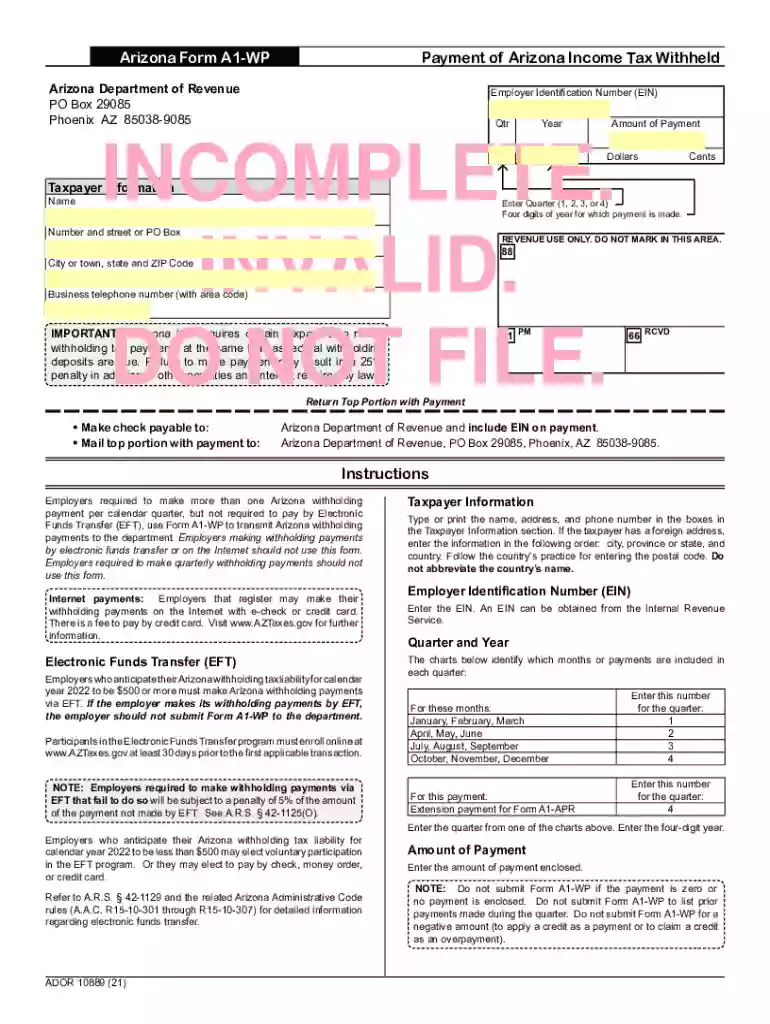
  2. Begin by filling out the Taxpayer Information section. Enter your name, address, and business telephone number. Ensure accuracy to avoid processing delays.
  3. Next, input your Employer Identification Number (EIN) in the designated field. If you do not have an EIN, you can obtain one from the Internal Revenue Service.
  4. Select the appropriate quarter and year for which you are making a payment. Use the provided charts to determine the correct quarter based on the months.
  5. Enter the amount of payment enclosed in both dollars and cents. Remember, do not submit this form if there is no payment or if it is zero.
  6. Once all fields are completed, review your entries for accuracy before printing. The yellow-colored fields must be filled out prior to printing.
  7. Finally, print the form and return the top portion with your payment to the Arizona Department of Revenue at the specified address.

Start using our platform today for free to streamline your document editing and form completion!

See more arizona a1 versions

We've got more versions of the arizona a1 form. Select the right arizona a1 version from the list and start editing it straight away!
Versions Form popularity Fillable & printable
2022 4.8 Satisfied (33 Votes)
2021 4.8 Satisfied (45 Votes)
2020 4.8 Satisfied (96 Votes)
2019 4.1 Satisfied (72 Votes)
2018 4.3 Satisfied (267 Votes)
2017 4.1 Satisfied (36 Votes)
2010 4.4 Satisfied (95 Votes)
2004 4.4 Satisfied (566 Votes)
be ready to get more

Complete this form in 5 minutes or less

Get form

Got questions?

We have answers to the most popular questions from our customers. If you can't find an answer to your question, please contact us.
Contact us

Of course, electronically drawing your signature is appropriate, but only if you use a tool that complies with industry regulations and policies. Try DocHub, which ensures eSignature validity under ESIGN and UETA requirements. All you need to eSign your form a1 wp is an account with DocHub and an internet connection. Once you open your paperwork in our editor, click Sign and choose the Draw tool.

If you edit your arizona a1 with DocHub, you only need a steady web connection and virtually any web browser installed on your device. No need to set up any third-party software or research tutorials. Simply open a tab with DocHub, drag and drop your file, and edit it on the spot.

If filing a paper return, mail Form A1-APR and any required attachments to: Arizona Department of Revenue PO Box 29009 Phoenix AZ 85038-9009 For details on how the department normally determines if a return has been filed timely, see the departments ruling, GTR 16-1, Timely Filing of Income or Withholding Tax Returns
Employers and other entities that pay Arizona income tax withheld on an annual basis must file Form A1-APR to pay the income tax withheld and to reconcile their payments for the year.
Filing Original Returns Send the return to the Arizona Department of Revenue, PO Box 29009, Phoenix AZ 85038-9009. The Form A1-APR is also the transmittal form for federal Forms W-2, W-2c, W-2G, and 1099-R (if the Forms W-2G and 1099-R include Arizona withholding).

Security and compliance

At DocHub, your data security is our priority. We follow HIPAA, SOC2, GDPR, and other standards, so you can work on your documents with confidence.

Learn more
be ready to get more

Complete this form in 5 minutes or less

Get form

People also ask

You may use a Payroll Service Company (PSC) to file your Form A1-QRT. If you use a PSC, that company must file your A1-QRT electronically. For Arizona income tax withholding purposes, several deposit schedules may apply.
All other employers submit Arizona Form(s) A1-APR and A1-QRT using .AZTaxes.gov. Please contact the department at azefile@azdor.gov if you need assistance in electronically submitting your Arizona withholding return. If this is an amended Form A1-R, check the Amended Return box.
Arizona Form A1-R is an information return. Do not submit any liability owed or try to claim refunds with this return. To submit additional liability or claim a refund, file amended quarterly withholding tax Form(s) A1-QRT.
Where do I mail Arizona A1-QRT? Mail the Form A1-T and its related documents to: Arizona Department of Revenue PO Box 29009 Phoenix, AZ 85038-9009 Keep a copy of Form A1-T and its related documents for the employers records.
Arizona Form A1-R is an information return. Do not submit any liability owed or try to claim refunds with this return. To submit additional liability or claim a refund, file amended quarterly withholding tax Form(s) A1-QRT.

Related links