Type text, add images, blackout confidential details, add comments, highlights and more.
02. Sign it in a few clicks
Draw your signature, type it, upload its image, or use your mobile device as a signature pad.
03. Share your form with others
Send form md 433 a via email, link, or fax. You can also download it, export it or print it out.
How to use or fill out md 433 a with our platform
Ease of Setup
DocHub User Ratings on G2
Ease of Use
DocHub User Ratings on G2
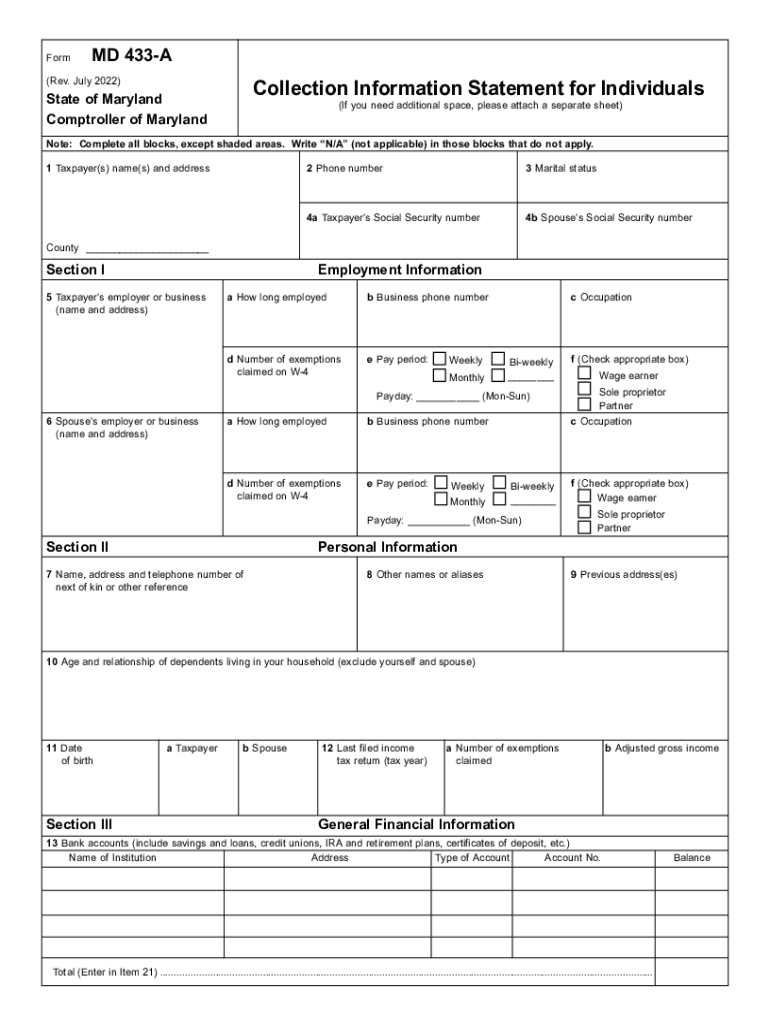
Click ‘Get Form’ to open the MD 433 A in the editor.
Begin by filling in your name and address in the first section. Ensure all fields are completed, except for shaded areas, where you should write 'N/A' if not applicable.
Provide your phone number and marital status. Next, enter your Social Security number and that of your spouse if applicable.
In Section I, input employment details for both you and your spouse. Include employer names, addresses, phone numbers, occupations, and how long you've been employed.
Proceed to Section II to list personal information such as next of kin details, previous addresses, and dependents living with you.
In Section III, detail your financial information including bank accounts, charge cards, real property, life insurance policies, and any other relevant assets or liabilities.
Finally, complete the Monthly Income and Expense Analysis in Section V by listing all sources of income and necessary living expenses before certifying the document with your signature.
Start using our platform today to fill out MD 433 A easily and for free!
Md. Code Regs. 31.12.08.03 | State Regulations | US Law
A health maintenance organization shall calculate the amount owed to a nonparticipating provider for covered services other than evaluation and managementRead more
Form MD 433-A. Charge cards and lines of credit from banks, credit unions, and savings and loans. 31 Wages/salaries (taxpayer) $ 42 National Standard Expenses
USDA Database for the Flavonoid Content of Selected
by S Bhagwat 2013 Cited by 398 M. D., Cano, M. P., and de. Pascual-Tertesa, S. Characterization of the antioxidant composition of strawberry tree (Arbutus unedo. L.) fruits. J. Food CompRead more
Cookie consent notice
This site uses cookies to enhance site navigation and personalize your experience.
By using this site you agree to our use of cookies as described in our Privacy Notice.
You can modify your selections by visiting our Cookie and Advertising Notice.