Type text, add images, blackout confidential details, add comments, highlights and more.

02. Sign it in a few clicks
Draw your signature, type it, upload its image, or use your mobile device as a signature pad.

03. Share your form with others
Send bank withdrawal form via email, link, or fax. You can also download it, export it or print it out.

How to use or fill out cash withdrawal form with our platform
Ease of Setup
DocHub User Ratings on G2
Ease of Use
DocHub User Ratings on G2
Click ‘Get Form’ to open the cash withdrawal form in the editor.
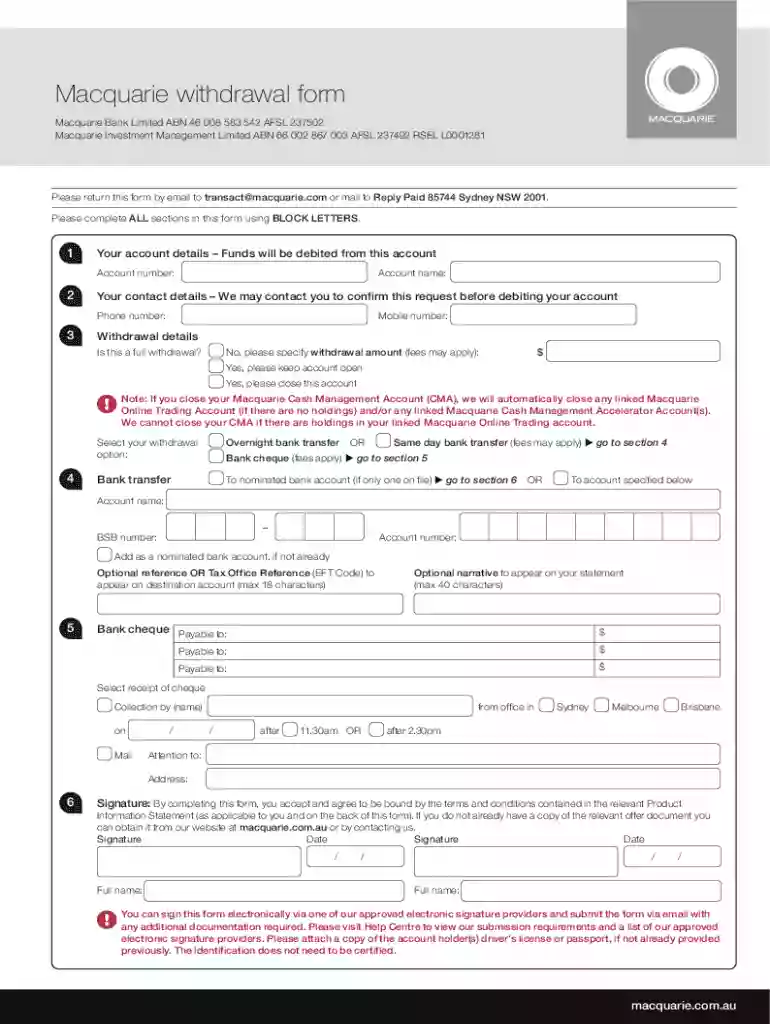
Begin by entering your account details in BLOCK LETTERS. Fill in your account number and account name, ensuring accuracy as funds will be debited from this account.
Provide your contact details, including your phone number and mobile number. This information is essential for any necessary confirmations regarding your request.
Specify whether this is a full withdrawal. If not, indicate the withdrawal amount and select your preferred withdrawal option, such as overnight bank transfer or bank cheque.
If applicable, fill in the details for the nominated bank account where funds should be transferred, including BSB and account numbers.
Complete the optional narrative section if you wish to include a reference on your statement. Finally, sign and date the form to confirm your agreement with the terms and conditions.
Start using our platform today to streamline your cash withdrawal process for free!
We've got more versions of the cash withdrawal form form. Select the right cash withdrawal form version from the list and start editing it straight away!
Cash withdrawal form pdfCash withdrawal form fidelityFree cash withdrawal formCash withdrawal form onlineTIAA withdrawal form pdfCorebridge financial withdrawal Form - PDFCorebridge withdrawal form onlineCorebridge financial withdrawal forms
Security and compliance
At DocHub, your data security is our priority. We follow HIPAA, SOC2, GDPR, and other standards, so you can work on your documents with confidence.
Instructions: Use this form for agency payments, reimbursements and cash withdrawals. 1) Compile all information on request. 2) Include signatures required.Read more
Cookie consent notice
This site uses cookies to enhance site navigation and personalize your experience.
By using this site you agree to our use of cookies as described in our Privacy Notice.
You can modify your selections by visiting our Cookie and Advertising Notice.