




Here's how it works



How to use or fill out w 1 louisville with our platform

- Click ‘Get Form’ to open the w 1 louisville in the editor.
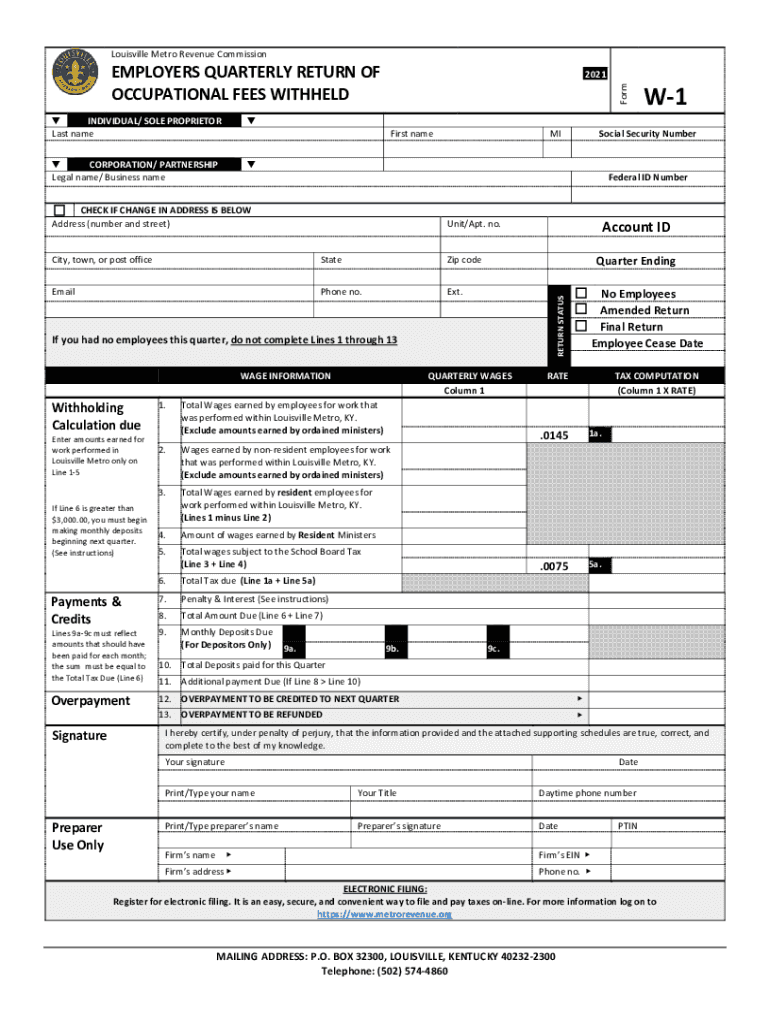
- Begin by entering your last name and first name in the designated fields. If applicable, provide your legal business name for corporations or partnerships.
- Fill in your Social Security Number and Federal ID Number. Ensure accuracy as these are crucial for tax processing.
- Complete the address section, including street number, city, state, and zip code. Don’t forget to check if there’s a change of address.
- Indicate the quarter ending date and select if you had no employees this quarter or if this is an amended/final return.
- In the wage information section, enter total wages earned by employees within Louisville Metro. Follow through with lines for non-resident and resident wages.
- Calculate total tax due based on your entries and ensure all monthly deposits are accurately reflected.
- Finally, sign and date the form at the bottom to certify that all information is correct before submitting.
Start using our platform today to fill out your w 1 louisville form easily and for free!
It's free
See more w 1 louisville versions
Got questions?
How do I sign my w 1 louisville on iOS?
With DocHub, you can rapidly approve your w 1 louisville or any other document on iOS, even without setting up extra programs. You can access your DocHub account from any web-connected browser and fill out and sign your document in any way you like with just a couple of clicks.
How do you create an e-signature for the w 1 louisville on iOS?
In addition to an extensive toolset for editing PDFs on mobile devices, DocHub enables you to sign your w 1 louisville along the way. Open our editor in your internet browser, make changes using DocHub’s toolset, and complete your editing by eSigning the completed form.
Security and compliance
At DocHub, your data security is our priority. We follow HIPAA, SOC2, GDPR, and other standards, so you can work on your documents with confidence.
Learn more




