Form occupational louisville 2026

Get Form
form occupational louisville Preview on Page 1

Here's how it works

01. Edit your form online
Type text, add images, blackout confidential details, add comments, highlights and more.

02. Sign it in a few clicks
Draw your signature, type it, upload its image, or use your mobile device as a signature pad.

03. Share your form with others
Send it via email, link, or fax. You can also download it, export it or print it out.

How to use or fill out form occupational louisville with our platform

Form edit decoration
9.5
Ease of Setup
DocHub User Ratings on G2
9.0
Ease of Use
DocHub User Ratings on G2
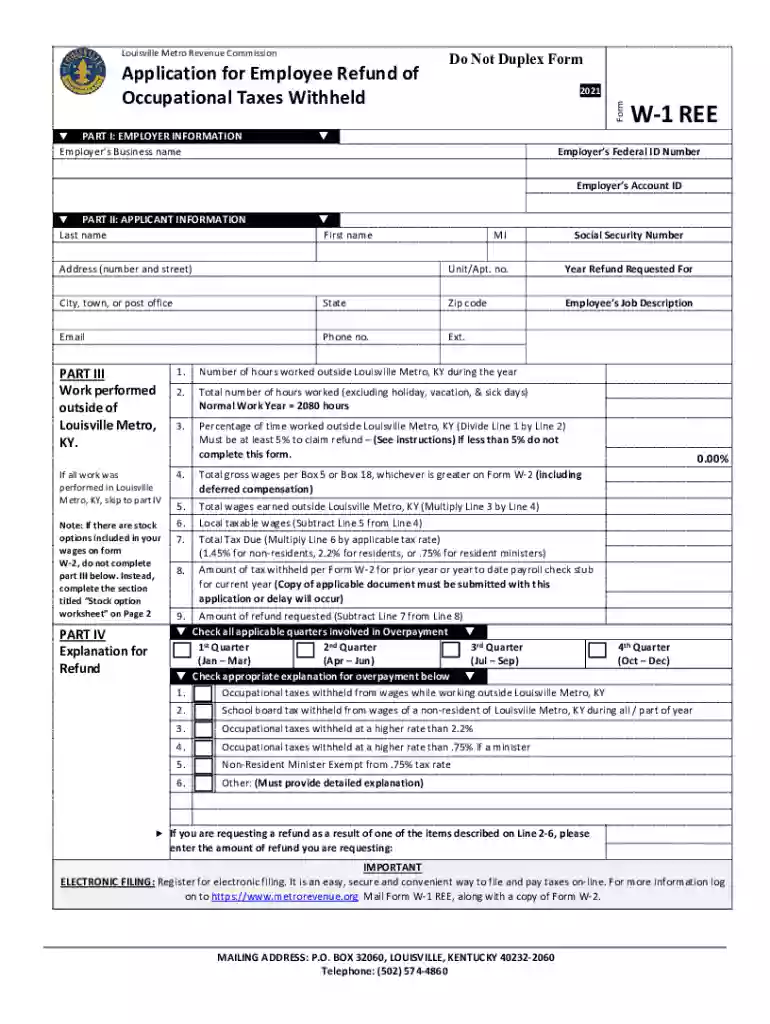
  1. Click ‘Get Form’ to open the form occupational louisville in the editor.
  2. Begin with Part I: Enter your employer’s business name, Federal ID number, and Account ID. Ensure accuracy as this information is crucial for processing your refund.
  3. Move to Part II: Fill in your personal details including last name, first name, address, email, and phone number. This section identifies you as the applicant.
  4. In Part III, indicate if any work was performed outside of Louisville Metro. If so, provide the necessary details; otherwise, skip to Part IV.
  5. Part IV requires an explanation for your refund request. Complete all fields regarding hours worked and wages earned both inside and outside Louisville Metro.
  6. Finally, review Parts V through VII for certification and signature requirements. Ensure all information is accurate before submitting.

Start filling out your form occupational louisville today for free using our platform!

See more form occupational louisville versions

We've got more versions of the form occupational louisville form. Select the right form occupational louisville version from the list and start editing it straight away!
Versions Form popularity Fillable & printable
2023 4.1 Satisfied (48 Votes)
2022 4.2 Satisfied (25 Votes)
2021 4.8 Satisfied (107 Votes)
2020 4.4 Satisfied (203 Votes)
2018 4.3 Satisfied (147 Votes)
be ready to get more

Complete this form in 5 minutes or less

Get form

Got questions?

We have answers to the most popular questions from our customers. If you can't find an answer to your question, please contact us.
Contact us
Jeffersontowns Occupational Tax is a 1% wage withholding tax on an employees gross wage. The tax must be withheld and remitted by the employer to the Jeffersontown Revenue Department on a quarterly basis each April 30th, July 31st, October 31st and January 31st.
Form OL-3 is a tax form used by any entity with a business nexus in Louisville/Jefferson County to file and pay the Occupational Tax Rate of 2.2% (resident rate) or 1.45% (non-resident rate).
Occupation tax means a tax levied on persons, partnerships, corporations or other entities for engaging in an occupation, profession or business for revenue raising purposes.
Overview of Kentucky Taxes Kentucky imposes a flat income tax of 4%.
Any individual (resident or non-resident) or business entity (partnerships, corporations, or S-Corporations) who receive taxable compensation are required to file the Occupational License Return (OL-3) and pay the Occupational License Tax to the Louisville Metro Revenue Commission (LMRC).

Security and compliance

At DocHub, your data security is our priority. We follow HIPAA, SOC2, GDPR, and other standards, so you can work on your documents with confidence.

Learn more
ccpa2
pci-dss
gdpr-compliance
hipaa
soc-compliance
be ready to get more

Complete this form in 5 minutes or less

Get form

People also ask

Occupational license taxes may be imposed as a percentage of gross earnings (payroll) on all persons working within the city or on gross receipts or net profits on all businesses within a city. A flat annual rate may also be used by cities, which is often referred to as a business license fee.

Related links