Monthly financial statements 2026

Get Form
3072 2 Preview on Page 1

Here's how it works

01. Edit your 3072 2 online
Type text, add images, blackout confidential details, add comments, highlights and more.

02. Sign it in a few clicks
Draw your signature, type it, upload its image, or use your mobile device as a signature pad.

03. Share your form with others
Send da 3072 2 via email, link, or fax. You can also download it, export it or print it out.

How to use or fill out monthly financial statements with our platform

Form edit decoration
9.5
Ease of Setup
DocHub User Ratings on G2
9.0
Ease of Use
DocHub User Ratings on G2
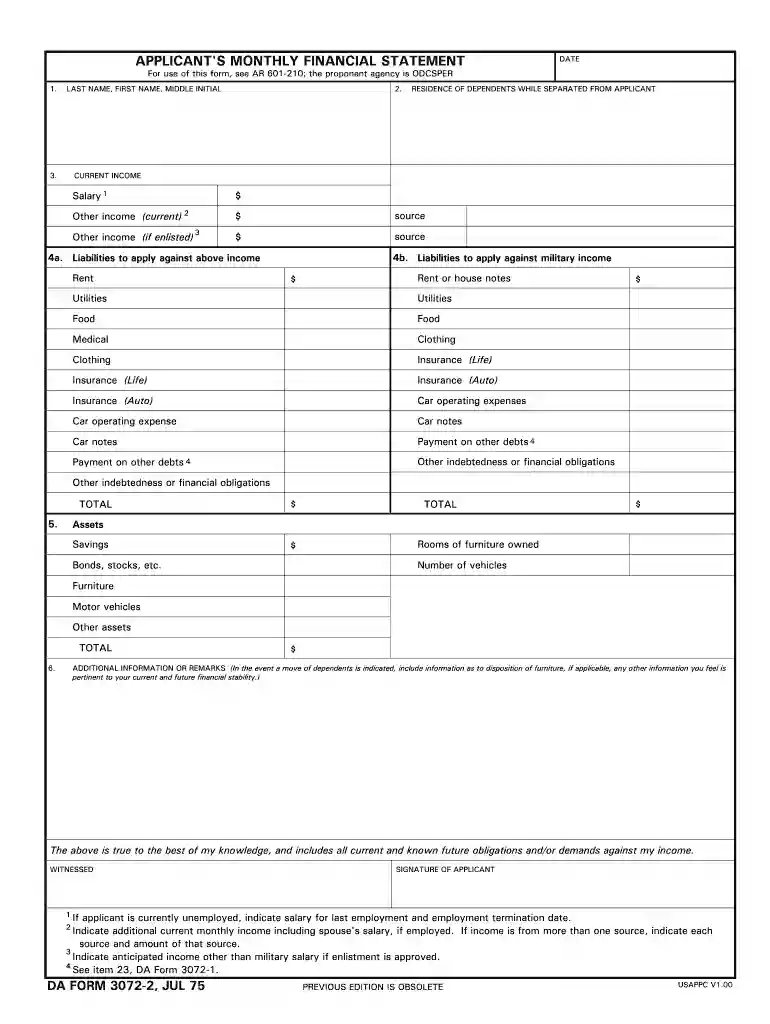
  1. Click ‘Get Form’ to open the monthly financial statement in the editor.
  2. Begin by entering your personal information in the designated fields, including your last name, first name, and middle initial.
  3. Fill in the residence of dependents while separated from you. This is crucial for understanding your financial obligations.
  4. In the 'Current Income' section, list all sources of income. Include salary and any other current income, ensuring to specify amounts for each source.
  5. Next, detail your liabilities under 'Liabilities to apply against above income.' Include rent, utilities, food expenses, and any other debts.
  6. Proceed to the 'Assets' section where you will document savings, bonds, stocks, and any owned furniture or vehicles.
  7. Finally, provide any additional information or remarks that may affect your financial stability before signing at the bottom of the form.

Start using our platform today to easily complete your monthly financial statements online for free!

See more monthly financial statements versions

We've got more versions of the monthly financial statements form. Select the right monthly financial statements version from the list and start editing it straight away!
Versions Form popularity Fillable & printable
1975 4.9 Satisfied (280 Votes)
be ready to get more

Complete this form in 5 minutes or less

Get form

Got questions?

We have answers to the most popular questions from our customers. If you can't find an answer to your question, please contact us.
Contact us
Monthly Financial Report in 7 Steps Step 1: Define your reporting goals. Step 2: Collect and bring together all your data. Step 3: Establish a reporting framework. Step 4: Use automation to keep things accurate. Step 5: Analyze the results. Step 6: Visualize your findings. Step 7: Share and improve.
Financial statements are generally prepared annually. If the end of the reporting period changes, and financial statements are presented for a period other than one year, additional disclosures are required.
The income statement, balance sheet, and statement of cash flows are all required financial statements. These three statements are informative tools that traders can use to analyze a companys financial strength and provide a quick picture of a companys financial health and underlying value.
A financial report, also known as a financial statement, is a document that organizes and displays a businesss financial information during a period of time or at a specific point in time. Different financial statements illustrate different aspects of the businesss finances.

Security and compliance

At DocHub, your data security is our priority. We follow HIPAA, SOC2, GDPR, and other standards, so you can work on your documents with confidence.

Learn more
ccpa2
pci-dss
gdpr-compliance
hipaa
soc-compliance