




01. Edit your form online
Type text, add images, blackout confidential details, add comments, highlights and more.

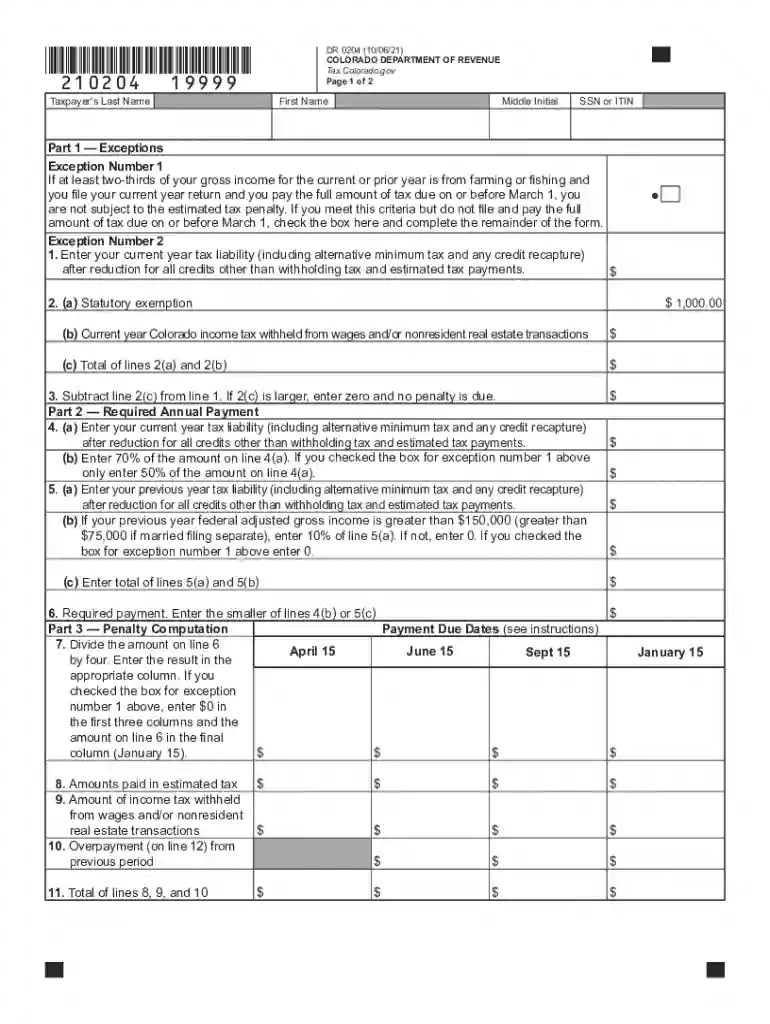
Type text, add images, blackout confidential details, add comments, highlights and more.

Draw your signature, type it, upload its image, or use your mobile device as a signature pad.

Send it via email, link, or fax. You can also download it, export it or print it out.
The "Colorado Estimated Tax" refers to the payments a taxpayer anticipates owing to the state of Colorado for their individual income tax. These payments are usually made quarterly to cover tax liabilities that are not withheld by an employer or other sources. This form is essential for individuals who expect to owe more than one thousand dollars in Colorado state tax beyond what is withheld. It ensures compliance with state tax laws and helps avoid penalties due to underpayment.
To effectively utilize the "Colorado Estimated Tax" form, understanding the payment schedule and calculation methods is crucial.
Taxpayers typically make four payments per year, corresponding to quarterly deadlines. Each installment should reflect one-fourth of the estimated tax liability, unless the taxpayer chooses to use the annualized income installment method.
Filling out the form precisely can prevent costly errors and penalties.
If a freelancer anticipates earning ninety thousand dollars annually, with no taxes withheld, they would calculate the tax at the Colorado rate, apply any known deductions, and divide by four.
Understanding key dates for tax submissions helps maintain compliance and avoid late fees.
It's essential to note that if a taxpayer files their annual return and pays in full by January 31, they may skip the January estimated payment.
Each state carries unique regulations that impact how estimated taxes are calculated and reported.
Taxpayers experiencing significant economic shifts can adjust their estimated payments. For example, if an unexpected decrease in income occurs, reckoning for the adjusted total could avoid overpayments.
Failing to properly estimate and pay the Colorado tax can result in penalties and interest.
Taxpayers can potentially reduce penalties by demonstrating reasonable cause or using the annualized income installment method, which accommodates fluctuating income patterns.
Taxpayers can leverage software tools for efficient tax management.
These tools can sync financial data, calculate tax estimates, and establish alerts for payment deadlines, streamlining the tax management process.
Different taxpayer categories necessitate tailored approaches to estimated tax.


Understanding these distinct scenarios helps taxpayers file accurately and efficiently, minimizing the risk of surprises at year-end.
We've got more versions of the colorado estimated form. Select the right colorado estimated version from the list and start editing it straight away!
| Versions | Form popularity | Fillable & printable |
|---|---|---|
| 2025 | 4.3 Satisfied (29 Votes) | |
| 2024 | 4.6 Satisfied (23 Votes) | |
| 2023 | 4.8 Satisfied (45 Votes) | |
| 2022 | 4.9 Satisfied (28 Votes) | |
| 2021 | 4.8 Satisfied (62 Votes) | |
| 2020 | 4.3 Satisfied (206 Votes) | |
| 2019 | 4.2 Satisfied (92 Votes) | |
| 2018 | 4.4 Satisfied (100 Votes) | |
| 2017 | 4.4 Satisfied (102 Votes) | |
| 2014 | 4.3 Satisfied (28 Votes) |
At DocHub, your data security is our priority. We follow HIPAA, SOC2, GDPR, and other standards, so you can work on your documents with confidence.


