




Here's how it works

01. Edit your connecticut taxpayer service center online
Type text, add images, blackout confidential details, add comments, highlights and more.

02. Sign it in a few clicks
Draw your signature, type it, upload its image, or use your mobile device as a signature pad.

03. Share your form with others
Send ct taxpayer service center via email, link, or fax. You can also download it, export it or print it out.
How to use or fill out connecticut taxpayer service center tpg with our platform

- Click ‘Get Form’ to open it in the editor.
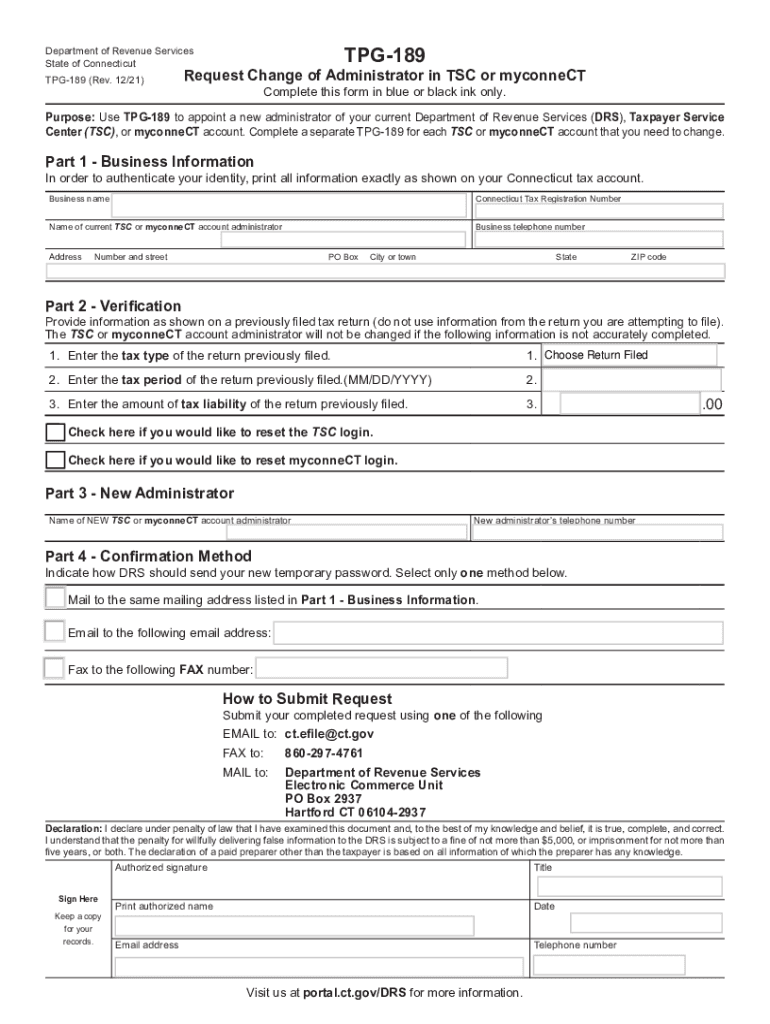
- In Part 1, enter your Business Information. Fill in your business name, Connecticut Tax Registration Number, current administrator's name, business telephone number, and address accurately as shown on your tax account.
- Move to Part 2 for Verification. Provide details from a previously filed tax return: select the tax type, enter the tax period (MM/DD/YYYY), and specify the amount of tax liability. If needed, check the boxes to reset TSC or myconneCT login.
- In Part 3, input the New Administrator's name and telephone number.
- For Part 4, choose how you want DRS to send your new temporary password: by mail, email, or fax.
- Finally, review your entries for accuracy. Sign and date the form before submitting it via email, fax, or mail as instructed.
Start using our platform today to streamline your form completion process for free!
Fill out connecticut taxpayer service center tpg online
It's free
It's free
See more connecticut taxpayer service center tpg versions
We've got more versions of the connecticut taxpayer service center tpg form. Select the right connecticut taxpayer service center tpg version from the list and start editing it straight away!
Security and compliance
At DocHub, your data security is our priority. We follow HIPAA, SOC2, GDPR, and other standards, so you can work on your documents with confidence.
Learn more




