Type text, add images, blackout confidential details, add comments, highlights and more.
02. Sign it in a few clicks
Draw your signature, type it, upload its image, or use your mobile device as a signature pad.
03. Share your form with others
Send form 8453 llc via email, link, or fax. You can also download it, export it or print it out.
How to use or fill out form 8453 llc with our platform
Ease of Setup
DocHub User Ratings on G2
Ease of Use
DocHub User Ratings on G2
Click ‘Get Form’ to open it in the editor.
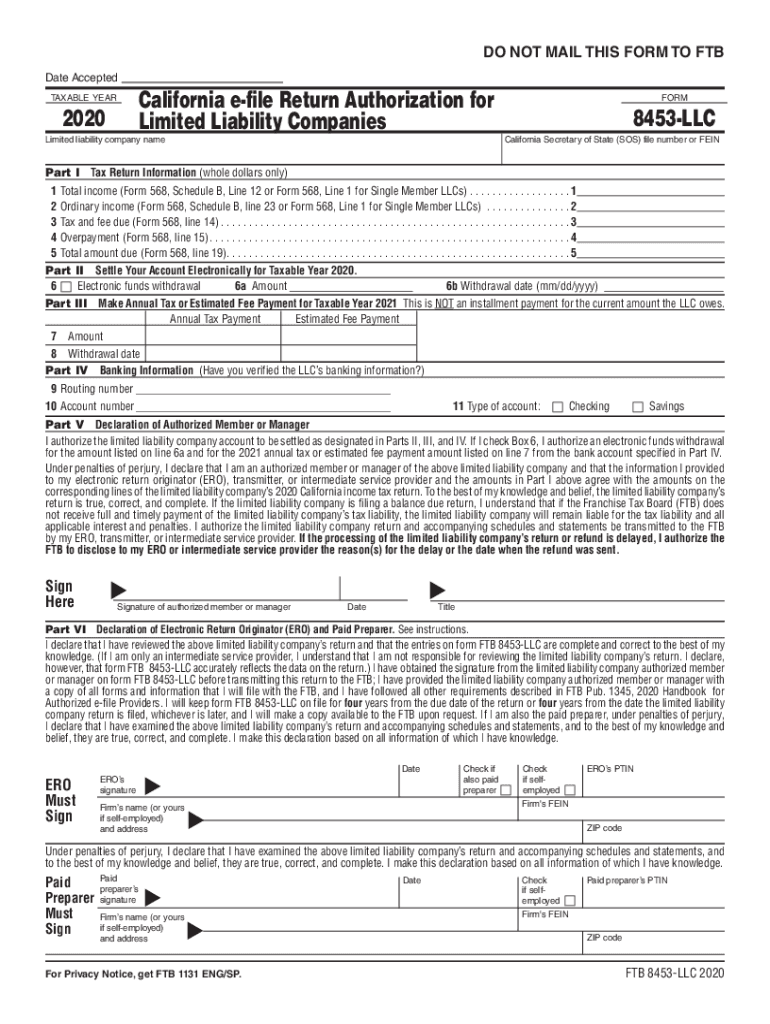
Begin by entering the limited liability company name at the top of Part I. This is essential for identifying your LLC.
Fill in the California Secretary of State (SOS) file number or FEIN, which is crucial for tax identification.
In Part I, provide whole dollar amounts for total income, ordinary income, tax and fee due, overpayment, and total amount due as indicated on Form 568.
Proceed to Part II to specify electronic funds withdrawal details. Enter the amount and desired withdrawal date.
In Part IV, input your banking information including routing number and account number. Ensure accuracy to avoid payment issues.
Complete the declaration in Part V by signing and dating where indicated. This confirms your authorization for transactions listed above.
Start using our platform today to easily complete your form 8453 llc online for free!
2025 Form 8453-LLC California e-file Return Authorization
I will keep form FTB 8453-LLC on file for four years from the due date of the return or four years from the date the limited liability company return is filed,Read more
Part I. Type of Return and Return Information. Check the box for the type of return being filed with Form 8453-TE and enter the applicable amount, if any,
Cookie consent notice
This site uses cookies to enhance site navigation and personalize your experience.
By using this site you agree to our use of cookies as described in our Privacy Notice.
You can modify your selections by visiting our Cookie and Advertising Notice.