Property refund claim 2026

Get Form
property refund claim Preview on Page 1

Here's how it works

01. Edit your form online
Type text, add images, blackout confidential details, add comments, highlights and more.

02. Sign it in a few clicks
Draw your signature, type it, upload its image, or use your mobile device as a signature pad.

03. Share your form with others
Send it via email, link, or fax. You can also download it, export it or print it out.

How to use or fill out property refund claim with our platform

Form edit decoration
9.5
Ease of Setup
DocHub User Ratings on G2
9.0
Ease of Use
DocHub User Ratings on G2
  1. Click ‘Get Form’ to open the property refund claim in the editor.
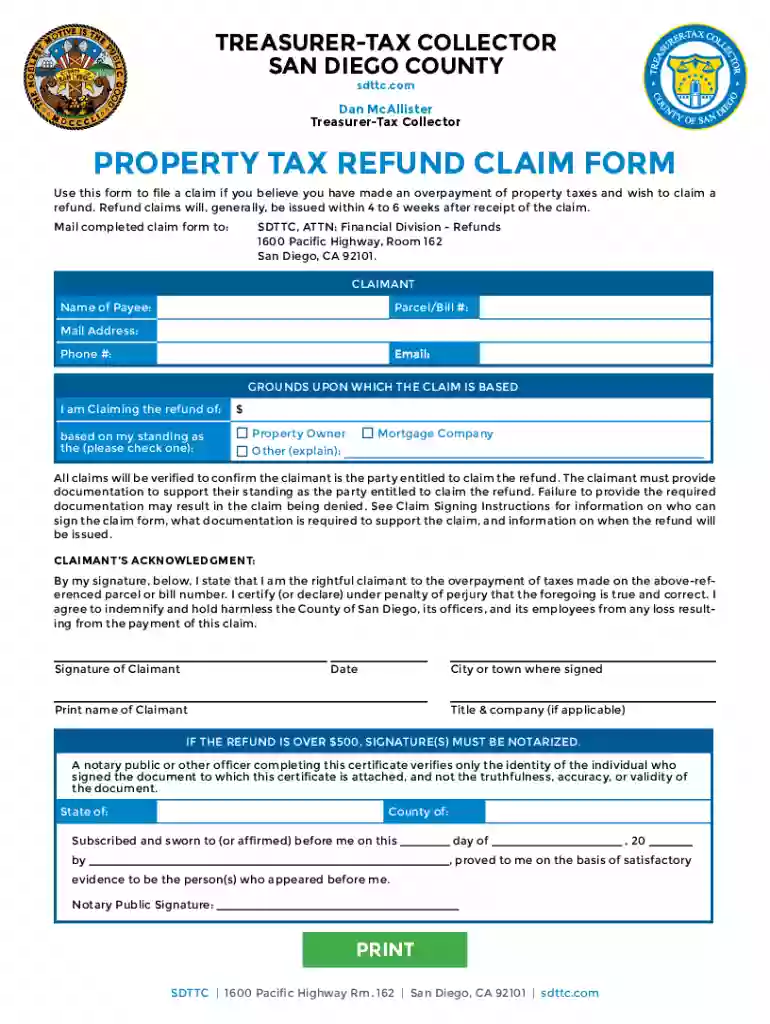
  2. Begin by filling in your personal information in the 'CLAIMANT' section. Enter your name, parcel/bill number, mailing address, phone number, and email address.
  3. In the 'GROUNDS UPON WHICH THE CLAIM IS BASED' section, specify the amount you are claiming a refund for and check the appropriate box indicating your status (Property Owner, Other, or Mortgage Company).
  4. Ensure you provide any required documentation that supports your claim. This may include identification or proof of ownership as outlined in the Claim Signing Instructions.
  5. Sign and date the form in the 'CLAIMANT’S ACKNOWLEDGMENT' section. If applicable, ensure that signatures are notarized for refunds over $500.
  6. Finally, submit your completed claim form via email or mail it to the specified address for processing.

Start using our platform today to easily complete your property refund claim online for free!

See more property refund claim versions

We've got more versions of the property refund claim form. Select the right property refund claim version from the list and start editing it straight away!
Versions Form popularity Fillable & printable
2023 4.3 Satisfied (27 Votes)
2020 4.9 Satisfied (47 Votes)
2017 4.4 Satisfied (55 Votes)
be ready to get more

Complete this form in 5 minutes or less

Get form

Got questions?

We have answers to the most popular questions from our customers. If you can't find an answer to your question, please contact us.
Contact us
Documents required for GST refund GST refund application - Form RFD-01. Tax invoices related to the refund claim. Proof of tax payment - Challans. Export documents - Shipping bills or LUT. Bank account details for refund credit. Additional documents (as required)
The excess amount will appear in Part A2 of Form 26AS of the buyer. For excess TDS, the buyer can claim a refund by filing an application using Form 26B on the TRACES portal, or they may file a correction for 26QB on TRACES if there are subsequent instalments of TDS due for payment.
A claim for refund is a request for reimbursement of amounts previously paid. Generally, if you have paid your balance in full you will file a formal claim. If you have not paid your balance in full, you will file an informal claim.
The money you receive in your tax refund is the amount of money you overpaid to the IRS throughout the year. Typically, this happens when your employer over-withheld taxes from your paycheck. You may also receive a refund for the portion of a refundable tax credit that exceeded the taxes you owed.
Processing your refund usually takes: Up to 21 days for an e-filed return. 6 weeks or more for returns sent by mail. Longer if your return needs corrections or extra review.

Security and compliance

At DocHub, your data security is our priority. We follow HIPAA, SOC2, GDPR, and other standards, so you can work on your documents with confidence.

Learn more
ccpa2
pci-dss
gdpr-compliance
hipaa
soc-compliance