




01. Edit your 2021 form 1042 instructions online
Type text, add images, blackout confidential details, add comments, highlights and more.

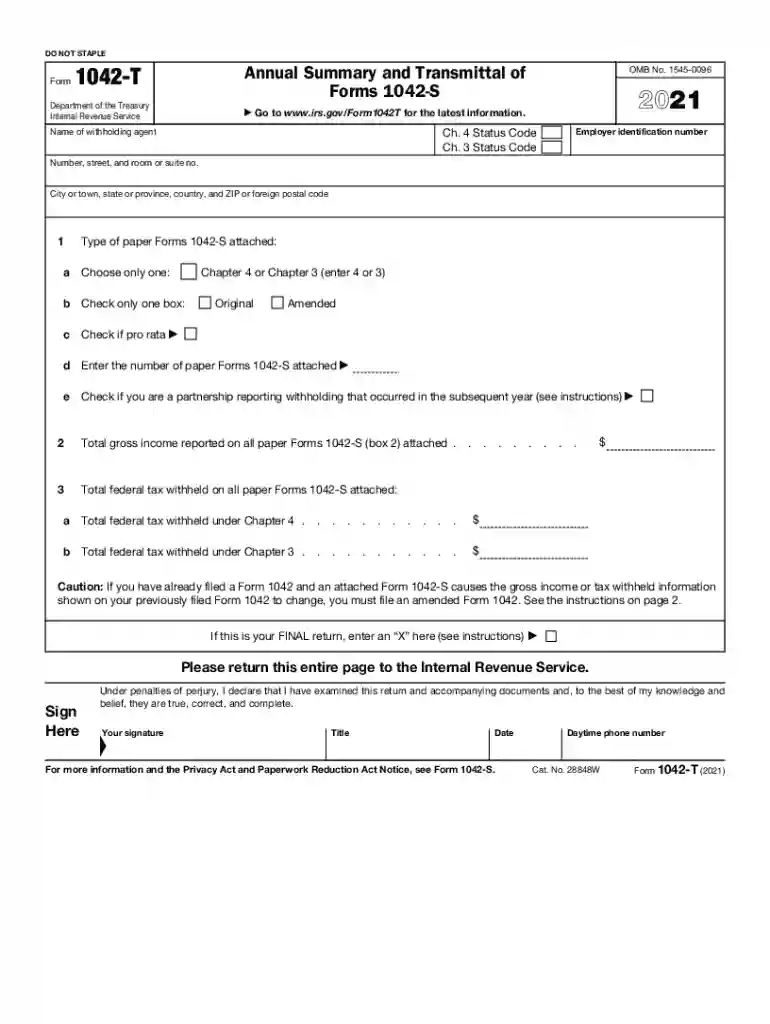
Type text, add images, blackout confidential details, add comments, highlights and more.

Draw your signature, type it, upload its image, or use your mobile device as a signature pad.

Send 2021 form 1042 t via email, link, or fax. You can also download it, export it or print it out.
IRS Form Annual Forms are essential documents used by individuals, businesses, and other entities to report financial information to the IRS on an annual basis. These forms facilitate the process of declaring income, expenses, and other tax-related data, ensuring compliance with federal tax regulations. Some well-known annual forms include Form 1040 for individual income tax, Form 1065 for partnerships, and Form 1120 for corporations. Each form serves a distinct purpose, addressing specific tax situations and requirements.
Filling out IRS Form Annual Forms involves several critical steps to ensure accuracy and completeness. Here is a typical process to follow:
Gather Required Documents: Collect all pertinent documents, including income statements, receipts for deductions, and previous year's tax returns.
Choose the Correct Form: Identify the specific form that aligns with your tax situation, such as individual or business filings.
Complete Personal and Financial Details: Accurately fill in personal information, income details, and tax deductions.
Check for Deductions and Credits: Review potential deductions and credits that may apply to reduce taxable income effectively.
Review and Double-check Entries: Carefully review the form to ensure all information is accurate and nothing is missing.
Submit by Deadline: Submit the completed form to the IRS by the applicable deadline to avoid penalties.
Obtaining the necessary IRS Form Annual Forms is a straightforward process with multiple options available:
Online Access: Visit the IRS official website to download the forms directly. This is the most convenient and accessible method.
Local IRS Office: Visit an IRS office to acquire physical copies of the required forms.
Tax Software: Utilize tax preparation software that offers integrated forms, providing step-by-step instructions and uploads.
Mail Request: Request forms by mail if you prefer hard copies and are unable to visit an IRS office.
Each IRS Form Annual Form comes with specific deadlines that are crucial for timely submission:
Individual Returns (Form 1040): Typically due by April 15th unless extended.
Partnerships (Form 1065): Generally due by March 15th.
Corporations (Form 1120): Filed by either March 15th or April 15th depending on the fiscal year.
Failing to file IRS Form Annual Forms can result in significant penalties and interest charges:
Failure-to-File Penalty: Assessed at 5% of unpaid taxes for each month the return is late, up to a maximum of 25%.
Failure-to-Pay Penalty: Typically 0.5% of the unpaid taxes for each month following the deadline.
Interest Charges: Accumulates daily from the date the tax return is due until any balance is paid in full.
Different entities and individuals are required to file IRS Form Annual Forms each year:
Individuals: All U.S. residents and citizens with taxable income.
Businesses: Corporations, partnerships, and sole proprietorships need specific forms for income declaration.
Non-Resident Aliens: Individuals who earn money in the U.S. but are not residents may need to file particular forms like Form 1040-NR.
Adhering to IRS guidelines ensures that the form is filed accurately and accepted:
Standard Instructions: Follow the instructions provided with each form regarding required information, deductions, and credit eligibility.
Approved Software: Use IRS-approved tax preparation software to assist in form completion.
Consult Professionals: Seek guidance from tax professionals, especially for complex tax situations.
The choice between digital and paper versions primarily depends on convenience and accessibility:
Digital Forms: These offer advantages such as quicker processing, e-filing options, and integrated error-checking functionalities.
Paper Forms: Suitable for those who prefer physical documentation or face technological barriers.
We've got more versions of the 2021 form 1042 instructions form. Select the right 2021 form 1042 instructions version from the list and start editing it straight away!
| Versions | Form popularity | Fillable & printable |
|---|---|---|
| 2025 | 4.3 Satisfied (24 Votes) | |
| 2024 | 4.9 Satisfied (23 Votes) | |
| 2023 | 4.7 Satisfied (48 Votes) | |
| 2022 | 4.3 Satisfied (59 Votes) | |
| 2021 | 4.8 Satisfied (37 Votes) | |
| 2020 | 4.4 Satisfied (144 Votes) | |
| 2019 | 4.4 Satisfied (159 Votes) | |
| 2018 | 4.3 Satisfied (93 Votes) | |
| 2017 | 4.3 Satisfied (219 Votes) | |
| 2016 | 4.3 Satisfied (54 Votes) | |
| 2015 | 4 Satisfied (41 Votes) | |
| 2011 | 4.4 Satisfied (38 Votes) |
At DocHub, your data security is our priority. We follow HIPAA, SOC2, GDPR, and other standards, so you can work on your documents with confidence.
Jan 14, 2026 Organizations exempt from taxation under section 501(a) to file their annual Form 990 and Form 990-PF returns electronically.Read more
May 2, 2025 The information provided will enable you to file a more complete return and reduce the chances the IRS will need to contact you. A For the 2025Read more
May 2, 2017 Use the 944 checkbox in box b of Form W-3 or Form W-3SS if you filed Form 944, Employers. ANNUAL Federal Tax Return. Also use the 944.Read more


