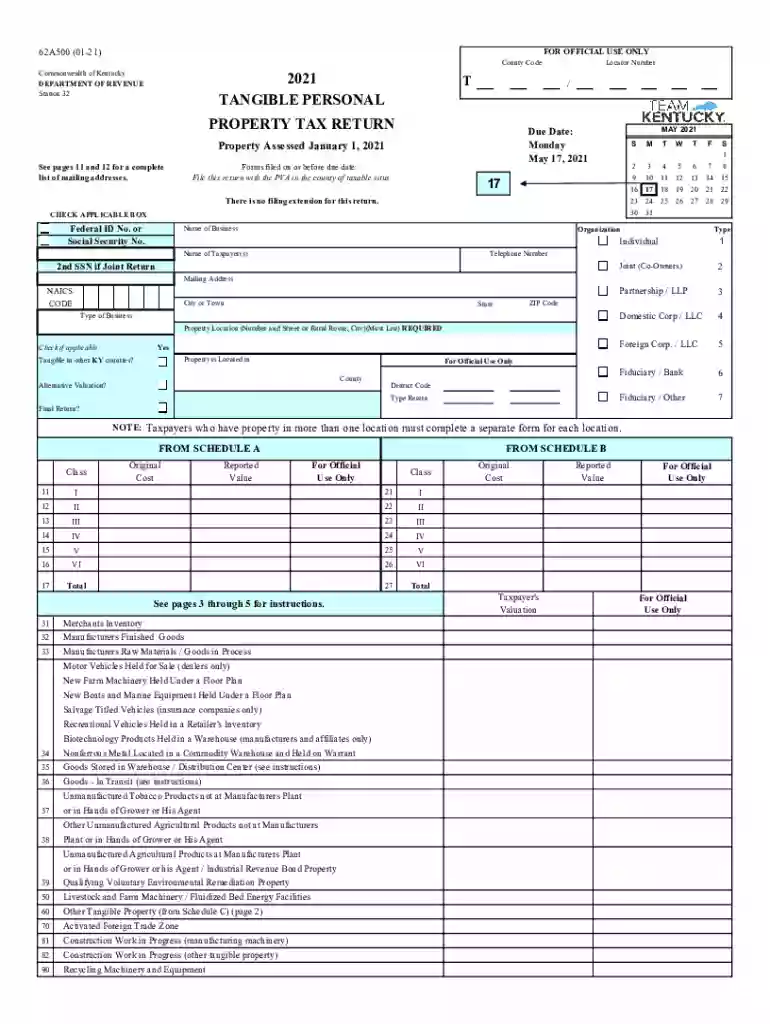
2021 ky form Preview on Page 1

Ky form 2026

Here's how it works

  • 01. Edit your 2021 ky form online

    Type text, add images, blackout confidential details, add comments, highlights and more.

  • 02. Sign it in a few clicks

    Draw your signature, type it, upload its image, or use your mobile device as a signature pad.

  • 03. Share your form with others

    Send it via email, link, or fax. You can also download it, export it or print it out.

How to use or fill out ky form with our platform

Form edit decoration
9.5
Ease of Setup
DocHub User Ratings on G2
9.0
Ease of Use
DocHub User Ratings on G2
  1. Click ‘Get Form’ to open the ky form in the editor.
  2. Begin by entering your Federal ID Number or Social Security Number in the designated field. This is essential for identification purposes.
  3. Fill in the name of your business and select the appropriate organization type from the options provided, such as Individual, Partnership, or Corporation.
  4. Provide your mailing address, including city, state, and ZIP code. Ensure that this information is accurate for correspondence.
  5. In the property location section, list the number and street or rural route where your tangible personal property is located. This is a required field.
  6. Complete any additional sections relevant to your specific assets, such as Schedule A or B for detailed reporting of property values.
  7. Review all entered information for accuracy before submitting. Use our platform's features to save and edit as needed.

Start filling out your ky form today using our platform for free!

See more 2021 ky form versions

We've got more versions of the 2021 ky form form. Select the right 2021 ky form version from the list and start editing it straight away!

VersionsForm popularityFillable & printable
20254.3 Satisfied (45 Votes)
20234.4 Satisfied (55 Votes)
20224.7 Satisfied (21 Votes)
20214.8 Satisfied (130 Votes)
20204.4 Satisfied (212 Votes)

be ready to get more

Complete this form in 5 minutes or less

Security and compliance

At DocHub, your data security is our priority. We follow HIPAA, SOC2, GDPR, and other standards, so you can work on your documents with confidence.

Related links

Instructions for Form 7004 (Rev. December 2017)

Feb 1, 2018 Use Form 7004 to request an automatic extension of time to file certain business income tax, information, and other returns. The extension willRead more

Learn more
Form K-4 Withholding Certificate.pdf

In order to qualify you must complete this form in full, DocHub that the you are not subject to Kentucky withholding tax because you met the conditions setRead more

Learn more
Forms - Department of Revenue - Kentucky.gov

Download the Taxpayer Bill of Rights. The Kentucky Department of Revenue conducts work under the authority of the Finance and Administration Cabinet.Read more

Learn more
If you believe that this page should be taken down, please follow our DMCA take down process here