Type text, add images, blackout confidential details, add comments, highlights and more.
02. Sign it in a few clicks
Draw your signature, type it, upload its image, or use your mobile device as a signature pad.
03. Share your form with others
Send it217 via email, link, or fax. You can also download it, export it or print it out.
How to use or fill out IT-217 form with our platform
Ease of Setup
DocHub User Ratings on G2
Ease of Use
DocHub User Ratings on G2
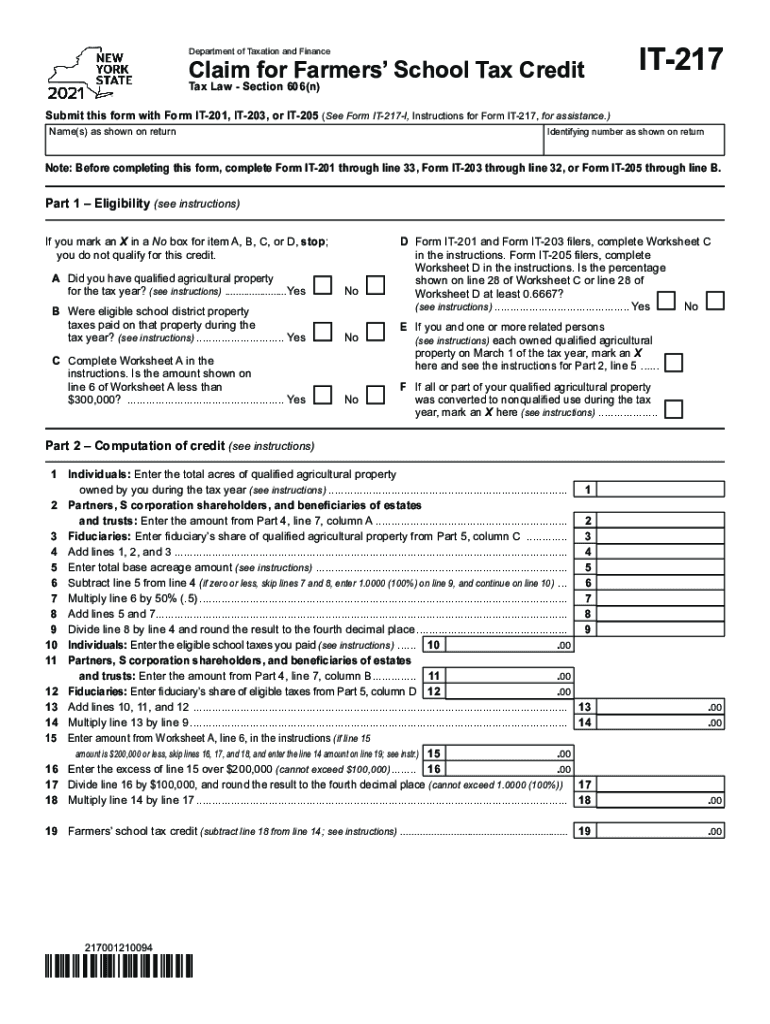
Click ‘Get Form’ to open the IT-217 form in the editor.
Begin with Part 1 – Eligibility. Carefully review each question and mark 'Yes' or 'No' as applicable. If you answer 'No' to any of the first four questions, you will not qualify for the credit.
Proceed to Part 2 – Computation of Credit. Enter the total acres of qualified agricultural property owned during the tax year in line 1. Follow through each calculation step, ensuring accuracy in your entries.
In Part 3, provide information about any partnerships, S corporations, or trusts that owned qualified agricultural property. Fill in the required details accurately.
Complete Parts 4 and 5 by entering your share of eligible taxes and acres from partnerships or estates as instructed.
Finally, review all sections for completeness and accuracy before submitting your form through our platform.
Start using our platform today to fill out your IT-217 form easily and for free!
Please complete a separate form for each contributor who did not file and is not required to file a 2023 income tax return with the IRS. Income Verification.Read more
Cookie consent notice
This site uses cookies to enhance site navigation and personalize your experience.
By using this site you agree to our use of cookies as described in our Privacy Notice.
You can modify your selections by visiting our Cookie and Advertising Notice.