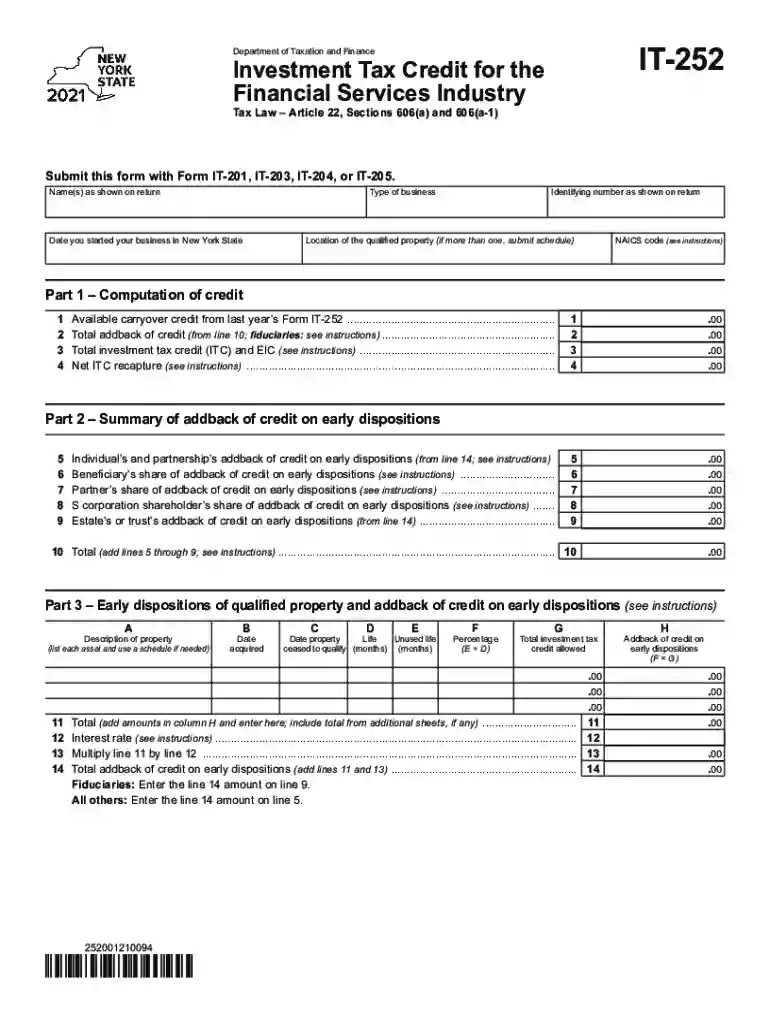
It 252 2026

Get Form
it 252 Preview on Page 1

Here's how it works

01. Edit your form online
Type text, add images, blackout confidential details, add comments, highlights and more.

02. Sign it in a few clicks
Draw your signature, type it, upload its image, or use your mobile device as a signature pad.

03. Share your form with others
Send it via email, link, or fax. You can also download it, export it or print it out.

How to use or fill out it 252 with our platform

Form edit decoration
9.5
Ease of Setup
DocHub User Ratings on G2
9.0
Ease of Use
DocHub User Ratings on G2
  1. Click ‘Get Form’ to open it in the editor.
  2. Begin by entering your name(s) as shown on your tax return in the designated field.
  3. Indicate the type of business you operate and the date you started your business in New York State.
  4. Fill in your identifying number as shown on your return and provide the location of any qualified property.
  5. Complete Part 1 by calculating the credit. Enter amounts for lines 1 through 9, then sum them up on line 10.
  6. Proceed to Part 2 and summarize any addback of credit on early dispositions, ensuring all relevant fields are filled accurately.
  7. In Part 3, list each asset under early dispositions, providing necessary details such as acquisition date and percentage for total investment tax credit.
  8. Continue through Parts 4 and 5, ensuring all calculations are correct before finalizing your form.

Start using our platform today to easily complete your IT-252 form online for free!

See more it 252 versions

We've got more versions of the it 252 form. Select the right it 252 version from the list and start editing it straight away!
Versions Form popularity Fillable & printable
2023 4.6 Satisfied (24 Votes)
2022 4.3 Satisfied (49 Votes)
2021 4.8 Satisfied (44 Votes)
2020 4.1 Satisfied (59 Votes)
be ready to get more

Complete this form in 5 minutes or less

Get form

Got questions?

We have answers to the most popular questions from our customers. If you can't find an answer to your question, please contact us.
Contact us
Answer: Report all your estimated tax payments on Form 1040, line 26. Also include any overpayment that you elected to credit from your prior year tax return.
The State Tax Form 201, also known as IT-201, is the standard income tax return form for New York State residents. This form is used to report income, calculate tax liability, and claim credits or deductions. Think of it as the New York equivalent of the federal Form 1040.
The nonresident or part-year resident, if required to file a New York State return, must use Form IT-203. However, if you both choose to file a joint New York State return, use Form IT-201 and both spouses income will be taxed as full-year residents of New York State.
26 U.S. Code 41 - Credit for increasing research activities. 20 percent of the amounts paid or incurred by the taxpayer in carrying on any trade or business of the taxpayer during the taxable year (including as contributions) to an energy research consortium for energy research. contract research expenses.
The amount entered on line 1 (wages, salaries, tips, etc.) should be the same as the amount reported on federal Form 1040, line 1z. Be sure to enter your total other income on line 16 and your total federal adjustments to income on line 18.

Security and compliance

At DocHub, your data security is our priority. We follow HIPAA, SOC2, GDPR, and other standards, so you can work on your documents with confidence.

Learn more
ccpa2
pci-dss
gdpr-compliance
hipaa
soc-compliance
be ready to get more

Complete this form in 5 minutes or less

Get form

People also ask

(12/24) To be filed with Form IT-203, Nonresident and Part-Year Resident Income Tax Return, by married taxpayers filing a joint return when only one spouse has New York source income (see Form IT-203 instructions and page 2 of this form for additional information).
Exclusions of these pensions from New York income are reported on Line 26 of Form IT-201. Unlike the regular Pension and Annuity Income Exclusion, the exclusion of pensions from the Federal government or New York State and/or local governments are NOT limited to $20,000.
Line 26. Combine Lines 11 through 23, and Line 25. These are adjustments to income. Enter the total in Line 26, and on Line 10 of your federal tax return.

Related links