






Definition and Meaning of the NM ACD 31102
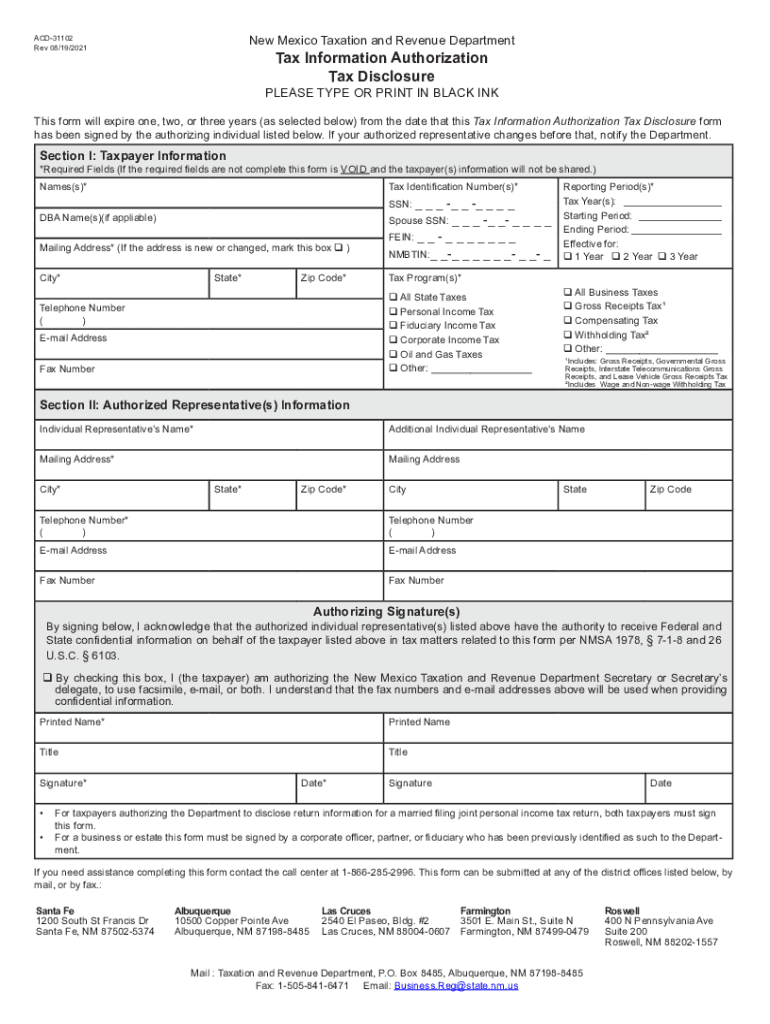
The form "NM ACD 31102" is a Tax Information Authorization and Disclosure form issued by the New Mexico Taxation and Revenue Department. It allows taxpayers to authorize specific representatives to access their confidential tax information for designated tax programs and periods. This authorization is crucial for individuals who want third parties, such as accountants or legal representatives, to manage or review their tax-related information on their behalf. Understanding the form involves recognizing its purpose in providing legal access to sensitive data, which requires proper execution and careful adherence to state guidelines.
Steps to Complete the NM ACD 31102
-
Preparation and Information Collection:
- Gather all necessary taxpayer identification details, including Social Security numbers or business identification numbers.
- Identify the tax programs and periods for which you are granting access.
-
Filling Out Taxpayer Information:
- Enter the taxpayer's full name, address, and contact details.
- Ensure all information matches the records held by the New Mexico Taxation and Revenue Department.
-
Representative Information:
- Provide the full name, contact information, and professional credentials of the representative(s) you authorize.
- Clarify the scope of access granted, specifying which tax programs and periods are covered.
-
Signatures and Date:
- Taxpayer must sign and date the form, confirming the authorization.
- If applicable, the representative might also need to sign to acknowledge their role and responsibilities.
-
Review and Submission:
- Double-check all entries for accuracy to avoid processing delays.
- Submit the form following the preferred method outlined by the New Mexico Taxation and Revenue Department—either online, by mail, or in-person.
Who Typically Uses the NM ACD 31102
The NM ACD 31102 form is predominantly used by taxpayers in New Mexico, including both individuals and businesses that wish to delegate access to their tax information. This typically includes:
- Businesses: Corporations, partnerships, and LLCs often authorize accountants or financial advisors to manage tax compliance and reporting.
- Individuals: Residents in New Mexico, particularly those with complex tax situations or those undergoing audits, frequently use this form to involve legal or financial representatives.
- Tax Professionals: CPAs and tax attorneys use this form to formally obtain access to their clients' tax information, facilitating better representation and advice.


Legal Use of the NM ACD 31102
Legally, the NM ACD 31102 serves as a binding document that specifies who can access a taxpayer's sensitive information. It mandates:
- Authorization Boundaries: Only the designated representatives can view or interact with the specified tax data.
- Confidentiality Obligations: Representatives must handle the information per legal confidentiality requirements, ensuring there is no unauthorized disclosure.
- Revocation Rights: Taxpayers retain the right to revoke access at any time by submitting a new form or a formal request to the New Mexico Taxation and Revenue Department.
Key Elements of the NM ACD 31102
Several critical elements must be detailed to ensure the form is legally compliant and effective:
- Taxpayer and Representative Identifiers: Accurate personal and contact information for all parties involved.
- Scope of Authorization: Clearly delineated access parameters, specifying tax periods and types of information.
- Acknowledgments of Understanding: Confirmations that the taxpayer understands the implications of granting this access.
- Legal Signatures: Both parties, where applicable, must sign to validate the agreement.
Examples of Using the NM ACD 31102
Practical applications of the NM ACD 31102 include:
- Business Tax Management: A small business owner in New Mexico grants their CPA authorization to access past tax filings for audit preparation.
- Estate Planning: An individual in New Mexico allows their estate lawyer access to tax records to manage and plan the estate better.
- Audit Assistance: A taxpayer under audit provides a tax consultant with access to past return data to prepare defenses and reports.
Required Documents for Completing the NM ACD 31102
To complete the NM ACD 31102 correctly, taxpayers must prepare:
- Identification Documents: Copies of government-issued IDs (e.g., driver's license) for verification.
- Tax Registrations: Documentation proving taxpayer status, such as business licenses or Social Security cards.
These documents ensure the information provided is accurate and aligns with the taxpayer's statutory obligations, facilitating seamless processing and access authorization.
Form Submission Methods for the NM ACD 31102
Once the form is completed, taxpayers can choose from various submission methods:
- Online Submission: For efficiency and real-time processing, electronic submission through the New Mexico Taxation and Revenue Department's website is ideal.
- Mail Submission: Send the completed form to the New Mexico Taxation and Revenue Department's address, ensuring that all copies are clear and intact.
- In-Person Submission: Drop off the form at a physical branch of the department for immediate acknowledgment and in-person confirmation of receipt.