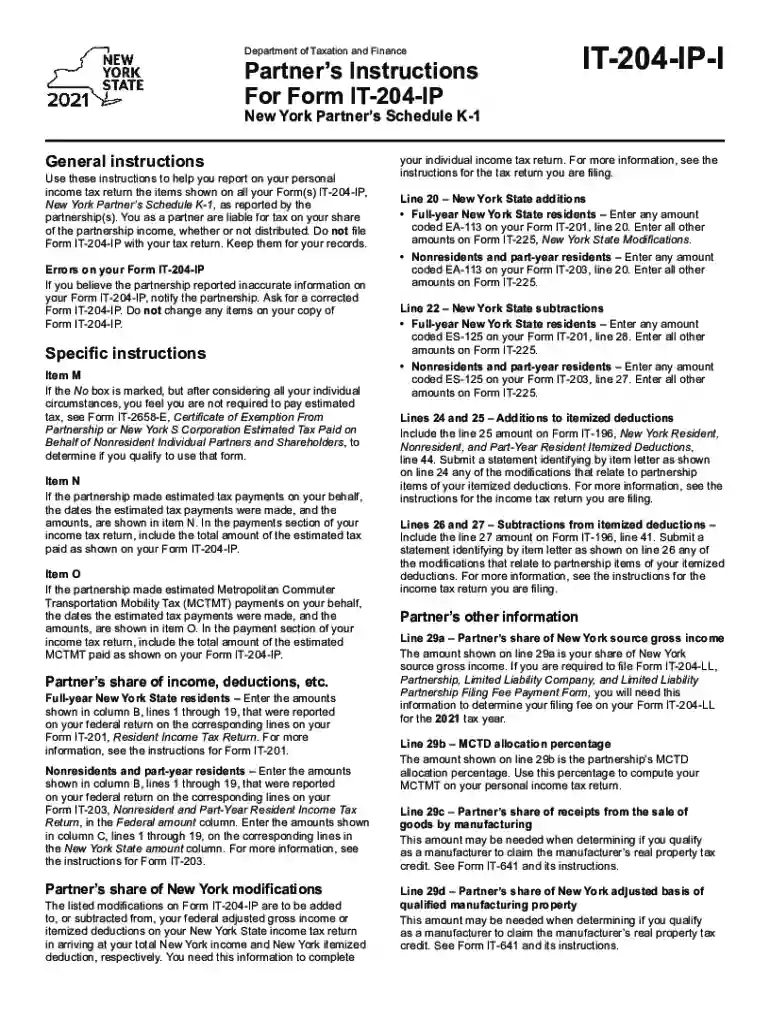
Instructions it 204 form 2026

Get Form
form it 204 instructions Preview on Page 1

Here's how it works

01. Edit your form it 204 instructions online
Type text, add images, blackout confidential details, add comments, highlights and more.

02. Sign it in a few clicks
Draw your signature, type it, upload its image, or use your mobile device as a signature pad.

03. Share your form with others
Send form it 204 ip via email, link, or fax. You can also download it, export it or print it out.

How to use or fill out instructions IT-204 form with our platform

Form edit decoration
9.5
Ease of Setup
DocHub User Ratings on G2
9.0
Ease of Use
DocHub User Ratings on G2
  1. Click ‘Get Form’ to open the IT-204 form in the editor.
  2. Begin by reviewing the general instructions provided. Ensure you understand your responsibilities as a partner regarding income tax reporting.
  3. Fill out Item M, indicating whether you are required to pay estimated tax. If unsure, refer to Form IT-2658-E for guidance.
  4. In Item N, enter the estimated tax payments made on your behalf, as indicated in the form. This amount should be included in your income tax return.
  5. Proceed to report your share of income and deductions from columns B and C based on your residency status. Full-year residents will use Form IT-201, while nonresidents will use Form IT-203.
  6. Complete the modifications section by adding or subtracting amounts from your federal adjusted gross income as specified in the form.
  7. Finally, review all entries for accuracy before saving and exporting your completed form for submission.

Start using our platform today to simplify filling out your IT-204 form for free!

See more instructions it 204 form versions

We've got more versions of the instructions it 204 form form. Select the right instructions it 204 form version from the list and start editing it straight away!
Versions Form popularity Fillable & printable
2023 4.2 Satisfied (47 Votes)
2022 4.5 Satisfied (33 Votes)
2021 4.8 Satisfied (81 Votes)
2020 4.4 Satisfied (258 Votes)
2019 4.3 Satisfied (163 Votes)
2018 4.3 Satisfied (239 Votes)
2012 4.2 Satisfied (47 Votes)
be ready to get more

Complete this form in 5 minutes or less

Get form

Got questions?

We have answers to the most popular questions from our customers. If you can't find an answer to your question, please contact us.
Contact us
Get the current filing years forms, instructions, and publications for free from the IRS. Download them from IRS.gov. Order online and have them delivered by U.S. mail. Order by phone at 1-800-TAX-FORM (1-800-829-3676)
If you need an extension of time to file, you may request an automatic extension by the due date of Form IT-204. To apply for an automatic extension of time to file Form IT-204, visit .tax.ny.gov (search: extension).
You must file Form IT-204-LL, Partnership, Limited Liability Company, and Limited Liability Partnership Filing Fee Payment Form, if you are a: limited liability company (LLC) that is a disregarded entity for federal income tax purposes that has income, gain, loss, or deduction from New York State sources; or.
There is no extension of time to file Form IT-204-LL or pay the annual fee.
An LLC that elects to be treated as a corporation, including an S corporation, for federal income tax purposes is not subject to the filing fee. An LLC or LLP that owes the filing fee must file Form IT-204-LL.

Security and compliance

At DocHub, your data security is our priority. We follow HIPAA, SOC2, GDPR, and other standards, so you can work on your documents with confidence.

Learn more
ccpa2
pci-dss
gdpr-compliance
hipaa
soc-compliance

People also ask

Any partnership that carries on or liquidates any trade, business, profession or occupation wholly or partly within New York City and has a total gross income from all business regardless of where carried on of more than $25,000 (prior to any deduction for cost of goods sold or services performed) must file an
Go to New York Other Forms. Select Section 2 - Form IT-204-LL (Disregarded Entities). Select Detail (located in the upper left corner of the grid). In line 23 - Suppress this Form IT-204-LL, checkmark this line.

it 204 instructions