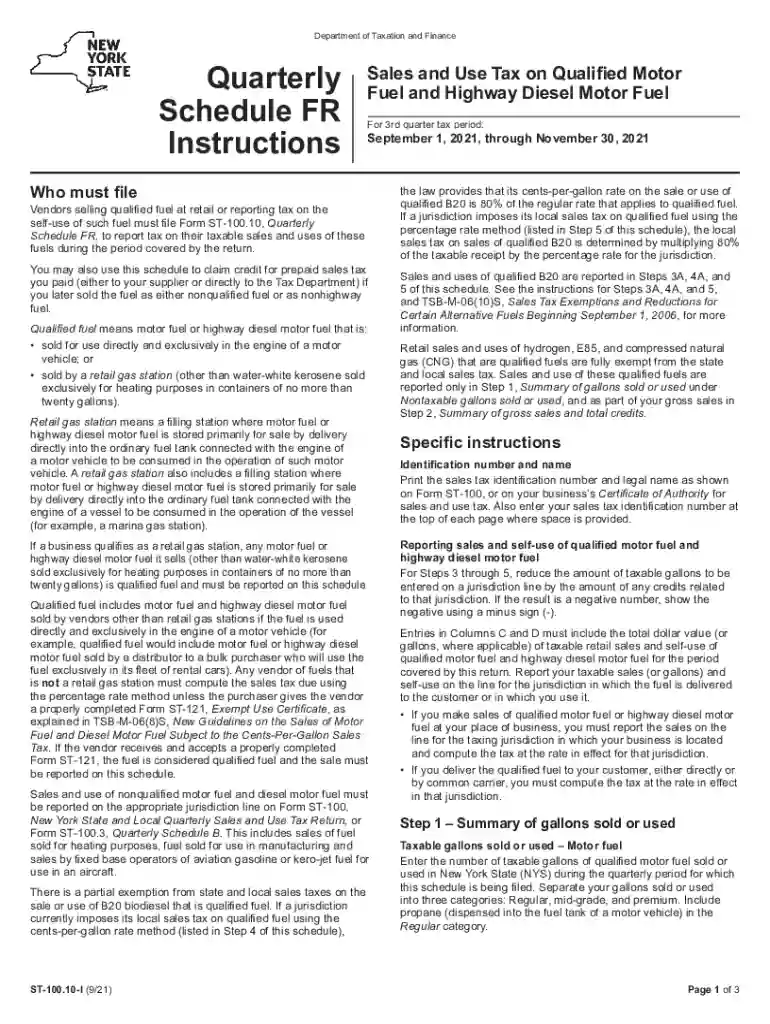
DocHub 55282799-st10010i115pdf-NewFillable Online tax ny New York State Department of Taxation 2026

Get Form
DocHub 55282799-st10010i115pdf-NewFillable Online tax ny New York State Department of Taxation Preview on Page 1

Here's how it works

01. Edit your form online
Type text, add images, blackout confidential details, add comments, highlights and more.

02. Sign it in a few clicks
Draw your signature, type it, upload its image, or use your mobile device as a signature pad.

03. Share your form with others
Send it via email, link, or fax. You can also download it, export it or print it out.

How to use or fill out DocHub 55282799-st10010i115pdf-NewFillable Online tax ny New York State Department of Taxation with DocHub

Form edit decoration
9.5
Ease of Setup
DocHub User Ratings on G2
9.0
Ease of Use
DocHub User Ratings on G2
  1. Click ‘Get Form’ to open the DocHub editor and access the ST-100.10 form.
  2. Begin by entering your sales tax identification number and legal name as shown on Form ST-100 in the designated fields at the top of each page.
  3. In Step 1, summarize the gallons sold or used by entering the number of taxable gallons for regular, mid-grade, and premium motor fuel. Ensure to include propane in the Regular category.
  4. Proceed to Step 2 to report your gross sales. Enter the total dollar amount of all qualified motor fuel sales, including exempt sales, ensuring not to include sales tax collected.
  5. For Steps 3 through 5, calculate taxes based on jurisdiction rates. Enter total gallons sold in Column C and D, then compute taxes using provided rates in Column E.
  6. Complete Step 6 by calculating any credits for prepaid sales tax you may claim. Ensure all necessary substantiation is attached.
  7. Finally, review all entries for accuracy before submitting your completed form along with Form ST-100 by the due date.

Start filling out your form today using our platform for free!

See more DocHub 55282799-st10010i115pdf-NewFillable Online tax ny New York State Department of Taxation versions

We've got more versions of the DocHub 55282799-st10010i115pdf-NewFillable Online tax ny New York State Department of Taxation form. Select the right DocHub 55282799-st10010i115pdf-NewFillable Online tax ny New York State Department of Taxation version from the list and start editing it straight away!
Versions Form popularity Fillable & printable
2023 4.5 Satisfied (42 Votes)
2022 4.9 Satisfied (38 Votes)
2021 4.8 Satisfied (57 Votes)
2020 4.3 Satisfied (129 Votes)
2020 4.4 Satisfied (204 Votes)
2019 4.4 Satisfied (75 Votes)
2019 4.3 Satisfied (258 Votes)
2018 4 Satisfied (44 Votes)
2018 4.3 Satisfied (105 Votes)
be ready to get more

Complete this form in 5 minutes or less

Get form

Got questions?

We have answers to the most popular questions from our customers. If you can't find an answer to your question, please contact us.
Contact us
We may communicate with you by mail for many reasons, including: to send you a check for your refund or an additional payment; to let you know we adjusted your refund; to request information that supports what you reported on a return; and.
Online Visit the Department of Taxation and Finance website. Download State tax forms. Learn about Tax Warrants.
We may send you a notice or letter if: You have a balance due. Your refund has changed. We have a question about your return.
To check on your New York state refund status go to . On the next page, enter the provided security code displayed and then select Continue. On the Tax Refund Status page, select your: Tax year.
Inflation refund checks This one-time check provides relief to New Yorkers who have paid increased sales taxes due to inflation. To stay up to date on news about the inflation refund check, subscribe to Inflation refund check emails.

Security and compliance

At DocHub, your data security is our priority. We follow HIPAA, SOC2, GDPR, and other standards, so you can work on your documents with confidence.

Learn more
ccpa2
pci-dss
gdpr-compliance
hipaa
soc-compliance

People also ask

The New York State Department of Taxation and Finance (NYSDTF) is the department of the New York state government responsible for taxation and revenue, including handling all tax forms and publications, and dispersing tax revenue to other agencies and counties within New York State.
Simply log in to your Individual Online Services account, select Payments, bills and notices from the upper left menu, and then select Make a Payment from the drop-down. (Youll need to create an account if you dont already have one.)