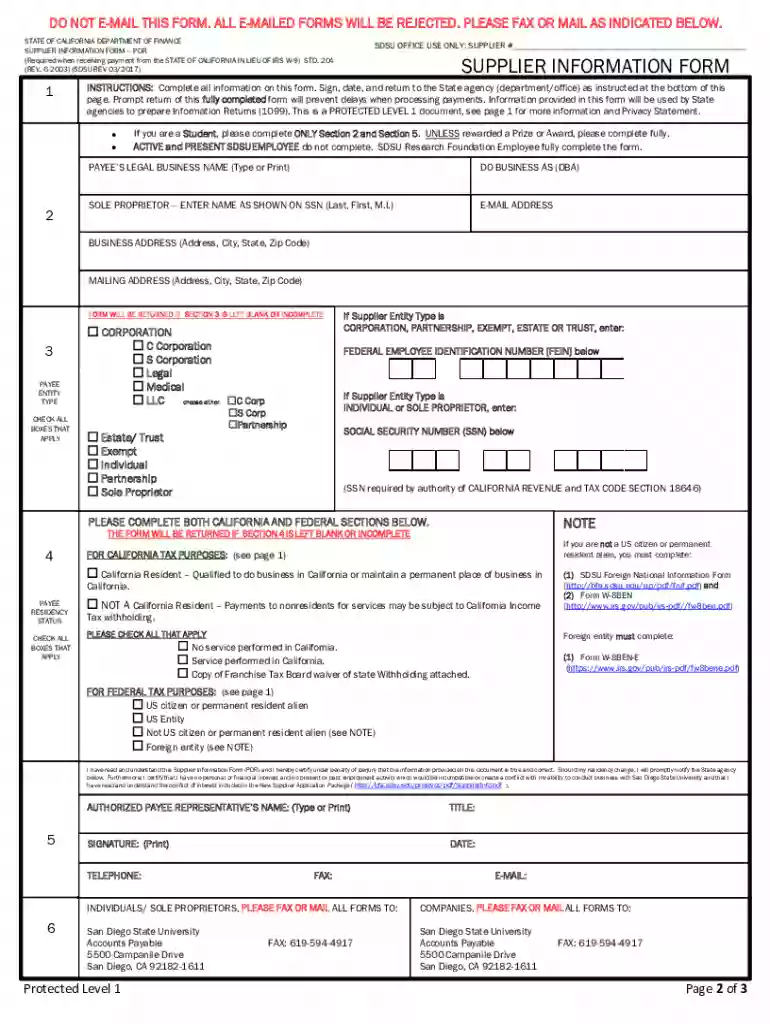
std 204 form Preview on Page 1

Std 204 form payee data record 2026

Here's how it works

  • 01. Edit your std 204 form online

    Type text, add images, blackout confidential details, add comments, highlights and more.

  • 02. Sign it in a few clicks

    Draw your signature, type it, upload its image, or use your mobile device as a signature pad.

  • 03. Share your form with others

    Send std 204 form payee data record via email, link, or fax. You can also download it, export it or print it out.

How to use or fill out std 204 form payee data record with our platform

Form edit decoration
9.5
Ease of Setup
DocHub User Ratings on G2
9.0
Ease of Use
DocHub User Ratings on G2
  1. Click ‘Get Form’ to open the STD 204 form in the editor.
  2. Begin by entering the payee’s legal business name. If you are a sole proprietor, include your full name as shown on your Social Security Number (SSN). Ensure that the mailing address is where you wish to receive correspondence.
  3. Select the appropriate box that corresponds to your business type. Remember, only one box should be checked. Corporations must specify their type.
  4. Input your Taxpayer Identification Number (TIN). For individuals and sole proprietors, this will be your SSN; partnerships and corporations will use their Federal Employer Identification Number (FEIN).
  5. Complete the residency status section by checking all applicable boxes regarding California residency.
  6. Provide the name, title, signature, and telephone number of the individual completing this form along with the date of completion.

Start using our platform today for free to streamline your document editing and form completion!

See more std 204 form versions

We've got more versions of the std 204 form form. Select the right std 204 form version from the list and start editing it straight away!

VersionsForm popularityFillable & printable
20124.8 Satisfied (298 Votes)
20034.4 Satisfied (71 Votes)

be ready to get more

Complete this form in 5 minutes or less

Got questions?

We have answers to the most popular questions from our customers. If you can't find an answer to your question, please contact us.

The STD. 204 provides, among other data, a suppliers taxpayer identification number and is used to determine when the payment(s) to the supplier is reportable (see SAM, Section 8422.190) and is needed in order to process payments of invoices.
Form is used to provide remittance address information if different than the mailing address on the STD 204 - Payee Data Record. Use this form to provide additional remittance addresses and additional Authorized Representatives of the Payee not identified on the STD 204.)
204 form is to obtain payee information for income tax reporting and to ensure tax compliance with federal and state law. The STD. 204 is required for any non-governmental entity or individual entering into a transaction that may lead to a payment from the state.
A completed Payee Data Record, STD 204 form, is required for all payees (non-governmental entities or individuals) entering into a transaction that may lead to a payment from the state.
Complete name, title, e-mail address, telephone number, date, and handwritten or electronic signature of the payees authorized representative. This signature certifies the accuracy of the information provided. All data on the submitted STD 204 must be unalterable including the signature.

Security and compliance

At DocHub, your data security is our priority. We follow HIPAA, SOC2, GDPR, and other standards, so you can work on your documents with confidence.

std 204

STD 204 - Payee Data Record

STD 204 (Rev. 03/2021). GENERAL INSTRUCTIONS. Type or print the information on the Payee Data Record, STD 204 form. Sign, date, and return to the state agencyRead more

Learn more
If you believe that this page should be taken down, please follow our DMCA take down process here