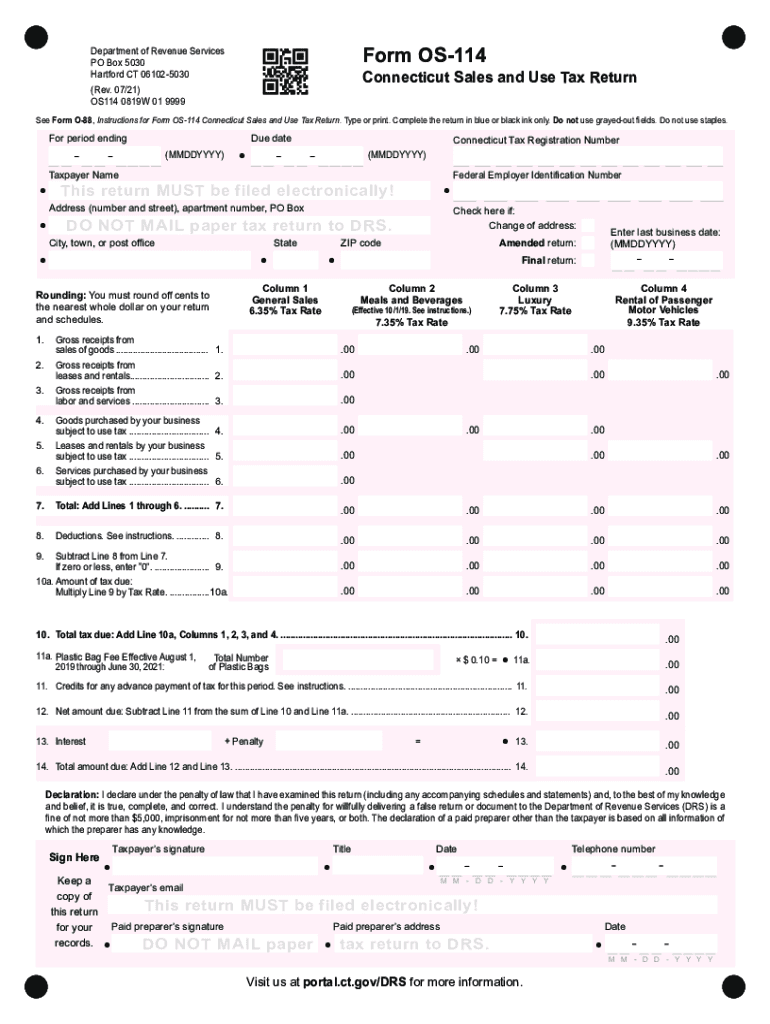
Form os 114 2026

Get Form
form os 114 Preview on Page 1

Here's how it works

01. Edit your form online
Type text, add images, blackout confidential details, add comments, highlights and more.
02. Sign it in a few clicks
Draw your signature, type it, upload its image, or use your mobile device as a signature pad.
03. Share your form with others
Send it via email, link, or fax. You can also download it, export it or print it out.

How to use or fill out form OS-114 with our platform

Form edit decoration
9.5
Ease of Setup
DocHub User Ratings on G2
9.0
Ease of Use
DocHub User Ratings on G2
  1. Click ‘Get Form’ to open it in the editor.
  2. Begin by entering the period ending date and due date in the specified fields. Ensure you use the correct format (MMDDYYYY).
  3. Fill in your Connecticut Tax Registration Number, Taxpayer Name, and Federal Employer Identification Number accurately.
  4. Complete your address details, including street number, apartment number (if applicable), city, state, and ZIP code.
  5. In the sections for gross receipts, enter amounts for sales of goods, leases, rentals, and services under the appropriate columns based on tax rates.
  6. Calculate total deductions and ensure to round off cents to the nearest whole dollar as instructed.
  7. Finally, sign and date the declaration section before submitting electronically through our platform.

Start using our platform today for free to streamline your form completion process!

See more form os 114 versions

We've got more versions of the form os 114 form. Select the right form os 114 version from the list and start editing it straight away!
Versions Form popularity Fillable & printable
2022 4.5 Satisfied (21 Votes)
2021 4.8 Satisfied (216 Votes)
2020 4.3 Satisfied (207 Votes)
2018 4.3 Satisfied (46 Votes)
2017 4.2 Satisfied (68 Votes)
2016 4.2 Satisfied (97 Votes)
2015 4.4 Satisfied (69 Votes)
2015 4.4 Satisfied (1461 Votes)
2013 4.4 Satisfied (46 Votes)
2011 4 Satisfied (45 Votes)
2011 4.4 Satisfied (46 Votes)
be ready to get more

Complete this form in 5 minutes or less

Get form

Got questions?

We have answers to the most popular questions from our customers. If you can't find an answer to your question, please contact us.
Contact us
6. How do I file a corrected/amended FinCEN SAR via the BSA E-Filing System? Filers attempting to submit a corrected/amended SAR via the BSA E-Filing System should check Correct/amend prior report and enter the previous Document Control Number (DCN)/BSA Identifier (ID) in the appropriate field.
Follow these steps to amend FinCEN Form 114. Enter the previously assigned 14-digit number in the. BSA Identifier / BSA identifier of previously filed report. Enter. M. Check for and correct any electronic filing errors. Create the electronic file. Transmit the successfully created electronic file using CS Connect.
Businesses must complete and file Form OS‑114 to report all sales activity in Connecticut, even if no sales were made or no tax is due. Both taxable and nontaxable sales must be reported in accordance with your monthly, quarterly, or annual filing frequency assigned by DRS.
On the Federal Information Worksheet, scroll down to Part VI Electronic Filing of Tax Return Information. Mark the checkbox for File Amended Form 114 Report of Foreign Bank and Financial Accounts (FBAR) Electronically. From File menu, select Go to Foreign Bank Reporting Form 114. Make the necessary corrections.
File and pay Form OS-114 electronically. Visit portal.ct.gov/DRS-myconneCT to file your return electronically using myconneCT. Form OS-114 must be filed and paid on or before the last day of the month following the end of the period.

Security and compliance

At DocHub, your data security is our priority. We follow HIPAA, SOC2, GDPR, and other standards, so you can work on your documents with confidence.

Learn more
ccpa2
pci-dss
gdpr-compliance
hipaa
soc-compliance
be ready to get more

Complete this form in 5 minutes or less

Get form

People also ask

Those who need to correct a filed FBAR must file a new FBAR with the corrected information and mark the new FBAR as Amended. Fill it out completely, even fields that dont need correction.
FBAR penalties can be civil or criminal, or both. For non-willful violations, the penalty is usually $10,000 for each year you didnt file. For willful violations, the penalty is either $100,000 or 50% of the highest account valuewhichever is higher.
HOW TO OBTAIN CONNECTICUT TAX FORMS Connecticut state tax forms can be downloaded at the Department of Revenue Services (DRS) website: .ct.gov/drs/ Connecticut tax forms and publications are available at any DRS offices, during tax filing season.

Related links