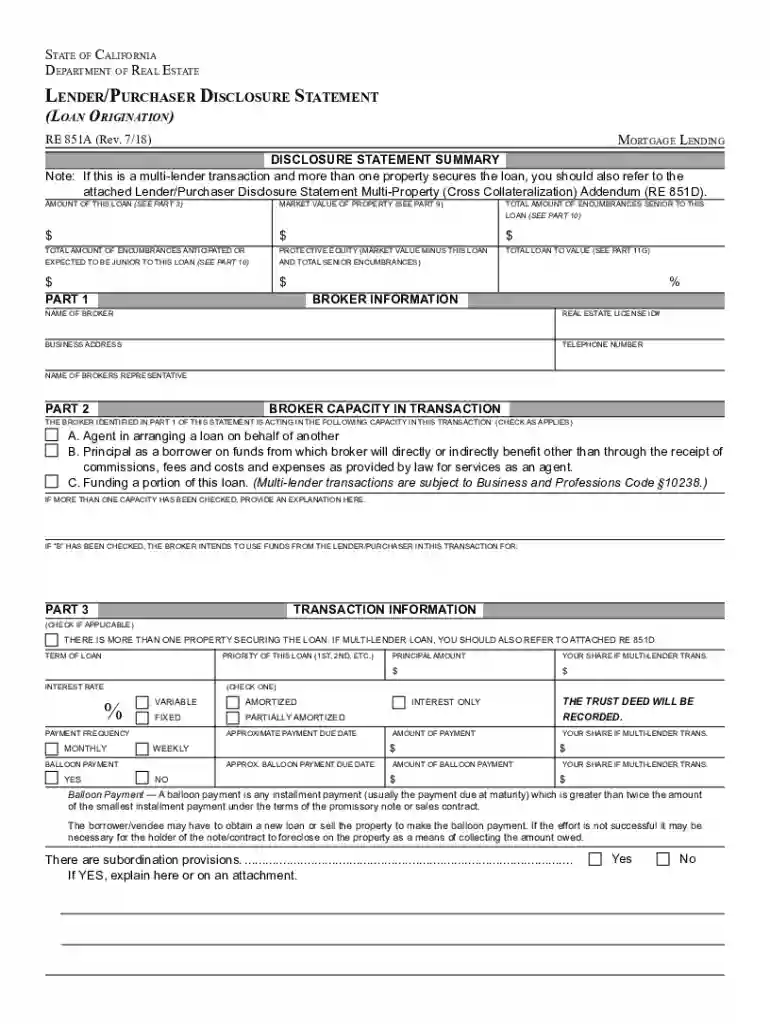
Lender statement 2026

Get Form
lender statement Preview on Page 1

Here's how it works

01. Edit your lender statement online
Type text, add images, blackout confidential details, add comments, highlights and more.

02. Sign it in a few clicks
Draw your signature, type it, upload its image, or use your mobile device as a signature pad.

03. Share your form with others
Send lender disclosure form via email, link, or fax. You can also download it, export it or print it out.

How to use or fill out lender statement with our platform

Form edit decoration
9.5
Ease of Setup
DocHub User Ratings on G2
9.0
Ease of Use
DocHub User Ratings on G2
  1. Click ‘Get Form’ to open the lender statement in the editor.
  2. Begin by filling out the 'Broker Information' section. Enter the broker's name, business address, and license ID number. Ensure all fields are completed accurately.
  3. In 'Transaction Information', specify the loan amount, interest rate, and payment frequency. Select whether the loan is variable or fixed and provide details about any balloon payments.
  4. Complete the 'Borrower Information' section by entering details for both the borrower and co-borrower, including names, addresses, occupations, and income sources.
  5. Review the 'Property Information' section to ensure that you have included accurate property details such as street address and annual property taxes.
  6. Finally, verify all entries for accuracy before saving or sharing your completed lender statement. Utilize our platform’s features to sign or distribute your document seamlessly.

Start using our platform today to streamline your lender statement process for free!

See more lender statement versions

We've got more versions of the lender statement form. Select the right lender statement version from the list and start editing it straight away!
Versions Form popularity Fillable & printable
2018 4.9 Satisfied (49 Votes)
2015 4.4 Satisfied (186 Votes)
2013 4.4 Satisfied (106 Votes)
be ready to get more

Complete this form in 5 minutes or less

Get form

Got questions?

We have answers to the most popular questions from our customers. If you can't find an answer to your question, please contact us.
Contact us
A mortgage commitment letter is a formal document from your lender stating that youre approved for the loan. Lenders issue a mortgage commitment letter after an applicant successfully completes the preapproval process.
If you need another copy of your mortgage statement, you may be able to get one by: Logging into the lenders app or online banking portal. Calling your lender. Visiting a branch by contacting your lender.
Updated July 30, 2025. by Better. If you have a mortgage, chances are youve seen a statement from your lender, either by mail or online. But whats a mortgage statement, exactly? Your mortgage statement is a detailed snapshot of your loan activity, showing where your money is going and how your loan is progressing.
A bank statement loan is a type of mortgage that allows self-employed borrowers to verify their income based on their personal or business bank statements, rather than traditional methods like tax returns, W-2s, or paystubs.
Most preapproval letters are valid for 60 to 90 days. Lenders want to make sure your income, debts, and credit score havent changed docHubly. If your preapproval expires, youll need to reapply with the same lender or a new one.

Security and compliance

At DocHub, your data security is our priority. We follow HIPAA, SOC2, GDPR, and other standards, so you can work on your documents with confidence.

Learn more
ccpa2
pci-dss
gdpr-compliance
hipaa
soc-compliance
be ready to get more

Complete this form in 5 minutes or less

Get form