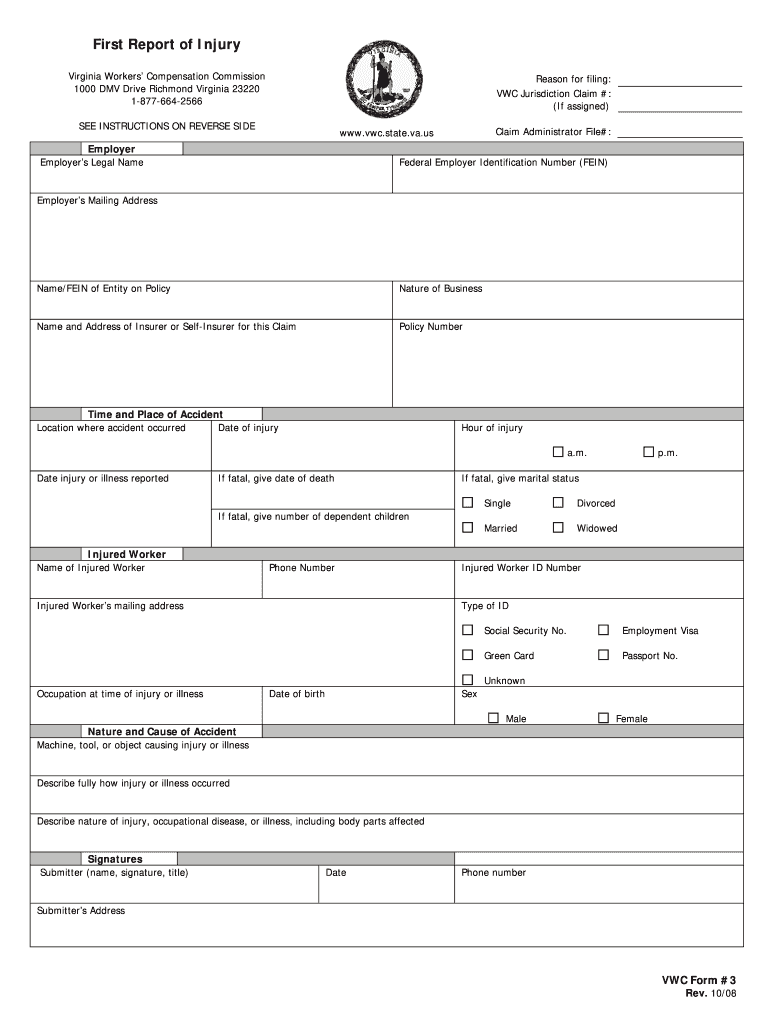
First injury report 2026

Get Form
employer accident Preview on Page 1

Here's how it works

01. Edit your employer accident online
Type text, add images, blackout confidential details, add comments, highlights and more.
02. Sign it in a few clicks
Draw your signature, type it, upload its image, or use your mobile device as a signature pad.
03. Share your form with others
Send virginia injury via email, link, or fax. You can also download it, export it or print it out.

How to Use or Fill Out the First Injury Report

Form edit decoration
9.5
Ease of Setup
DocHub User Ratings on G2
9.0
Ease of Use
DocHub User Ratings on G2
  1. Click ‘Get Form’ to open the First Report of Injury in our editor.
  2. Begin by entering the employer's legal name and Federal Employer Identification Number (FEIN) in the designated fields. Ensure accuracy as this information is crucial for processing.
  3. Fill out the 'Time and Place of Accident' section, including the date, location, and hour of injury. Be precise to avoid any delays in claims processing.
  4. In the 'Injured Worker' section, provide details such as the worker's name, phone number, and Social Security Number. This information helps identify the injured party clearly.
  5. Describe the nature and cause of the accident thoroughly. Include details about how the injury occurred and specify any affected body parts.
  6. Finally, ensure that all required signatures are completed before submitting. The submitter must sign and date the form to validate it.

Start filling out your First Injury Report today using our platform for free!

See more first injury report versions

We've got more versions of the first injury report form. Select the right first injury report version from the list and start editing it straight away!
Versions Form popularity Fillable & printable
2008 4.9 Satisfied (373 Votes)
be ready to get more

Complete this form in 5 minutes or less

Get form

Got questions?

We have answers to the most popular questions from our customers. If you can't find an answer to your question, please contact us.
Contact us
How to write a workplace incident report Gather essential information. Describe the incident. Include injuries and damages. Interview witnesses. Identify contributing factors. Review company policies and procedures. Attach supporting documents. Maintain objectivity.
The FROI serves several important functions: Notification: The FROI serves as the formal notification to the employer and insurance carrier that an employee has sustained a work-related injury or illness.
Documentation: Injury reports document the date, time, location, nature of injuries, and contributing factors related to workplace accidents or incidents.
(a) The employer shall file a first report of injury as follows: (1) Within 48 hours for every injury resulting in death. (2) Within 7 days after the date disability begins for all other injuries covered by section 438 of the act (77 P. S. 994).
The Employers First Report of Injury or Illness provides information on the claimant, employer, insurance carrier and medical practitioner necessary to begin the claims process. Details of the claimants employment and circumstances surrounding the injury or illness are also requested.

People also ask

A first aid reporting form documents the details of any first aid provided in the workplace. It helps track injury patterns, enhances workplace safety, and supports legal compliance. Using a first aid report form template ensures consistency and thoroughness, making it easier to capture all necessary information.
The First Report of Injury (Form LWC-WC IA-1) is a legal form released by the Louisiana Workforce Commission - a government authority operating within Louisiana. Louisiana Law requires that employers complete the form within 10 days of actual knowledge of the incident.

first report of injury form virginia