Type text, add images, blackout confidential details, add comments, highlights and more.
02. Sign it in a few clicks
Draw your signature, type it, upload its image, or use your mobile device as a signature pad.
03. Share your form with others
Send it via email, link, or fax. You can also download it, export it or print it out.
How to use or fill out the Prospective Adoptive Parent Form
Ease of Setup
DocHub User Ratings on G2
Ease of Use
DocHub User Ratings on G2
Click ‘Get Form’ to open it in the editor.
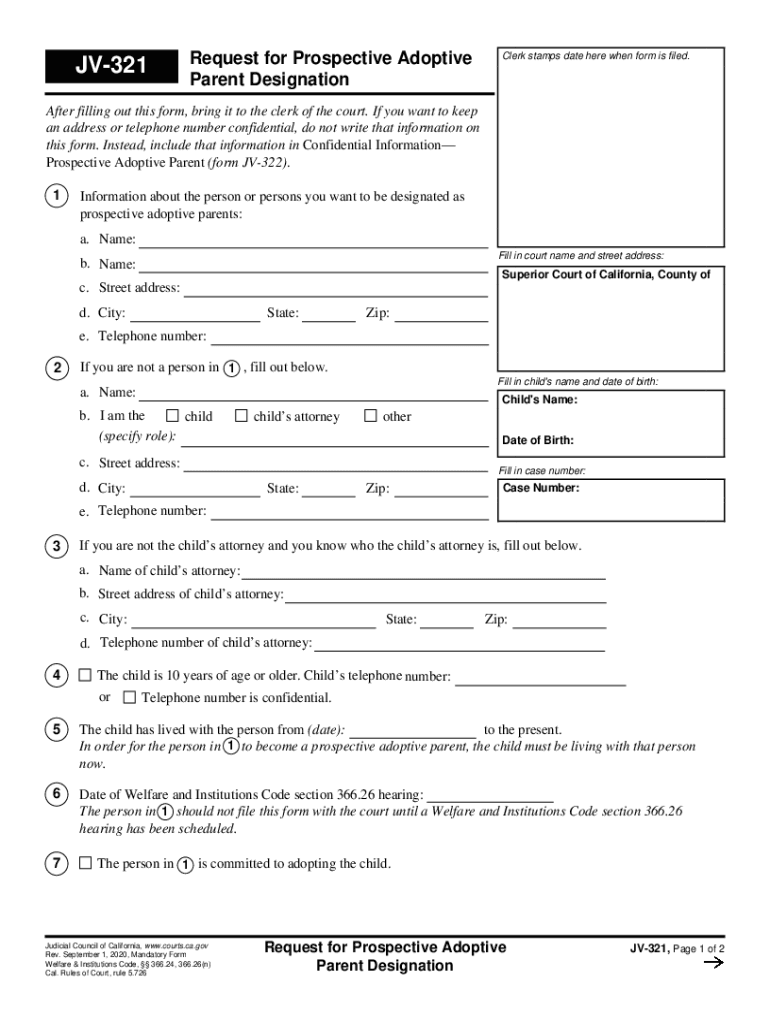
Begin by entering your name and address in Section 1. Ensure you provide accurate details for both prospective adoptive parents, including street address, city, state, and zip code.
If applicable, fill out Section 2 with the child's name and date of birth. Specify your role concerning the child, such as 'child' or 'child’s attorney'.
In Section 3, if you are not the child’s attorney but know who they are, provide their name and contact information.
Complete Section 4 if the child is over ten years old by providing their telephone number or indicating that it is confidential.
In Section 5, confirm that the child has been living with you from a specified date until now.
Fill out Section 6 with the date of the scheduled Welfare and Institutions Code section 366.26 hearing before submitting this form.
In Section 7, affirm your commitment to adopting the child.
Finally, complete Section 8 by checking all applicable steps you've taken toward adoption. If more space is needed, attach additional pages labeled accordingly.
Start filling out your Prospective Adoptive Parent form today using our platform for free!
Fill out prospective adoptive parent online It's free
We've got more versions of the prospective adoptive parent form. Select the right prospective adoptive parent version from the list and start editing it straight away!
Listening To Parents: Overcoming Barriers to the Adoption
We also recommend a changing the way initial calls are handled and development of a buddy system paring prospective adoptive parents with experienced adoptiveRead more
A dependent childs caregiver may be designated as a prospective adoptive parent. The court may make the designation on its own motion or on a request.Read more
Cookie consent notice
This site uses cookies to enhance site navigation and personalize your experience.
By using this site you agree to our use of cookies as described in our Privacy Notice.
You can modify your selections by visiting our Cookie and Advertising Notice.