Type text, add images, blackout confidential details, add comments, highlights and more.
02. Sign it in a few clicks
Draw your signature, type it, upload its image, or use your mobile device as a signature pad.
03. Share your form with others
Send it via email, link, or fax. You can also download it, export it or print it out.
How to use or fill out pwd 504 with our platform
Ease of Setup
DocHub User Ratings on G2
Ease of Use
DocHub User Ratings on G2
Click ‘Get Form’ to open it in the editor.
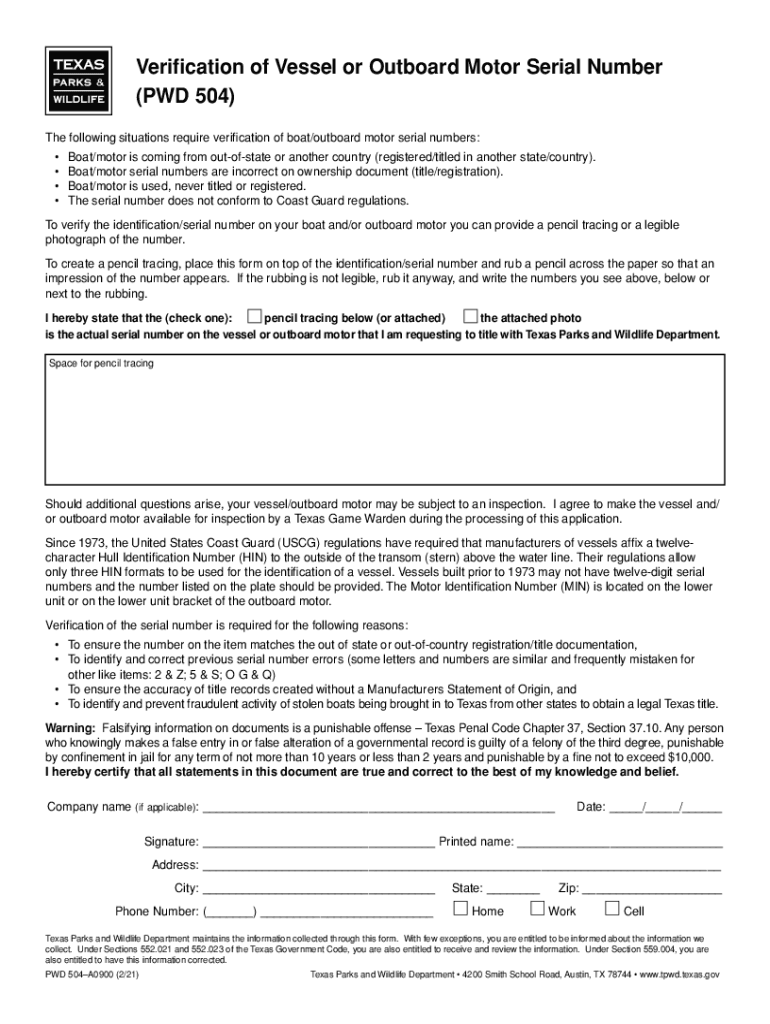
Begin by providing a pencil tracing or a clear photograph of the vessel or outboard motor's serial number. If using a pencil tracing, place the form over the serial number and rub a pencil across it to create an impression.
In the designated area, indicate whether you are submitting a pencil tracing or an attached photo by checking the appropriate box.
Fill in your company name (if applicable), date, signature, printed name, address, city, state, phone number, and zip code in the respective fields.
Review all information for accuracy before finalizing your submission. Ensure that all statements are true and correct as per legal requirements.
Start filling out your pwd 504 form online for free today!
Mar 7, 2025 504 plans describe accommodations so students with disabilitieswho do not need special education serviceshave comparable access to classrooms,Read more
Verification of Vessel or Outboard Motor Serial Number (PWD
The following situations require verification of boat/outboard motor serial numbers: Boat/motor is coming from out-of-state or another countryRead more
Enter new password in the New PWD field and Confirm PWD field. Valid 504 Gateway Timeout. No. 505 Version Not Supported. No. Page 474. Microsoft SkypeRead more
Cookie consent notice
This site uses cookies to enhance site navigation and personalize your experience.
By using this site you agree to our use of cookies as described in our Privacy Notice.
You can modify your selections by visiting our Cookie and Advertising Notice.