Type text, add images, blackout confidential details, add comments, highlights and more.

02. Sign it in a few clicks
Draw your signature, type it, upload its image, or use your mobile device as a signature pad.

03. Share your form with others
Send dispute notification via email, link, or fax. You can also download it, export it or print it out.

How to use or fill out clearance notification with our platform
Ease of Setup
DocHub User Ratings on G2
Ease of Use
DocHub User Ratings on G2
Click ‘Get Form’ to open the clearance notification in the editor.
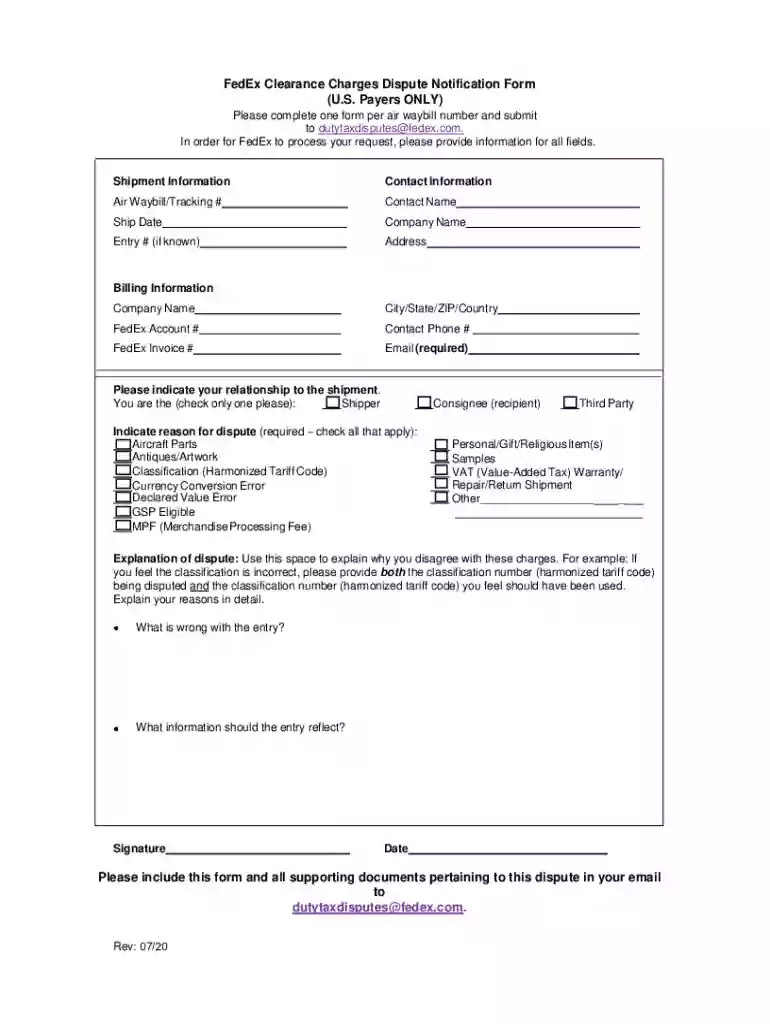
Begin by filling out the Shipment Information section. Enter the Air Waybill/Tracking #, Ship Date, and Entry # if known. Ensure all fields are completed accurately.
Next, provide your Contact Information. Fill in your Contact Name, Company Name, Address, City/State/ZIP/Country, and Contact Phone #. Don’t forget to include your Email as it is required for processing.
In the Billing Information section, enter your FedEx Account # and FedEx Invoice #. This information is crucial for identifying your account.
Indicate your relationship to the shipment by checking either 'Shipper' or 'Consignee'.
Select the reason for dispute by checking all applicable options provided in the form.
Use the Explanation of dispute section to detail why you disagree with the charges. Be specific about any classification numbers involved.
Finally, sign and date the form before submitting it via email along with any supporting documents.
Start using our platform today to streamline your clearance notification process for free!
We've got more versions of the clearance notification form. Select the right clearance notification version from the list and start editing it straight away!
Notification Clearance Instructions for Organizations | NIST
This notification can be cleared in two ways: Respond to the communication OR; Close the communication. These actions can be taken in either the DiscussionsRead more
Clearance and Separation. The Employee Separation and Clearance Notification Form should be completed for all employees leaving the University and is FOR USERead more
Cookie consent notice
This site uses cookies to enhance site navigation and personalize your experience.
By using this site you agree to our use of cookies as described in our Privacy Notice.
You can modify your selections by visiting our Cookie and Advertising Notice.