
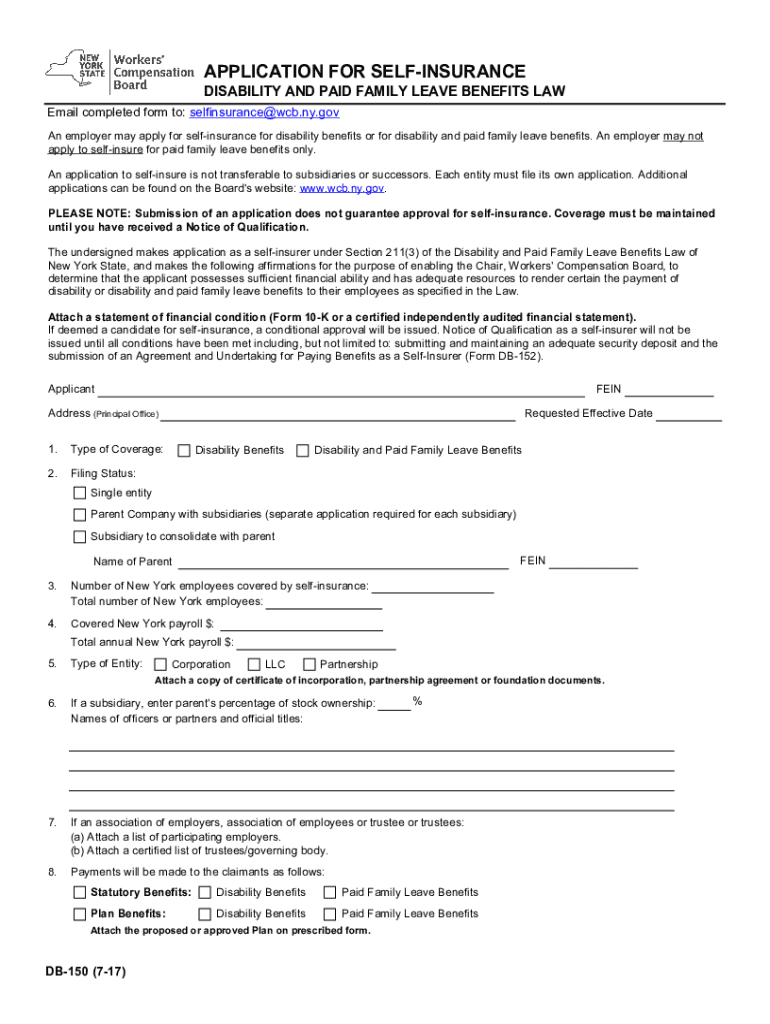




Here's how it works

01. Edit your db form online
Type text, add images, blackout confidential details, add comments, highlights and more.

02. Sign it in a few clicks
Draw your signature, type it, upload its image, or use your mobile device as a signature pad.

03. Share your form with others
Send dbl form via email, link, or fax. You can also download it, export it or print it out.
How to use or fill out db 150 form with our platform

- Click ‘Get Form’ to open the db 150 form in the editor.
- Begin by entering your FEIN (Federal Employer Identification Number) at the top of the form. This is essential for identification purposes.
- Fill in your business name and principal office address in the designated fields. Ensure accuracy as this information is crucial for processing your application.
- Select the type of coverage you are applying for: either Disability Benefits or Disability and Paid Family Leave Benefits. Mark your choice clearly.
- Indicate your filing status, whether you are a single entity, a parent company with subsidiaries, or a subsidiary consolidating with a parent company.
- Provide details about your New York employees, including the total number covered by self-insurance and total payroll amounts.
- Complete sections regarding claims administration, specifying if you intend to self-administer or use a licensed claims administrator. Fill in their contact details as required.
- Finally, ensure that an authorized official signs the application. Include their title, printed name, phone number, date, and email address before submitting.
Start using our platform today to easily fill out and submit your db 150 form online for free!
Fill out db 150 form online
It's free
It's free
Security and compliance
At DocHub, your data security is our priority. We follow HIPAA, SOC2, GDPR, and other standards, so you can work on your documents with confidence.
Learn more


Related forms
13753*04 - Dclaration de perte ou vol de certificat d'
The document is a declaration form for reporting the loss or theft of a vehicle registration certificate. It allows the ...
Page 557 mac76 mac76:385reb:
Chapter 14 discusses the organization and capital stock transactions of corporations, highlighting their characteristics ...

Hong Kong Resources A to Z
Chapter Five of 'Hong Kong Resources A to Z' provides a comprehensive guide to shopping in Hong Kong, focusing on art, a ...

JANUARY - APRIL 2013 TITLES - Wiley
The document is a comprehensive catalog of titles in the fields of Engineering and Computer Sciences published between J ...

Eight Dimensions of Wellness - The Nutrition PressThe Nutrition
The document provides an introduction to nutrition, discussing the factors influencing food selection, basic nutrition c ...
Investor Relations - Top Form
The document provides the voting results from the 2005 Annual General Meeting of Top Form International Limited, held on ...
2006 Annual Report
The document is the Annual Report for Top Form International Limited for the fiscal year ending June 30, 2006. It outlin ...