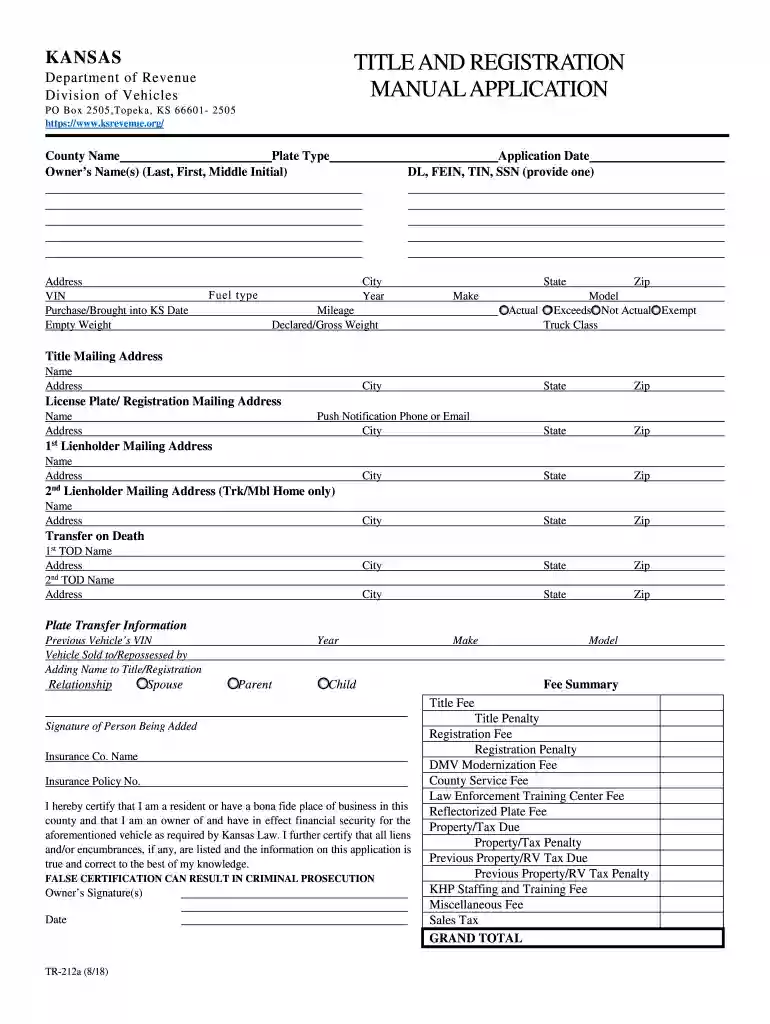
Ks forms titlr application 2026

Get Form
tr212a Preview on Page 1

Here's how it works

01. Edit your tr212a online
Type text, add images, blackout confidential details, add comments, highlights and more.

02. Sign it in a few clicks
Draw your signature, type it, upload its image, or use your mobile device as a signature pad.

03. Share your form with others
Send tr 212a via email, link, or fax. You can also download it, export it or print it out.

How to use or fill out ks forms titlr application with our platform

Form edit decoration
9.5
Ease of Setup
DocHub User Ratings on G2
9.0
Ease of Use
DocHub User Ratings on G2
  1. Click ‘Get Form’ to open the ks forms titlr application in the editor.
  2. Begin by entering the 'County Name' and 'Plate Type' at the top of the form. This information is essential for processing your application correctly.
  3. Fill in the 'Owner’s Name(s)' section with your last name, first name, and middle initial. Ensure accuracy as this will be used for official records.
  4. Provide your complete address, including city, state, and zip code. This is crucial for correspondence regarding your application.
  5. Enter the Vehicle Identification Number (VIN) and details such as 'Purchase/Brought into KS Date', 'Empty Weight', and 'Mileage'. These fields help verify vehicle ownership and specifications.
  6. Complete the sections for lienholders if applicable, including their mailing addresses. This ensures that any financial interests are recorded properly.
  7. Review all entered information carefully before signing. Your signature certifies that all details are true and correct.

Start using our platform today to fill out your ks forms titlr application easily and for free!

See more ks forms titlr application versions

We've got more versions of the ks forms titlr application form. Select the right ks forms titlr application version from the list and start editing it straight away!
Versions Form popularity Fillable & printable
2022 4.1 Satisfied (36 Votes)
2018 4.8 Satisfied (53 Votes)
2002 4 Satisfied (55 Votes)
2002 4.4 Satisfied (131 Votes)
be ready to get more

Complete this form in 5 minutes or less

Get form

Got questions?

We have answers to the most popular questions from our customers. If you can't find an answer to your question, please contact us.
Contact us
Scroll to the bottom of your survey, questionnaire, or form, and select Add new question. Select Section. Add a section title and subtitle to provide more context for the questions in this section.
Insert a title into a form or report Open the form or report in Design View or Layout view. On the Design tab, in the Header/Footer group, click Title. When the label is created, the text in the label is automatically selected so that you can change the text by typing the title you want.
Open your Google Forms. Select the question after which the new title and description must be added. Click on Add title and description TT icon as shown below. Add the title and description.
Microsoft Forms is a simple, lightweight app that lets individuals, small businesses, schools, and government organizations easily create surveys, quizzes, polls, and other types of forms.

Security and compliance

At DocHub, your data security is our priority. We follow HIPAA, SOC2, GDPR, and other standards, so you can work on your documents with confidence.

Learn more