Tax withholding election form 2026

Get Form
tax election form Preview on Page 1

Here's how it works

01. Edit your tax election form online
Type text, add images, blackout confidential details, add comments, highlights and more.

02. Sign it in a few clicks
Draw your signature, type it, upload its image, or use your mobile device as a signature pad.

03. Share your form with others
Send withholding tables 2025 via email, link, or fax. You can also download it, export it or print it out.

How to use or fill out tax withholding election form with our platform

Form edit decoration
9.5
Ease of Setup
DocHub User Ratings on G2
9.0
Ease of Use
DocHub User Ratings on G2
  1. Click ‘Get Form’ to open the tax withholding election form in the editor.
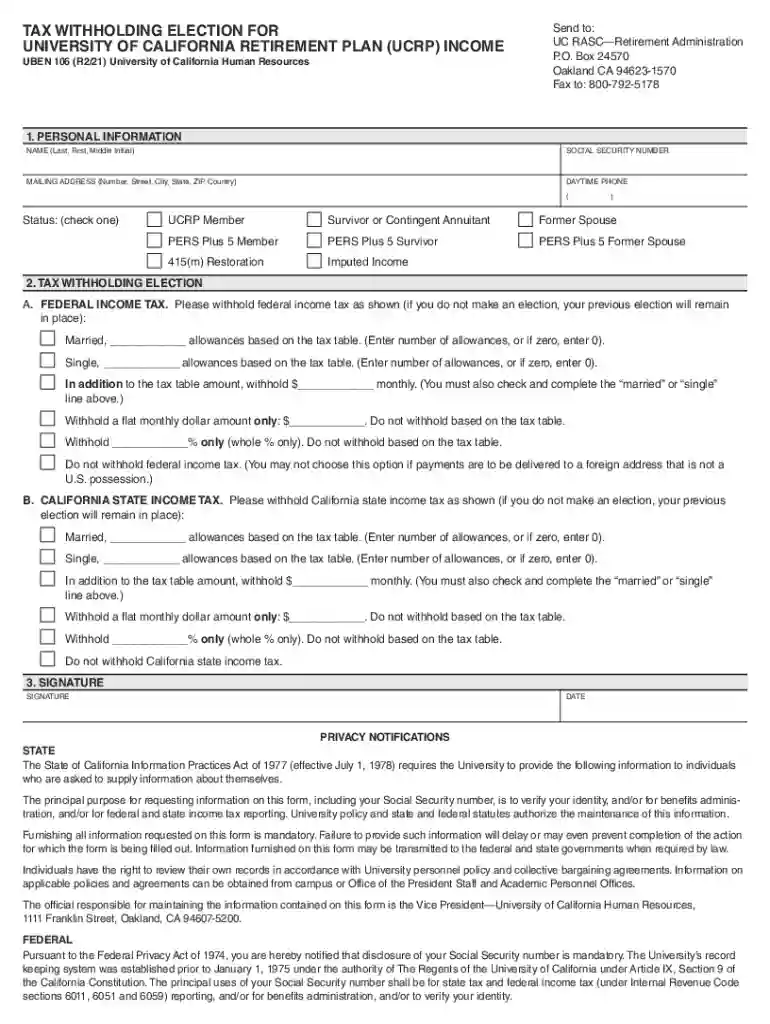
  2. Begin with Section 1—Personal Information. Fill in your name, Social Security number, mailing address, and daytime phone number. Ensure all details are accurate to avoid delays.
  3. Move to Section 2—Tax Withholding Election. For Federal Income Tax, choose your preferred withholding method by filling in the appropriate allowances or amounts based on your marital status.
  4. If you are a California resident, complete Section 2B for California State Income Tax similarly. Indicate your allowances or specify if you prefer no withholding.
  5. Finally, sign and date the form in Section 3. Review all entries for accuracy before submission.

Start using our platform today to easily fill out and manage your tax withholding election form online for free!

See more tax withholding election form versions

We've got more versions of the tax withholding election form form. Select the right tax withholding election form version from the list and start editing it straight away!
Versions Form popularity Fillable & printable
2022 4.6 Satisfied (50 Votes)
2021 4.8 Satisfied (170 Votes)
2019 4.4 Satisfied (117 Votes)
2015 4.4 Satisfied (559 Votes)
2010 4 Satisfied (26 Votes)
be ready to get more

Complete this form in 5 minutes or less

Get form

Got questions?

We have answers to the most popular questions from our customers. If you can't find an answer to your question, please contact us.
Contact us
Claiming 0 means more withheld. It reduces the take-home pay but possibly leads to a refund. Claiming 1 means less withheld. This option presents a larger paycheck but increases the risk of owing amounts at tax time.
Complete Form W-4 so that your employer can withhold the correct federal income tax from your pay. Consider completing a new Form W-4 each year and when your personal or financial situation changes.
Normally, the refund is issued as a separate payment. We cannot refund tax withholding for previous tax years. To request a refund of your withholdings for previous tax years, please contact the IRS at 1-800-829-1040 for Federal tax withholding refund and your State Revenue Office for state tax withholding refund.
The easiest way is to calculate how much tax you should have withheld from each pay period is to take how much you owed this year and divide it by the number of pay periods. So for example if you owed $2600 this year and you get paid weekly that. would be $2600 / 52 = $50/per weekly pay period.
How to fill out a W-4 Step 1: Enter your personal information. Fill in your name, address, Social Security number and tax filing status. Step 2: Account for all jobs or spousal income. Step 3: Claim dependents, including children. Step 4: Refine your withholdings. Step 5: Sign and date your W-4.

Security and compliance

At DocHub, your data security is our priority. We follow HIPAA, SOC2, GDPR, and other standards, so you can work on your documents with confidence.

Learn more
ccpa2
pci-dss
gdpr-compliance
hipaa
soc-compliance
be ready to get more

Complete this form in 5 minutes or less

Get form

People also ask

If you want California state income tax withheld, indicate the number of withholding allowances and your filing status by checking the appropriate box, and specify an additional flat dollar amount, if any.

Related links