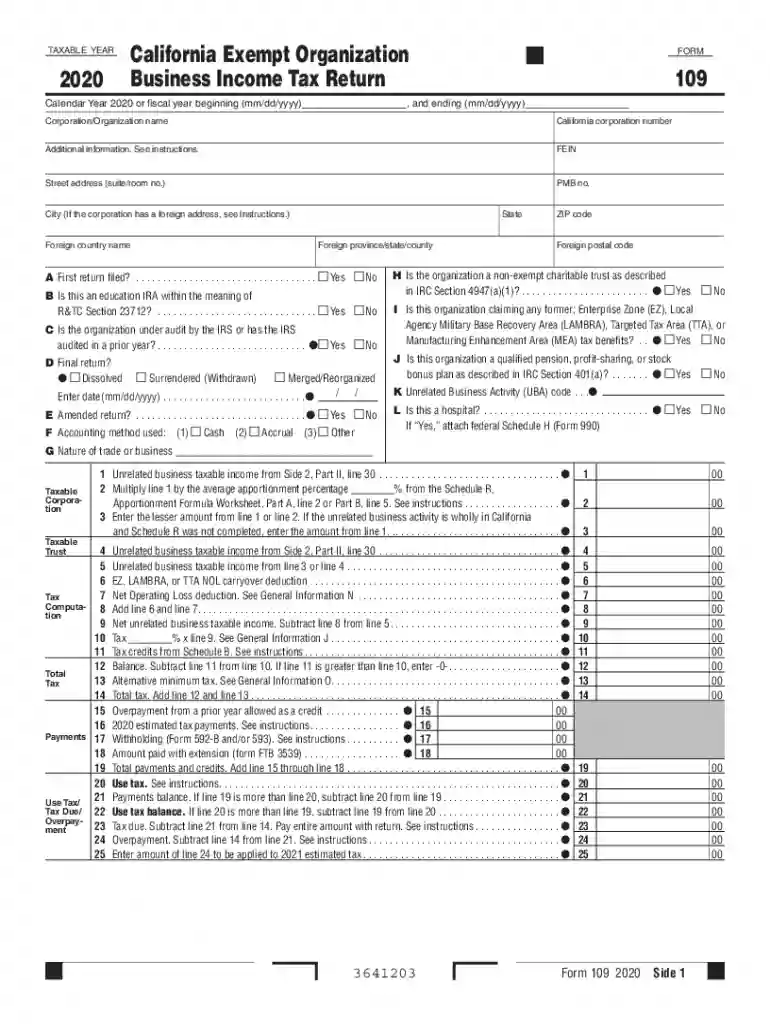
California 109 2026

Get Form
form 109 Preview on Page 1

Here's how it works

01. Edit your form 109 online
Type text, add images, blackout confidential details, add comments, highlights and more.

02. Sign it in a few clicks
Draw your signature, type it, upload its image, or use your mobile device as a signature pad.

03. Share your form with others
Send ca form 109 via email, link, or fax. You can also download it, export it or print it out.

How to use or fill out California 109 with our platform

Form edit decoration
9.5
Ease of Setup
DocHub User Ratings on G2
9.0
Ease of Use
DocHub User Ratings on G2
  1. Click ‘Get Form’ to open the California 109 in the editor.
  2. Begin by entering the taxable year at the top of the form. Ensure you specify whether it’s a calendar year or fiscal year.
  3. Fill in your corporation or organization name, California corporation number, and FEIN. Provide your street address, city, state, and ZIP code.
  4. Indicate if this is your first return by checking 'Yes' or 'No'. Answer other questions regarding audits, final returns, and accounting methods as applicable.
  5. Proceed to report unrelated business taxable income on Side 1. Follow the prompts for each line item carefully, ensuring accuracy in calculations.
  6. Complete any necessary schedules (A through H) based on your organization's activities and income sources. Attach additional documentation if required.
  7. Review all entries for completeness and accuracy before saving or exporting your completed form for submission.

Start using our platform today to streamline your California 109 filing process for free!

See more california 109 versions

We've got more versions of the california 109 form. Select the right california 109 version from the list and start editing it straight away!
Versions Form popularity Fillable & printable
2022 4.6 Satisfied (31 Votes)
2021 4.5 Satisfied (53 Votes)
2020 4.8 Satisfied (72 Votes)
2019 4.4 Satisfied (278 Votes)
2018 4.4 Satisfied (205 Votes)
2017 4.1 Satisfied (58 Votes)
2016 4.4 Satisfied (65 Votes)
2015 4.1 Satisfied (27 Votes)
be ready to get more

Complete this form in 5 minutes or less

Get form

Got questions?

We have answers to the most popular questions from our customers. If you can't find an answer to your question, please contact us.
Contact us
Follow these steps: Log in to myEDD and select UI Online. Select Payments. Select Form 1099G. Select View next to the desired year. Select Request Paper Copy to request an official paper copy of your Form 1099G. Confirm your address on the Form 1099G Address Confirmation screen.
For instance, the requirement to file Form 100 is triggered when the institution has taxable income greater than $100. By comparison, it may be necessary to file Form 109 if the organizations unrelated business taxable income, discussed above, exceeds a $1,000 threshold.
Use Form 109 to figure the tax on the unrelated business income of the organization. Filing Form 109 does not replace the requirement to file Form 199, California Exempt Organization Annual Information Return, or FTB 199N. State and federal laws are generally the same in this area.
SB 109, as introduced, Committee on Budget and Fiscal Review. Budget Act of 2025. This bill would express the intent of the Legislature to enact statutory changes relating to the Budget Act of 2025.
Every organization with California tax-exempt status must file Form 109 if the gross income from an unrelated trade or business is more than $1,000. See General Information B, Unrelated Trade or Business.

Security and compliance

At DocHub, your data security is our priority. We follow HIPAA, SOC2, GDPR, and other standards, so you can work on your documents with confidence.

Learn more
ccpa2
pci-dss
gdpr-compliance
hipaa
soc-compliance
be ready to get more

Complete this form in 5 minutes or less

Get form

People also ask

What is a 1099 Form? The IRS 1099 Forms are a group of tax forms that document payments made by an individual or a business that typically isnt your employer. Many small businesses need to send 1099s when they make certain payments. Copies of these forms get sent to the payee and to the IRS.

tax form 109