It47 municipal income tax form 2026

Get Form
city of columbus tax forms Preview on Page 1

Here's how it works

01. Edit your city of columbus tax forms online
Type text, add images, blackout confidential details, add comments, highlights and more.
02. Sign it in a few clicks
Draw your signature, type it, upload its image, or use your mobile device as a signature pad.
03. Share your form with others
Send it via email, link, or fax. You can also download it, export it or print it out.

How to use or fill out it47 municipal income tax form with our platform

Form edit decoration
9.5
Ease of Setup
DocHub User Ratings on G2
9.0
Ease of Use
DocHub User Ratings on G2
  1. Click ‘Get Form’ to open the it47 municipal income tax form in the editor.
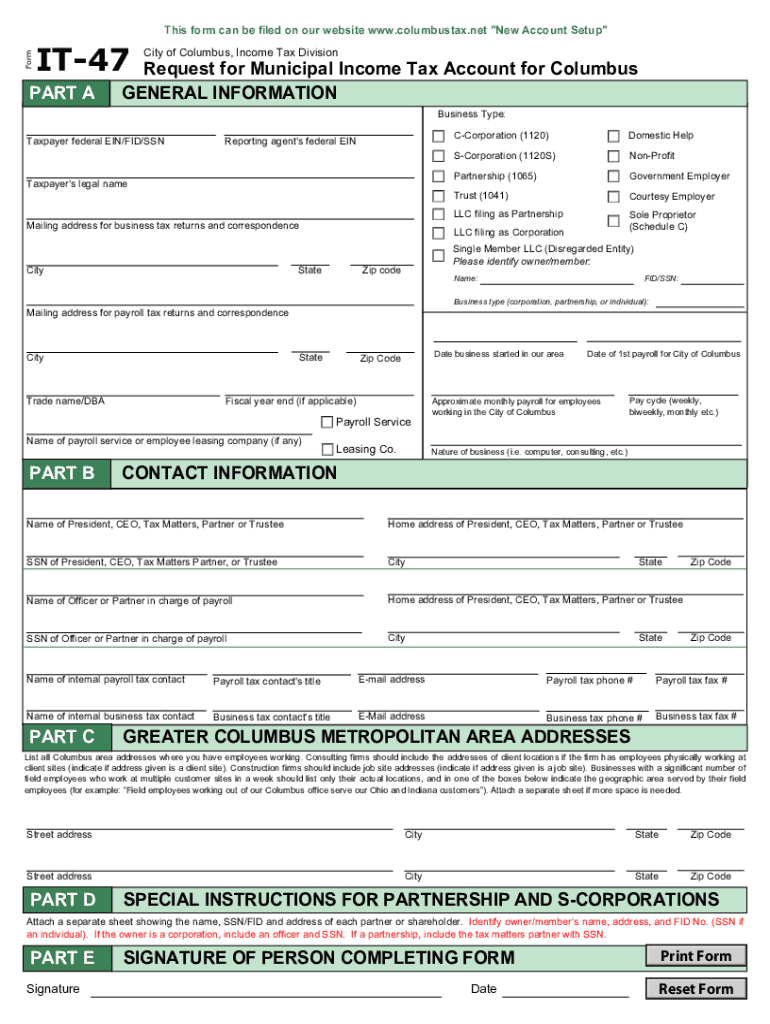
  2. Begin with Part A, where you will provide general information about your business. Fill in your business type, taxpayer identification number (EIN/FID/SSN), legal name, and mailing address.
  3. In Part B, specify your business type (e.g., corporation, partnership) and provide details such as trade name and payroll service information if applicable.
  4. Proceed to Part C to list all Columbus area addresses where employees work. Ensure to indicate if any addresses are client sites or job sites for construction firms.
  5. If applicable, follow the special instructions in Part D for partnerships and S-corporations by attaching a separate sheet with partner or shareholder details.
  6. Finally, complete Part E by signing and dating the form to certify that all information is accurate.

Start using our platform today for free to streamline your it47 municipal income tax form completion!

See more it47 municipal income tax form versions

We've got more versions of the it47 municipal income tax form form. Select the right it47 municipal income tax form version from the list and start editing it straight away!
Versions Form popularity Fillable & printable
2020 4.8 Satisfied (142 Votes)
2017 4.1 Satisfied (41 Votes)
2007 4.3 Satisfied (244 Votes)
be ready to get more

Complete this form in 5 minutes or less

Get form

Got questions?

We have answers to the most popular questions from our customers. If you can't find an answer to your question, please contact us.
Contact us

According to eSignature regulations, documents signed electronically have the same validity as traditionally approved ones. You can electronically sign almost any business and personal documentation. Four types of documents still require handwritten signatures only - wills and testamentary trusts, court orders and other court forms, state statutes governing divorce, adoption, or other family law, and notice of cancellation of utility services. If you follow the regulations and utilize a secure and compliant software solution, like DocHub, you can eSign your it47 municipal income tax form without printing it.

If you want to edit your it47 municipal income tax form on the internet swiftly, it does not matter what internet browser you employ. DocHub’s straightforward editing instruments are available using any internet browser. Simply open the appropriate tab within our editor, add your document, and fill it out without stress.

Step 1: Go to the e-Filing portal and click login. Step 2: On Login Page enter your user ID and password. Step 3: On your Dashboard, Go to e- File menu Income Tax Forms File Income Tax Forms. Step 4: On the page- File Income Tax Forms -Persons with Business/Professional Income -select the option-Form-10IEA. Form 10-IEA - User Manual FAQs | Income Tax Department Income Tax Department iec help popular-form Income Tax Department iec help popular-form
Local taxes are also known as municipal taxes. These taxes may be school district, town, city, or county-specific. What Is Local Income Tax? | Flat Tax Rate, Progressive - Patriot Software Patriot Software blog payroll what- Patriot Software blog payroll what-
The tax is paid by residents of a city or vil lage that has imposed a municipal income tax as well as nonresidents who work in such a municipality. The tax also applies to businesses that have earned net profits within the municipality.

Security and compliance

At DocHub, your data security is our priority. We follow HIPAA, SOC2, GDPR, and other standards, so you can work on your documents with confidence.

Learn more
ccpa2
pci-dss
gdpr-compliance
hipaa
soc-compliance
be ready to get more

Complete this form in 5 minutes or less

Get form

People also ask

A penalty may be imposed for failure of a taxpayer to pay city income tax due, other than taxes withheld, two and one-half percent (2.5%) of such outstanding tax per month or fraction thereof that the tax remains outstanding, or ten percent (10%) of the outstanding liability, whichever is greater, with the penalty on
If youre an Ohio resident, part-year resident, or a nonresident with Ohio-sourced income, you are required to file an Ohio income tax return. Ohio-sourced income includes: Wages earned in Ohio. Tax 101 - Ohio Department of Taxation Ohio Department of Taxation - Ohio.gov help-center tax-101 Ohio Department of Taxation - Ohio.gov help-center tax-101
In Ohio, you have an income tax obligation to both your employment city and your resident city. Your employer is required by law to withhold only your work place city tax.
You should file a city income tax return if you owe tax, are due a refund, or your AGI (resident return) or wages (part-year or nonresident return) exceeds your exemption allowance.
Call the 24-hour form request line at 1-800-282-1782 to order Individual and School District Income Tax forms (please allow up to 15 days for delivery). Tax Forms - Ohio Department of Taxation Ohio Department of Taxation (.gov) home forms Ohio Department of Taxation (.gov) home forms

Related links