Type text, add images, blackout confidential details, add comments, highlights and more.

02. Sign it in a few clicks
Draw your signature, type it, upload its image, or use your mobile device as a signature pad.

03. Share your form with others
Send 2306 via email, link, or fax. You can also download it, export it or print it out.

How to use or fill out 2306 BIR form with our platform
Ease of Setup
DocHub User Ratings on G2
Ease of Use
DocHub User Ratings on G2
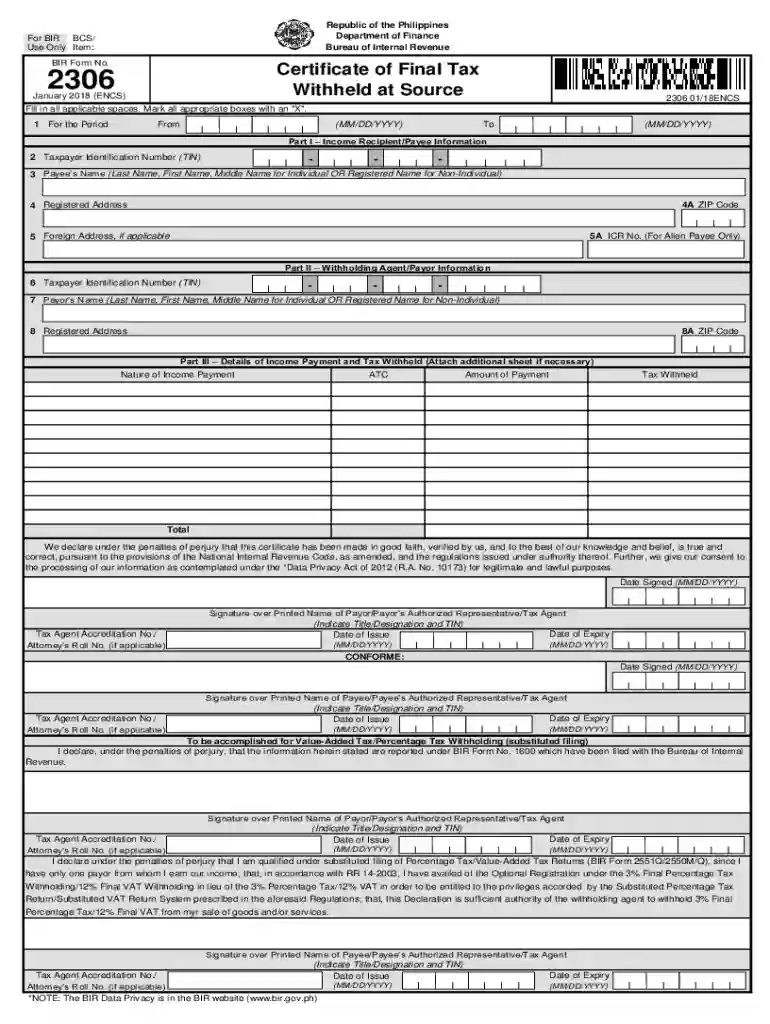
Click ‘Get Form’ to open the 2306 BIR form in the editor.
Fill in the 'For the Period' section by entering the start and end dates in MM/DD/YYYY format.
In Part I, provide the Income Recipient/Payee Information. Enter the Taxpayer Identification Number (TIN), Payee’s Name, and Registered Address. If applicable, include the Foreign Address and ICR No.
Proceed to Part II for Withholding Agent/Payor Information. Again, input the TIN, Payor’s Name, and Registered Address.
In Part III, detail the Income Payment and Tax Withheld. Specify the Nature of Income Payment, ATC code, Amount of Payment, and Tax Withheld. Attach additional sheets if necessary.
Finally, ensure all signatures are completed where indicated and verify that all information is accurate before submission.
Start filling out your 2306 BIR form online for free today!
2307 BIR Form2306 bir form 2021BIR Form 2316BIR Form 2306 downloadWhen to use BIR Form 2306 and 2307BIR Form 2306 excel format free downloadIs BIR Form 2306 still applicableWhat is BIR Form 2306 used for
Security and compliance
At DocHub, your data security is our priority. We follow HIPAA, SOC2, GDPR, and other standards, so you can work on your documents with confidence.
Cookie consent notice
This site uses cookies to enhance site navigation and personalize your experience.
By using this site you agree to our use of cookies as described in our Privacy Notice.
You can modify your selections by visiting our Cookie and Advertising Notice.