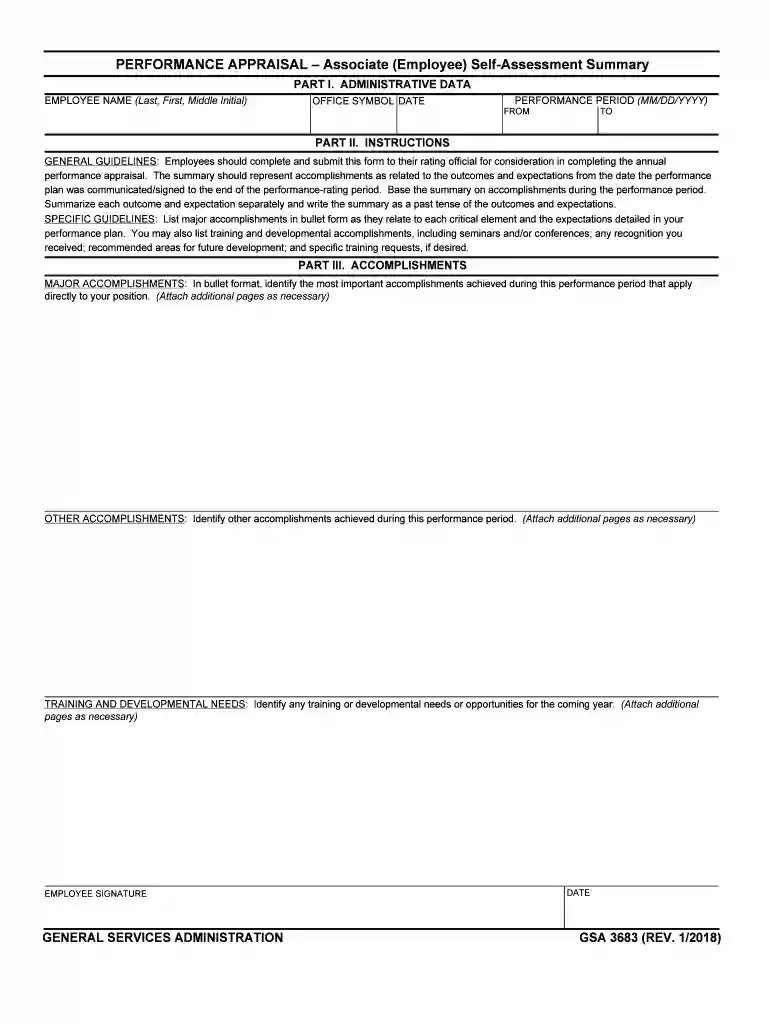
gsa 3683 form Preview on Page 1

Gsa 3683 form-2026

Here's how it works

  • 01. Edit your form online

    Type text, add images, blackout confidential details, add comments, highlights and more.

  • 02. Sign it in a few clicks

    Draw your signature, type it, upload its image, or use your mobile device as a signature pad.

  • 03. Share your form with others

    Send it via email, link, or fax. You can also download it, export it or print it out.

How to use or fill out gsa 3683 form with DocHub

Form edit decoration
9.5
Ease of Setup
DocHub User Ratings on G2
9.0
Ease of Use
DocHub User Ratings on G2
  1. Click ‘Get Form’ to open the GSA 3683 form in our editor.
  2. Begin by filling in your administrative data. Enter your name, office symbol, and the performance period dates in the designated fields.
  3. In Part II, follow the general guidelines to summarize your accomplishments. Use bullet points for clarity and ensure you write in past tense as you reflect on your performance.
  4. For Part III, list your major accomplishments directly related to your position. Be specific and attach additional pages if necessary for a comprehensive overview.
  5. Identify any training or developmental needs for the upcoming year. This section is crucial for planning future growth opportunities.
  6. Finally, sign and date the form electronically using our platform’s signature feature before submitting it to your rating official.

Start using our platform today to fill out your GSA 3683 form online for free!

See more gsa 3683 form versions

We've got more versions of the gsa 3683 form form. Select the right gsa 3683 form version from the list and start editing it straight away!

VersionsForm popularityFillable & printable
20184.8 Satisfied (83 Votes)
20054.3 Satisfied (170 Votes)

be ready to get more

Complete this form in 5 minutes or less

Got questions?

We have answers to the most popular questions from our customers. If you can't find an answer to your question, please contact us.

Offices LocationAddressGSA region Washington, D.C. 1800 F St. NW. 20405 11 San Francisco, CA 50 United Nations Plaza 94102 9 Chicago, IL 230 S. Dearborn St. 60604 5 New York City, NY One World Trade Center, 10007 2
The Standard Form (SF) 702 Security Container Check Sheet provides a record of the names and times that persons have opened, closed and checked a particular container that holds classified information.
The information is required by Federal Government agencies to administer motor vehicle programs, including maintaining records on crashes involving privately owned and Federal fleet vehicles, and collecting crash claims resulting from crashes.
(a) GSA Form 300 , Order for Supplies and Services, is a multipurpose form that may be used for purchases of supplies or services, orders under existing contracts or agreements, and orders from required sources of supplies and services.

Security and compliance

At DocHub, your data security is our priority. We follow HIPAA, SOC2, GDPR, and other standards, so you can work on your documents with confidence.

Related links

Self-Study Report 2020 - Baruch College - CUNY

The Baruch College faculty handbook has several entries pertaining to academic integrity, including a Summary of Policies for Faculty Members at Baruch College,Read more

Learn more
If you believe that this page should be taken down, please follow our DMCA take down process here