State limited ks form 2026

Get Form
state limited ks form Preview on Page 1

Here's how it works

01. Edit your form online
Type text, add images, blackout confidential details, add comments, highlights and more.

02. Sign it in a few clicks
Draw your signature, type it, upload its image, or use your mobile device as a signature pad.

03. Share your form with others
Send it via email, link, or fax. You can also download it, export it or print it out.

How to use or fill out state limited ks form with our platform

Form edit decoration
9.5
Ease of Setup
DocHub User Ratings on G2
9.0
Ease of Use
DocHub User Ratings on G2
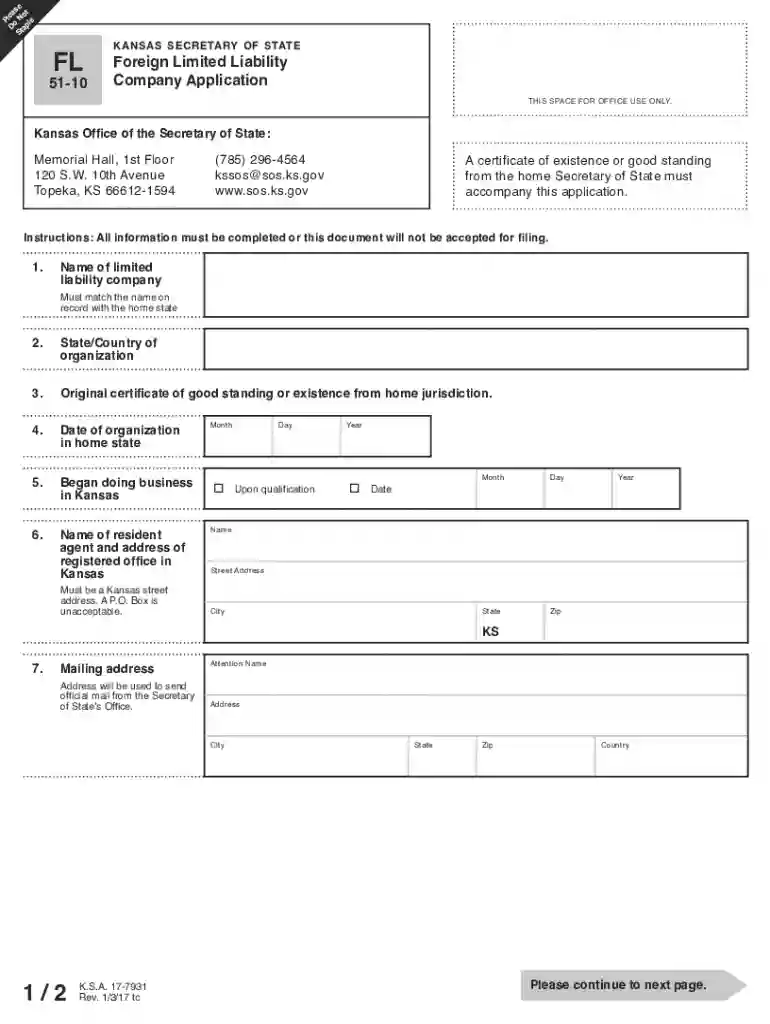
  1. Click ‘Get Form’ to open the state limited ks form in the editor.
  2. Begin by entering the name of your limited liability company, ensuring it matches exactly as it appears on your certificate of good standing.
  3. Fill in the state or country of organization and provide the original certificate of good standing from your home jurisdiction, issued within the last 90 days.
  4. Indicate the date of organization in your home state and when you began doing business in Kansas.
  5. Provide the name of your resident agent along with their registered office address in Kansas. Remember, a P.O. Box is not acceptable.
  6. Complete the mailing address section where you wish to receive official correspondence from the Secretary of State’s Office.
  7. Finally, ensure that an authorized officer signs the application before submitting it along with the required filing fee.

Start using our platform today for free to streamline your document editing and submission process!

See more state limited ks form versions

We've got more versions of the state limited ks form form. Select the right state limited ks form version from the list and start editing it straight away!
Versions Form popularity Fillable & printable
2017 4.8 Satisfied (27 Votes)
2013 4.4 Satisfied (556 Votes)
be ready to get more

Complete this form in 5 minutes or less

Get form

Got questions?

We have answers to the most popular questions from our customers. If you can't find an answer to your question, please contact us.
Contact us
It costs $160 to file your Kansas LLC Articles of Organization online and get your business formed with the state. If you choose to file your Articles in person, it costs $165. Going the fax route is even more expensive at $185.
Quick Summary. It takes 2-3 business days to form an LLC in Kansas by mail, while online filings are processed immediately. The state of Kansas does not offer expedited service because electronic submissions are instantly approved.
State LLC Costs: Overview State:Filing Fee:Annual Fee: California 75$ 800$ Colorado 50$ 10$ Connecticut 120$ 80$ Delaware 110$ 300$47 more rows
The filing fee for an LLC in Kansas is $160 or $165, depending on how you file it. There are other possible costs that you may need to consider, which we review in detail in this post.
Revenue Level: While theres no specific income threshold for forming an LLC, many small business owners consider forming one when their annual revenue reaches around $50000 to $100000. This is often when the benefits of liability protection and potential tax advantages become more significant.

Security and compliance

At DocHub, your data security is our priority. We follow HIPAA, SOC2, GDPR, and other standards, so you can work on your documents with confidence.

Learn more
ccpa2
pci-dss
gdpr-compliance
hipaa
soc-compliance

People also ask

There is no Kansas state law requiring an operating agreement. However, under Kansas Statute 17-76,134, the law gives maximum effect to the enforceability of operating agreements meaning that if you do have an operating agreement, it can wield a lot of power.
Biennial Reports: Unlike some states, you do not have to renew your LLC every year in Kansas. Instead, you must file a biennial report every other year. Kansas does its biennial reports in an interesting way. Businesses that formed on even years file biennial reports on even years.

Related links