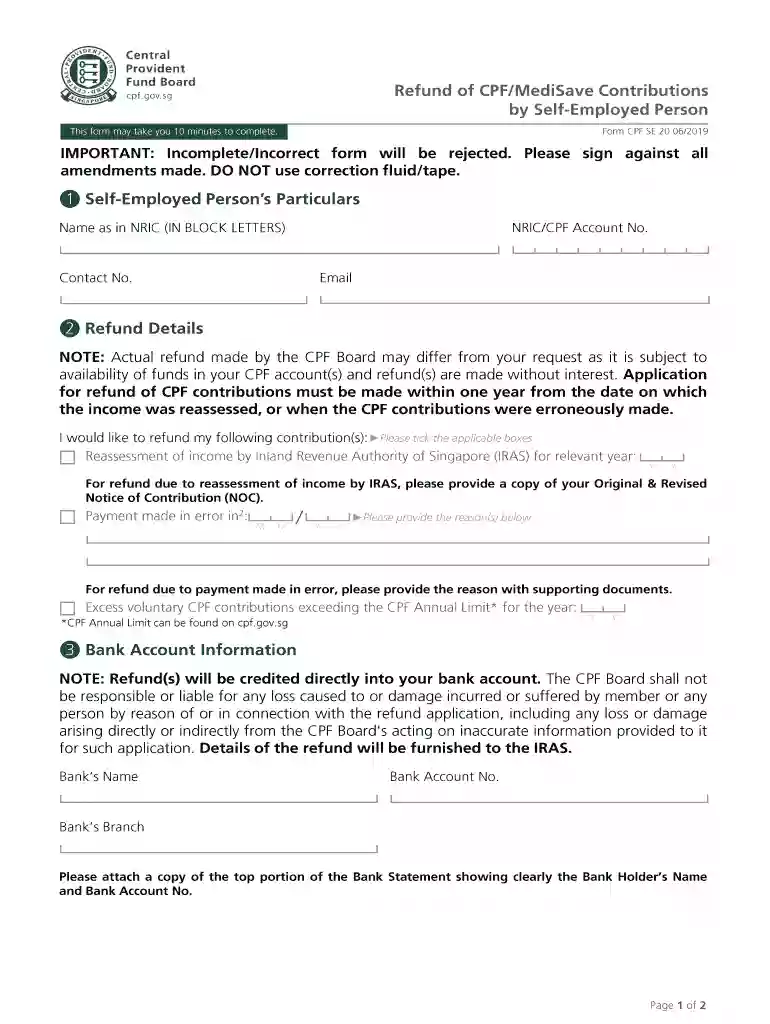
Cpf self employed form 2026

Get Form
cpf self employed medisave contribution Preview on Page 1

Here's how it works

01. Edit your cpf self employed medisave contribution online
Type text, add images, blackout confidential details, add comments, highlights and more.

02. Sign it in a few clicks
Draw your signature, type it, upload its image, or use your mobile device as a signature pad.

03. Share your form with others
Send self employed medisave top up via email, link, or fax. You can also download it, export it or print it out.

How to use or fill out cpf self employed form with our platform

Form edit decoration
9.5
Ease of Setup
DocHub User Ratings on G2
9.0
Ease of Use
DocHub User Ratings on G2
  1. Click ‘Get Form’ to open the cpf self employed form in the editor.
  2. Begin by entering your personal information in the designated fields, including your name, address, and contact details. Ensure accuracy for seamless processing.
  3. Next, navigate to the income section. Here, you will input your earnings from self-employment. Be sure to provide detailed figures for each source of income.
  4. Proceed to the expenses section. List all relevant business expenses that can be deducted. This may include costs for supplies, services, and other operational expenditures.
  5. Finally, review all entered information for completeness and accuracy. Utilize our platform’s editing tools to make any necessary adjustments before finalizing your submission.

Start using our platform today to fill out your cpf self employed form online for free!

See more cpf self employed form versions

We've got more versions of the cpf self employed form form. Select the right cpf self employed form version from the list and start editing it straight away!
Versions Form popularity Fillable & printable
2019 4.8 Satisfied (174 Votes)
2018 4.3 Satisfied (196 Votes)
2010 4.3 Satisfied (143 Votes)
be ready to get more

Complete this form in 5 minutes or less

Get form

Got questions?

We have answers to the most popular questions from our customers. If you can't find an answer to your question, please contact us.
Contact us
There is no need to file separate income declarations with CPF Board. When IRAS has completed the income assessment for the year, you will receive a notice of CPF contributions for self-employed persons from CPF Board informing you of your MediSave payable.
If you top up CPF, that CPF top-up is tax deductible. CPF money eventually comes back to you when you buy HDB or when you can withdraw, so its usually better to top up your CPF than to pay tax on it.
Guide on how to retrieve your CPF Contribution History Statement. Login with your SingPass ID and password. If you have forgotten/do not have a password, there are links within the page to retrieve them. Click the docHub icon to download your statement in PDF format.
Self-employed persons must make MediSave contribution to the Central Provident Fund (CPF) Board upon receipt of the Notice of CPF Contributions for Self-employed Persons. Voluntary MediSave contribution may be claimed as tax relief.
For freelancers who have an annual net trade income of at least $6,000, making CPF contributions is voluntary. However, its important to note that if you choose not to make CPF contributions as a freelancer, you will miss out on certain benefits and protections that come with it.

Security and compliance

At DocHub, your data security is our priority. We follow HIPAA, SOC2, GDPR, and other standards, so you can work on your documents with confidence.

Learn more
ccpa2
pci-dss
gdpr-compliance
hipaa
soc-compliance

People also ask

For self-employed, you will need to report your business income in a 2-line or 4-line statement in your income tax form. *Submit certified statements of accounts if revenue is $500,000 or more.
You can visit any ServiceSG Centre to seek assistance in making an online nomination. See the list of ServiceSG Centres locations and its operating hours. Alternatively, you may visit any of our CPF Service Centres to make your CPF nomination.

self employed medisave calculator