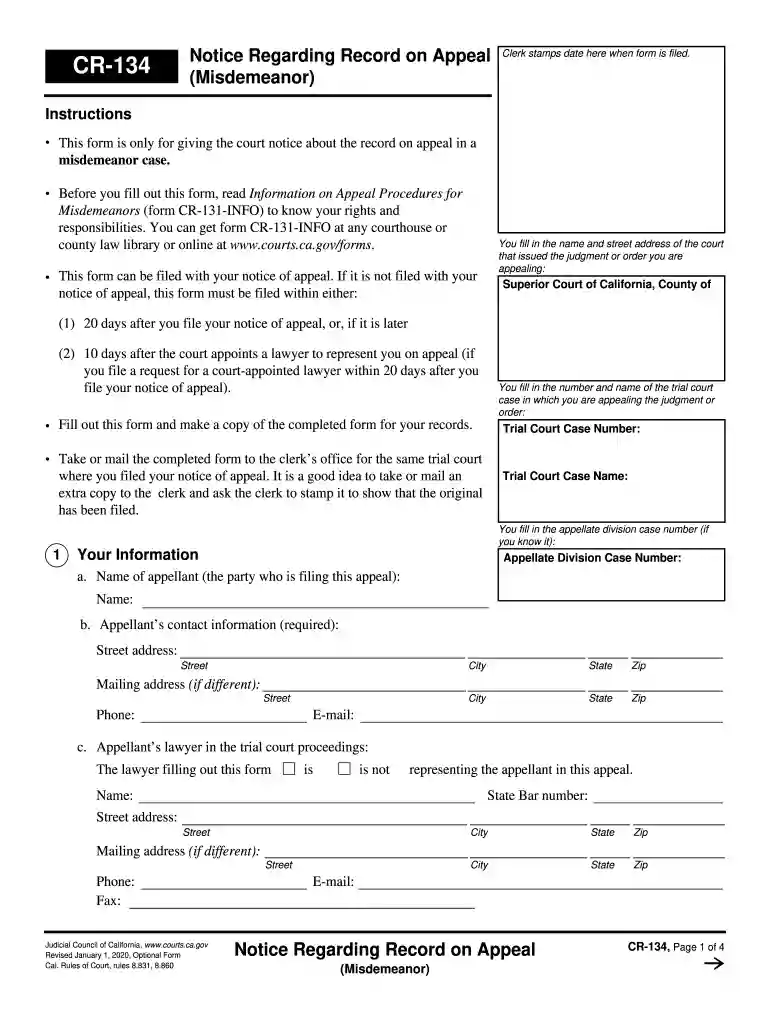
cr 134 Preview on Page 1

Regarding record 2026

Here's how it works

  • 01. Edit your cr 134 online

    Type text, add images, blackout confidential details, add comments, highlights and more.

  • 02. Sign it in a few clicks

    Draw your signature, type it, upload its image, or use your mobile device as a signature pad.

  • 03. Share your form with others

    Send cal form via email, link, or fax. You can also download it, export it or print it out.

How to use or fill out the Regarding Record with Our Platform

Form edit decoration
9.5
Ease of Setup
DocHub User Ratings on G2
9.0
Ease of Use
DocHub User Ratings on G2
  1. Click ‘Get Form’ to open it in the editor.
  2. Begin by entering the name and street address of the court that issued the judgment or order you are appealing. This is crucial for proper identification of your case.
  3. Fill in the trial court case number and name, ensuring accuracy as this information links your appeal to the correct records.
  4. Provide your personal information, including your name, contact details, and if applicable, your lawyer's information. This section is essential for communication regarding your appeal.
  5. Indicate whether you wish to proceed with or without a record of oral proceedings. Make sure to understand the implications of each choice before making a selection.
  6. If opting for a record, specify which type (e.g., reporter’s transcript or electronic recording) and follow any additional instructions provided in the form.
  7. Review all entered information for accuracy before saving or printing your completed form. It’s advisable to keep a copy for your records.

Start using our platform today to streamline your document editing and submission process!

See more cr 134 versions

We've got more versions of the cr 134 form. Select the right cr 134 version from the list and start editing it straight away!

VersionsForm popularityFillable & printable
20204.9 Satisfied (23 Votes)
20174.4 Satisfied (153 Votes)
20144.4 Satisfied (760 Votes)
20094 Satisfied (37 Votes)

be ready to get more

Complete this form in 5 minutes or less

Security and compliance

At DocHub, your data security is our priority. We follow HIPAA, SOC2, GDPR, and other standards, so you can work on your documents with confidence.

Related links

Part 80: Rules and Regulations on Controlled Substances in

(2) A record of all controlled substances used shall include the name of the person authorized to control and use such drugs, the date, type and quantity ofRead more

Learn more
FERPA - Protecting Student Privacy - Department of Education

Commonly referred to as the Family Educational Rights and Privacy Act (FERPA), and Federal Register Notices of amendments to FERPA.Read more

Learn more
If you believe that this page should be taken down, please follow our DMCA take down process here