




Here's how it works

01. Edit your corporate tax compliance documents online
Type text, add images, blackout confidential details, add comments, highlights and more.

02. Sign it in a few clicks
Draw your signature, type it, upload its image, or use your mobile device as a signature pad.

03. Share your form with others
Send tax compliance paperwork via email, link, or fax. You can also download it, export it or print it out.
How to use or fill out Oregon Tax Compliance with our platform

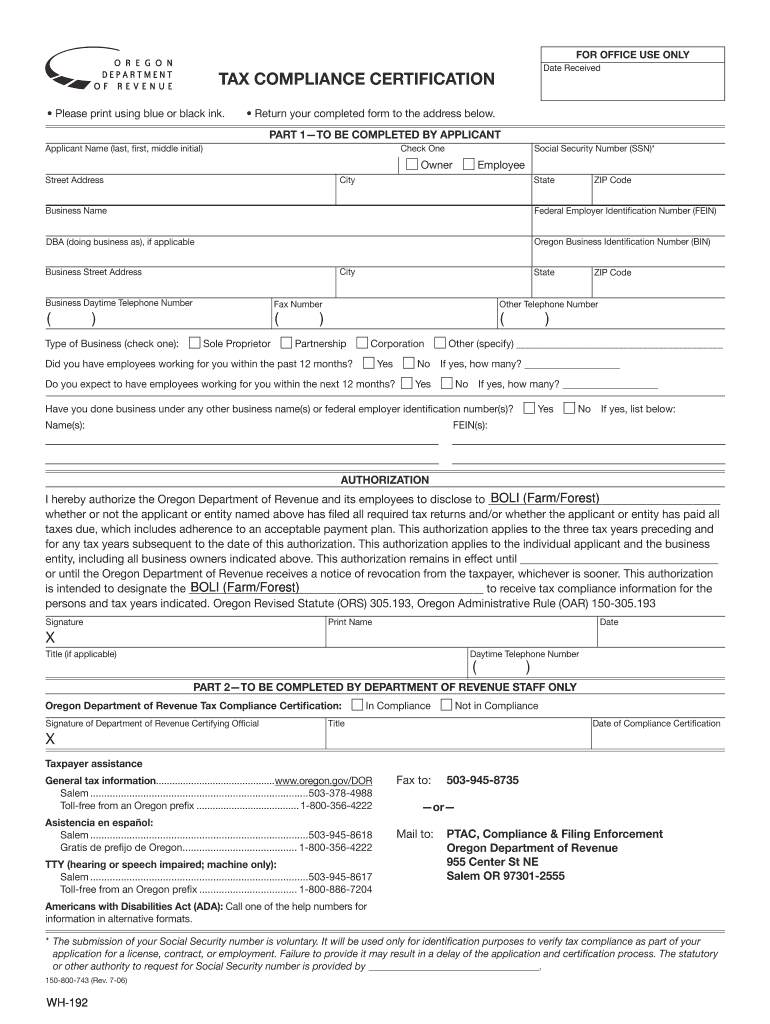
- Click ‘Get Form’ to open the Oregon Tax Compliance Certification in the editor.
- Begin with Part 1, where you will enter your Applicant Name. Ensure to provide your Social Security Number (SSN) and select whether you are an Owner or Employee.
- Fill in your Street Address, City, State, and ZIP Code. Include your Business Name and Federal Employer Identification Number (FEIN). If applicable, provide your DBA (doing business as) name and Oregon Business Identification Number (BIN).
- Indicate your Type of Business by checking the appropriate box: Sole Proprietor, Partnership, Corporation, or Other. Answer the questions regarding employee status for the past and upcoming 12 months.
- In the Authorization section, specify who can receive tax compliance information on your behalf. Sign and date the form at the bottom of Part 1.
- Part 2 is for Department of Revenue staff only; ensure that you submit your completed form to the provided address or fax number.
Start using our platform today to complete your Oregon Tax Compliance form easily and for free!
Fill out oregon tax compliance online
It's free
It's free
See more oregon tax compliance versions
We've got more versions of the oregon tax compliance form. Select the right oregon tax compliance version from the list and start editing it straight away!
Security and compliance
At DocHub, your data security is our priority. We follow HIPAA, SOC2, GDPR, and other standards, so you can work on your documents with confidence.
Learn more


Related forms

SLEEP WELL TO BE WELL
The Summer 2004 issue of the 50+ Wellness Newsletter from the City of Sacramento focuses on the importance of sleep for ...
On Tuesday, April 8, 2008, in the City Council Chambers of Temecula City Hall, - cityoftemecula
On Tuesday, April 8, 2008, in the City Council Chambers of Temecula City Hall, - cityoftemecula
The minutes of the Temecula City Council meeting held on April 8, 2008, detail the proceedings including closed session ...
Ebooks-Gratuits Me Costco Hours Of Operation Gas Station
The minutes from the March 15, 2011 meeting of the Sand City Council and Redevelopment Agency detail discussions on vari ...

APPLICATION FOR SERVICE COMMISSION COMMITTEE
The document is an application form for individuals interested in serving on a commission or committee in the City of Tu ...

I ACKNOWLEDGEMENTS Focus 2050 Steering - City of San Diego
The document provides a comprehensive assessment of the potential impacts of climate change on the San Diego region by 2 ...

2010 REDISTRICTING COMMISSION OF THE CITY OF SAN DIEGO MAP SUBMITTAL FORM
The document is a submission form for maps to the 2010 Redistricting Commission of San Diego. It outlines the process fo ...
Holiday Banner Application Form
The City of San Fernando is offering a Holiday Banner Program where local businesses, nonprofit organizations, and resid ...