01. Edit your for employment application form online
Type text, add images, blackout confidential details, add comments, highlights and more.

02. Sign it in a few clicks
Draw your signature, type it, upload its image, or use your mobile device as a signature pad.

03. Share your form with others
Send job application template via email, link, or fax. You can also download it, export it or print it out.

How to use or fill out employment application template with our platform
Ease of Setup
DocHub User Ratings on G2
Ease of Use
DocHub User Ratings on G2
Click ‘Get Form’ to open the employment application template in the editor.
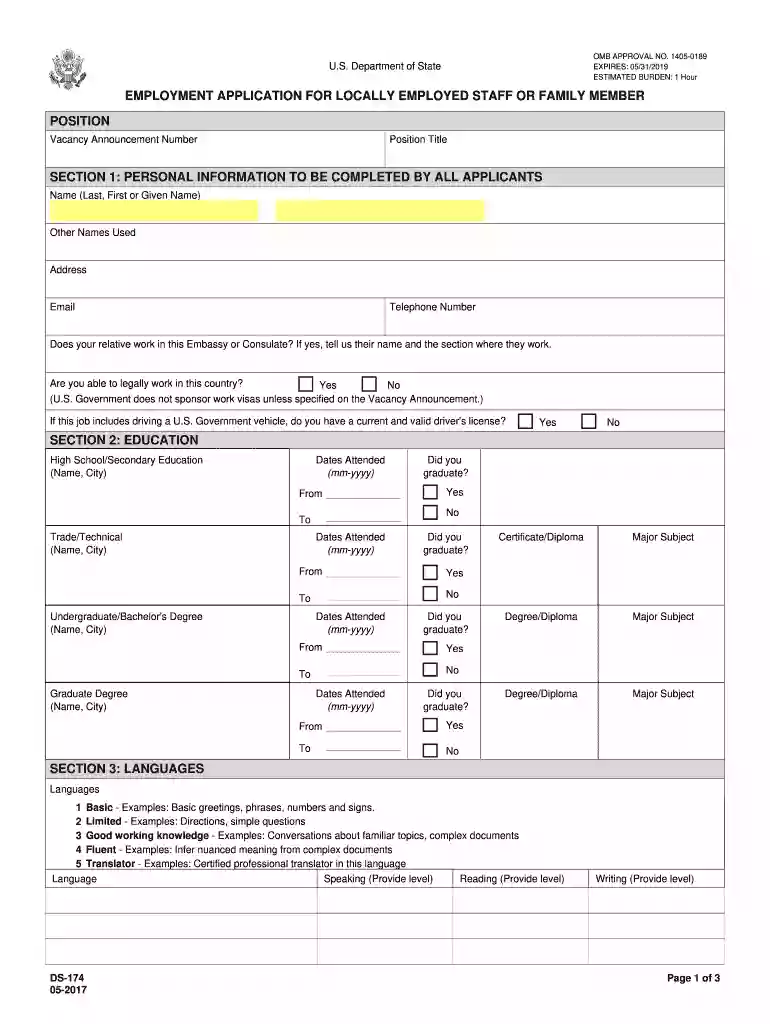
Begin with SECTION 1: PERSONAL INFORMATION. Fill in your name, other names used, address, email, and telephone number. Ensure accuracy as most correspondence will be via email.
In SECTION 2: EDUCATION, list all relevant educational experiences. Include the name of institutions and dates attended. Be prepared to provide diplomas if requested.
Move to SECTION 3: LANGUAGES. Indicate your proficiency levels for speaking, reading, and writing in each language you know.
For SECTION 4: WORK EXPERIENCE, start with your most recent job and work backward for up to ten years. Provide details such as job title, employer information, responsibilities, and reasons for leaving.
If applicable, complete SECTION 5: CITIZENSHIP by selecting all that apply and attaching required documents.
Finally, review SECTION 6: DECLARATION carefully before marking your agreement to proceed with the application.
Start filling out your employment application today for free using our platform!
Fill out employment application template online It's free
We've got more versions of the employment application template form. Select the right employment application template version from the list and start editing it straight away!
How do I write an application for a job application?
How Do You Write A Job Application Letter? Read the job advertisement details. Review professional letter formats. Write a clear heading. Address the letter to the right person. Begin by expressing interest in the job. Describe your eligibility for the job. Highlight your attributes. End the letter with a thank you.
How do you structure an application?
Once the requirements are defined and the major design decisions are made, the programmer is ready to work on the structure of the application. An application should be divided into three tiers. The first tier is referred to as the Main Level. The Main Level consists of the user interface and the test executive.
How to create an application form?
How to Create an Application Form Start with the Right Template or a Blank Form: Add and Customize Form Fields: Personalize the Form Design: Set Up Email Notifications and Autoresponders: Integrate with Other Tools (Optional): Publish and Share Your Form: Test and Manage Submissions:
How to create an application for employment?
What is included in a job application? Personal information. Full name, phone number, email address, social media accounts such as LinkedIn information, mailing address, and social security number or other identification details. Educational background. Work experience. Skills and competencies. References.
How to write an application for the job?
How to Write an Application Letter for a Job Step 1: Research the Company and Job Role. Step 2: Use a Professional Format. Step 3: Write an Engaging Introduction. Step 4: Highlight Relevant Skills and Experiences. Step 5: End with a Strong Conclusion.
employment application template
Employment application template pdfEmployment application template wordFree printable job applicationFree employment application form PDFFree downloadable employment applicationSimple job application formSimple job application Form WordSimple job application form PDF
Security and compliance
At DocHub, your data security is our priority. We follow HIPAA, SOC2, GDPR, and other standards, so you can work on your documents with confidence.
Your application form must follow an organized structure. My suggestion is for you to divide it into parts by topic. For example, have a section for personal information (name, email address, the preferred method for contact, etc.), another for education (degrees and certificates), and one more for work background.
Can I use ChatGPT to write a job application?
ChatGPT is a free AI tool that can help you write a cover letter, but it needs the right input. If your prompt is too vague, youll get a bland, generic draft that could apply to anyone. Thats because ChatGPT doesnt know your background, your accomplishments, or why you want the job, unless you tell it.
What is the difference between an application a resume?
Your resume does not have specific requirements like an application, i.e., it does not require an oath statement, and the content can be presented as a chronology or in a functional format or a combination of the two.
application form for employment
GENERAL APPLICATION FOR EMPLOYMENT (Print
Are you 18 years of age or older? Yes. No. Are you a military Veteran? Yes. No. Are you legally able to work in the US? Yes.Read more
Work. Please list your work experience for the past five years beginning with your most recent job held. Experience. If you were self-employed, give firm name.Read more
Rentex Job Application Form. Please provide as much information as possible. PERSONAL INFORMATION: First Name. Middle Name. Last Name. Street Address. City.Read more
Cookie consent notice
This site uses cookies to enhance site navigation and personalize your experience.
By using this site you agree to our use of cookies as described in our Privacy Notice.
You can modify your selections by visiting our Cookie and Advertising Notice.